VectorStyler
    • Categories
    • Unread
    • Recent
    • Tags
    • Popular
    • Register
    • Login

    How do I commit to changes made with warp tool and retain stroke attributes?

    Scheduled Pinned Locked Moved Questions and Support
    3 Posts 2 Posters 3.6k Views 1 Watching
    Loading More Posts
    • Oldest to Newest
    • Newest to Oldest
    • Most Votes
    Reply
    • Reply as topic
    Log in to reply
    This topic has been deleted. Only users with topic management privileges can see it.
    • BoldlineB Online
      Boldline
      last edited by Boldline

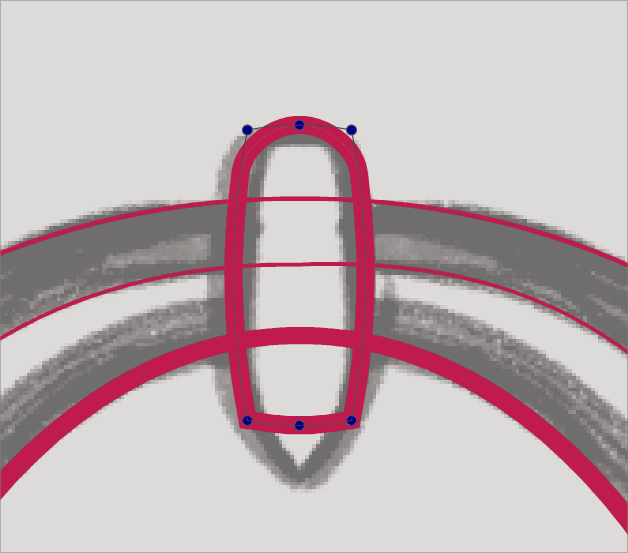
      How do I commit to changes made with warp tool and retain stroke attributes? I had a square shape that I warped some using the warp tool in the vertical toolbar. I was trying to commit to those changes and get back the standard stroke with regular nodes, etc... but nothing seems to let me do that unless I expand it and then it becomes a fill
      0_1667909398679_5cd96e82-2b75-49ab-8338-2a314541ede8-BLD 2022-11-08 at 06.56.34.png

      🍎 macOS Tahoe 26.2, Mac mini (M1, 2020), Chip Apple M1, Memory 16 GB
      Cintiq 27QHD Display and LG Ultra HD Display

      VectorStylerV 1 Reply Last reply Reply Quote 0
      • VectorStylerV Offline
        VectorStyler @Boldline
        last edited by

        @Boldline Since shapes effects are "live", the node tool will edit the shape effect.
        To get back to editing nodes, you need to convert to curves (again).

        BoldlineB 1 Reply Last reply Reply Quote 0
        • BoldlineB Online
          Boldline @VectorStyler
          last edited by

          @VectorStyler said in How do I commit to changes made with warp tool and retain stroke attributes?:

          To get back to editing nodes, you need to convert to curves (again).

          thank you - I found where I got stuck. If the node editing tool is selected and used to select the warped shape, then pressing "convert to curves" will not work - you need to switch to the transform tool and then try "convert to curves" to have success


          🍎 macOS Tahoe 26.2, Mac mini (M1, 2020), Chip Apple M1, Memory 16 GB
          Cintiq 27QHD Display and LG Ultra HD Display

          1 Reply Last reply Reply Quote 1
          • First post
            Last post