VectorStyler
    • Categories
    • Unread
    • Recent
    • Tags
    • Popular
    • Register
    • Login

    Pantone palette not displaying proper colors in VS

    Scheduled Pinned Locked Moved Resolved Issues
    10 Posts 3 Posters 13.4k Views 2 Watching
    Loading More Posts
    • Oldest to Newest
    • Newest to Oldest
    • Most Votes
    Reply
    • Reply as topic
    Log in to reply
    This topic has been deleted. Only users with topic management privileges can see it.
    • BoldlineB Offline
      Boldline
      last edited by

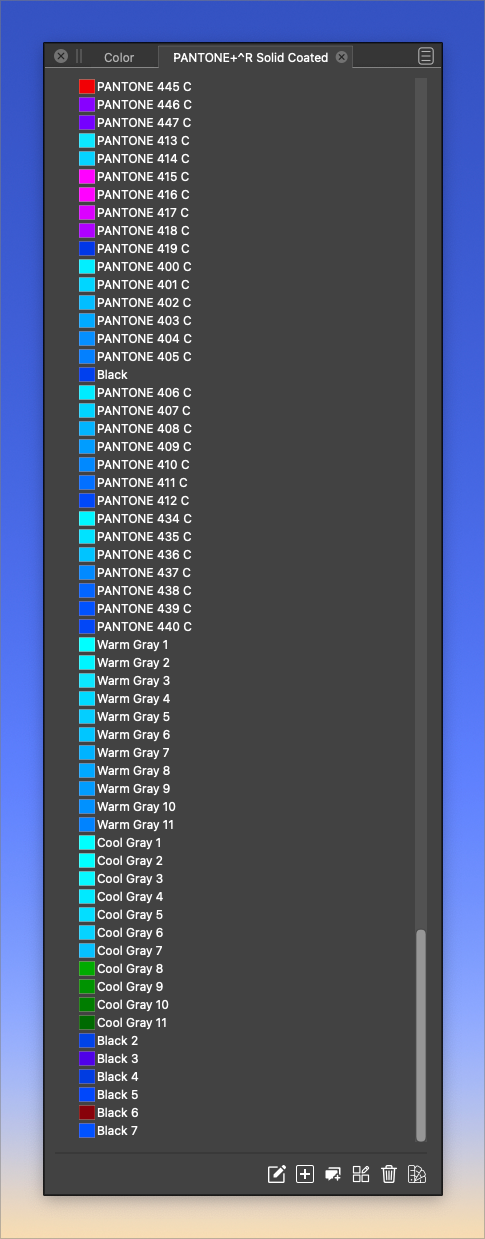
      I opened a pantone pallet file from Illustrator inside VS and it appears many of the colors are off. When I look at this list, all the cool grays are blues and greens, etc.
      0_1665001480356_b9277e1b-f057-46c0-bac6-3c5c6ed04e0f-BLD 2022-10-05 at 16.22.58.png

      🍎 macOS Tahoe 26.2, Mac mini (M1, 2020), Chip Apple M1, Memory 16 GB
      Cintiq 27QHD Display and LG Ultra HD Display

      b77B VectorStylerV 3 Replies Last reply Reply Quote 0
      • b77B Offline
        b77 @Boldline
        last edited by

        @Boldline Was the palette opened before or this is the first time?

        If it was opened before and maybe modified by some operation inside VS, it might have been overwritten with converted values.

        MacBook Pro (Intel) running Monterey 12.6.4

        BoldlineB 1 Reply Last reply Reply Quote 0
        • BoldlineB Offline
          Boldline @b77
          last edited by Boldline

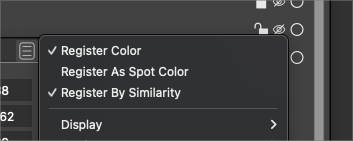
          @b77 I had opened it the first time as a supplemental palettes and the colors all seemed to be correct. I found the color I wanted to use and was trying to figure out how to add it to my main palette. I first tried double-clicking the color in the pantone palette, but that did not seem to work and instead brought the a color edit panel up. I had adjusted the "register color" settings and then was trying to go put them back when I lost track of the color I was looking for. I closed out the pantone palette and reopened it and the colors were all funky at that point.
          I have no doubt it was something dumb that i did, but if it was that easy to mess up and difficult to fix myself, I'm sure it will happen again to someone else
          0_1665014793231_fdc59116-3b7e-4304-8266-7aeb829040da-BLD 2022-10-05 at 20.06.18.png

          🍎 macOS Tahoe 26.2, Mac mini (M1, 2020), Chip Apple M1, Memory 16 GB
          Cintiq 27QHD Display and LG Ultra HD Display

          1 Reply Last reply Reply Quote 0
          • VectorStylerV Offline
            VectorStyler @Boldline
            last edited by

            @Boldline Is this palette part of the Illustrator install, and which version?
            I will try to replicate this issue.

            BoldlineB 1 Reply Last reply Reply Quote 0
            • BoldlineB Offline
              Boldline @VectorStyler
              last edited by

              @VectorStyler This was an acb file that originated from Illustrator CS5. I just emailed you the file

              🍎 macOS Tahoe 26.2, Mac mini (M1, 2020), Chip Apple M1, Memory 16 GB
              Cintiq 27QHD Display and LG Ultra HD Display

              VectorStylerV 1 Reply Last reply Reply Quote 1
              • VectorStylerV Offline
                VectorStyler @Boldline
                last edited by

                @Boldline Yes, the problem can be replicated, and the fix has been found!
                ACB color palettes with Lab color format are not loaded correctly by VS.

                The fix will be in the next build.

                BoldlineB 1 Reply Last reply Reply Quote 1
                • BoldlineB Offline
                  Boldline @VectorStyler
                  last edited by Boldline

                  @VectorStyler Amazing how fast you were able to fix the issue! thank you.
                  I'm also glad it was not just me making a silly mistake 🙂

                  🍎 macOS Tahoe 26.2, Mac mini (M1, 2020), Chip Apple M1, Memory 16 GB
                  Cintiq 27QHD Display and LG Ultra HD Display

                  VectorStylerV 1 Reply Last reply Reply Quote 0
                  • VectorStylerV Offline
                    VectorStyler @Boldline
                    last edited by

                    @Boldline The only problem is that I cannot verify the fix. Illustrator 2019 and above will not open this ACB file.
                    I sent you an email with the converted palette.

                    BoldlineB 1 Reply Last reply Reply Quote 0
                    • BoldlineB Offline
                      Boldline @VectorStyler
                      last edited by

                      @VectorStyler
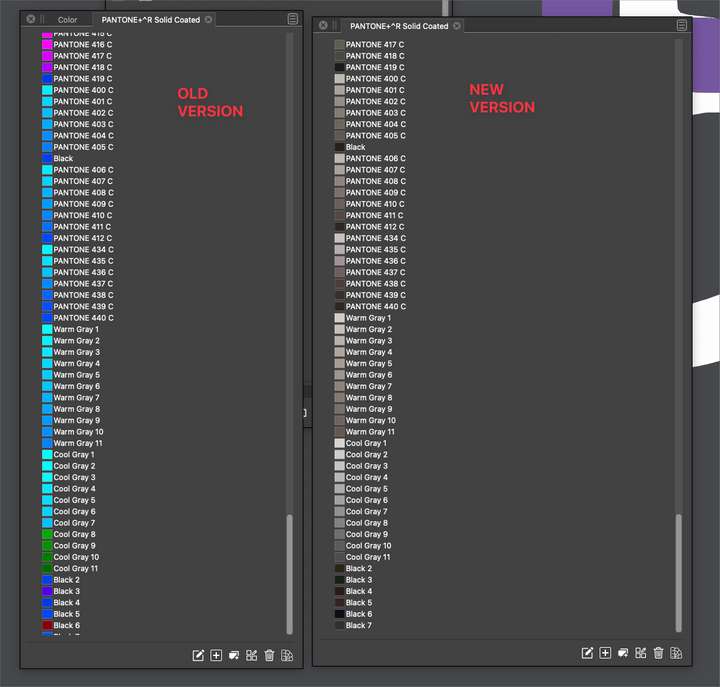
                      Got your email and opened the file you sent - everything looks correct to me
                      0_1665059189485_aad67a8b-12ad-4113-bf50-5426d901a99d-BLD 2022-10-06 at 08.25.21.png

                      🍎 macOS Tahoe 26.2, Mac mini (M1, 2020), Chip Apple M1, Memory 16 GB
                      Cintiq 27QHD Display and LG Ultra HD Display

                      1 Reply Last reply Reply Quote 1
                      • VectorStylerV Offline
                        VectorStyler @Boldline
                        last edited by

                        @Boldline This issue should be fixed in build 1.1.062

                        1 Reply Last reply Reply Quote 0
                        • First post
                          Last post
