VectorStyler
    • Categories
    • Unread
    • Recent
    • Tags
    • Popular
    • Register
    • Login

    Right Mousebutton to fill the opposite Node in a Gradient

    Scheduled Pinned Locked Moved Features and Ideas
    25 Posts 5 Posters 40.0k Views 4 Watching
    Loading More Posts
    • Oldest to Newest
    • Newest to Oldest
    • Most Votes
    Reply
    • Reply as topic
    Log in to reply
    This topic has been deleted. Only users with topic management privileges can see it.
    • b77B Offline
      b77 @Subpath
      last edited by b77

      @Subpath You can double-click any of the color stops and you get a popover with the color sliders, the color wheel, its position and opacity.

      MacBook Pro (Intel) running Monterey 12.6.4

      S 1 Reply Last reply Reply Quote 0
      • VectorStylerV Offline
        VectorStyler @Subpath
        last edited by

        @Subpath For two color gradients (most are), this could speed up working with the gradient editor.

        S 1 Reply Last reply Reply Quote 0
        • S Offline
          Subpath @b77
          last edited by Subpath

          @b77

          thats not really helpful and no solution
          what i plaid for

          the popover covers the Object sometimes
          you see only a half of a Gradient

          and you have to double click on the first
          node and then double click on the next node

          sorry, before i choose this way i would stay
          with the normal color wheel

          Win 11
          CPU: AMD Ryzen 5 9600X, 6-core.
          GPU: Nvidia Geforce RTX 5070.

          b77B 1 Reply Last reply Reply Quote 0
          • S Offline
            Subpath @VectorStyler
            last edited by Subpath

            @VectorStyler

            yes, i also thought that the most Gradients would
            be two colors. So the way i descriped would be useful.

            Win 11
            CPU: AMD Ryzen 5 9600X, 6-core.
            GPU: Nvidia Geforce RTX 5070.

            1 Reply Last reply Reply Quote 0
            • b77B Offline
              b77 @Subpath
              last edited by b77

              @Subpath I misunderstood what you meant, sorry.

              Yes, I agree, this would be an improvement. πŸ‘

              MacBook Pro (Intel) running Monterey 12.6.4

              S 1 Reply Last reply Reply Quote 2
              • S Offline
                Subpath @b77
                last edited by

                @b77

                No Problem

                Win 11
                CPU: AMD Ryzen 5 9600X, 6-core.
                GPU: Nvidia Geforce RTX 5070.

                1 Reply Last reply Reply Quote 0
                • IngolfI Offline
                  Ingolf
                  last edited by Ingolf

                  Most of the time when I work with gradients I create several gradient stops. Rarely just two. I am not sure about this idea.

                  I think a better idea is a pop up color selector near gradient stops. Probably discussed before in this forum. Probably implemented in other programs. I think I have seen it - simply too tired now. πŸ™‚

                  🍏 macOS Sequoia Apple Silicon

                  S BoldlineB 2 Replies Last reply Reply Quote 0
                  • S Offline
                    Subpath @Ingolf
                    last edited by Subpath

                    @Ingolf

                    Nothing would stop you (and anybody else) from creating (multi) gradients the way you are used to.

                    After all, you don't have to use the right mouse button if you don't want to.

                    Win 11
                    CPU: AMD Ryzen 5 9600X, 6-core.
                    GPU: Nvidia Geforce RTX 5070.

                    IngolfI 1 Reply Last reply Reply Quote 0
                    • BoldlineB Offline
                      Boldline @Ingolf
                      last edited by

                      @Ingolf said in Right Mousebutton to fill the opposite Node in a Gradient:

                      Most of the time when I work with gradients I create several gradient stops. Rarely just two. I am not sure about this idea.

                      A basic gradient is two colors and would cover the basics for any gradient being made so it seems like a logical move to have it focus on two colors initially and add more as needed per situation

                      🍎 macOS Tahoe 26.2, Mac mini (M1, 2020), Chip Apple M1, Memory 16 GB
                      Cintiq 27QHD Display and LG Ultra HD Display

                      1 Reply Last reply Reply Quote 0
                      • b77B Offline
                        b77
                        last edited by b77

                        Maybe Ingolf is thinking of something that is even faster β€” one click(?) on a gradient color stop and a small color spectrum(?) appears, if I understand correctly.

                        Although this kinda "overlaps" with the panel you get when you double-click…

                        In any case, maybe he will clarify tomorrow.

                        MacBook Pro (Intel) running Monterey 12.6.4

                        S 1 Reply Last reply Reply Quote 0
                        • S Offline
                          Subpath @b77
                          last edited by Subpath

                          @b77

                          sorry to say so, but the possibility via the double-click panel.
                          Is in my eyes the worst of all.
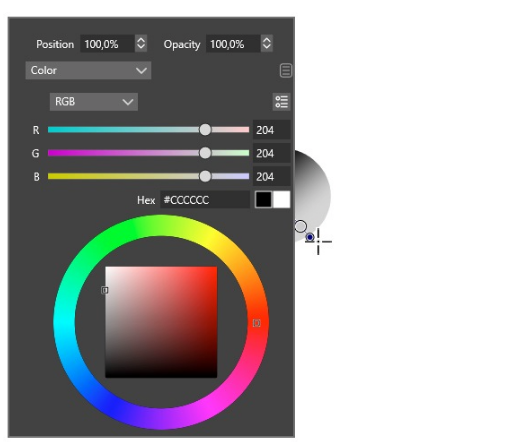
                          see video here

                          0_1659991946400_double click panel.png

                          Win 11
                          CPU: AMD Ryzen 5 9600X, 6-core.
                          GPU: Nvidia Geforce RTX 5070.

                          b77B 1 Reply Last reply Reply Quote 1
                          • b77B Offline
                            b77
                            last edited by b77

                            @Subpath If the popover would always * be displayed to the right of the color stop you double-click, it would not be bad at all, I would say.

                            MacBook Pro (Intel) running Monterey 12.6.4

                            1 Reply Last reply Reply Quote 0
                            • b77B Offline
                              b77 @Subpath
                              last edited by b77

                              @Subpath The popover overlapping the color stop and the entire object happens when it is too close to the lower margin of the document window.
                              I hope the developer finds a fix for this.

                              But sometimes it is displayed to the right of the color stop, which is ideal… and other times it's displayed under the color stop, not covering it at all.
                              I didn't figure out why.

                              Quick video here: https://recordit.co/mPBsj9laoH

                              MacBook Pro (Intel) running Monterey 12.6.4

                              S 1 Reply Last reply Reply Quote 2
                              • IngolfI Offline
                                Ingolf
                                last edited by

                                I had forgotten about the double click. πŸ˜›

                                I imagined a much smaller, compact version of that popover - not that big dialog. Perhaps even auto displaying itself after a reasonable unintrusive interval when you hover a gradient stop - or right click it/double click it, whatever.

                                My issue with gradients in many programs is (also) the many miles my mouse travel from panel to toolbars etc. etc. just to pull a lightness slider a bit, for example. So my point was just that my issue goes for all stops when working with gradients.

                                I wouldn't mind if a magic popover color dialog could be used for shapes and objects - fill and stroke - as well. Not sure how it should be activated - wouldn't like to drive other people crazy - but editing colors causes a lot of mouse movement from objects to panels etc. etc. I try to keep the panels floating and close but sometimes they are just in the way and add visual noise. And then I have to move them back and forth.

                                🍏 macOS Sequoia Apple Silicon

                                1 Reply Last reply Reply Quote 0
                                • IngolfI Offline
                                  Ingolf @Subpath
                                  last edited by

                                  @Subpath said in Right Mousebutton to fill the opposite Node in a Gradient:

                                  @Ingolf

                                  Nothing would stop you (and anybody else) from creating (multi) gradients the way you are used to.
                                  After all, you don't have to use the right mouse button if you don't want to.

                                  Indeed - no objections - just trying to imagine a solution that works for all gradient stops. πŸ™‚

                                  🍏 macOS Sequoia Apple Silicon

                                  1 Reply Last reply Reply Quote 0
                                  • S Offline
                                    Subpath @b77
                                    last edited by Subpath

                                    @b77

                                    this popover panel is much to big
                                    not dragable and not scaleable

                                    apart from the fact that it covers an Object
                                    what should not be happen.

                                    and you need to double click every Node to get this Panel
                                    (not so very much fun on a multi gradient, i guess)

                                    Win 11
                                    CPU: AMD Ryzen 5 9600X, 6-core.
                                    GPU: Nvidia Geforce RTX 5070.

                                    IngolfI 1 Reply Last reply Reply Quote 0
                                    • S Offline
                                      Subpath
                                      last edited by Subpath

                                      I looked around what solutions other Vector programs
                                      offering for this case.

                                      So far like the Magix Graphics Designer (MGD)
                                      way of doing this.

                                      But i don't like that you have to select a small menu first
                                      should go directly in my opinion.

                                      Here are some points I like about the MGD popup panel
                                      -- it stays open
                                      -- it is scalable
                                      -- it is movable

                                      -- you can seamlessly switch between different
                                      objects with different gradients

                                      -- there is a small icon in the Contex Bar when you activate it,
                                      an object will display its gradient nodes when you select it

                                      I made a Video, see here
                                      .
                                      .
                                      and a Picture with selected Gradient Objects
                                      (Btw works in VS too, as i saw)
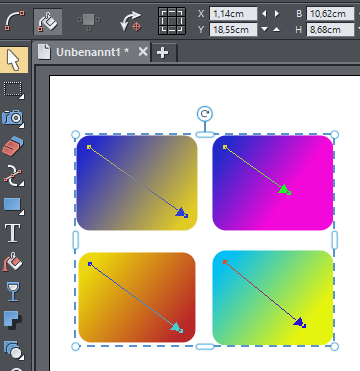
                                      0_1660031662050_Gradient Objects.png

                                      Win 11
                                      CPU: AMD Ryzen 5 9600X, 6-core.
                                      GPU: Nvidia Geforce RTX 5070.

                                      1 Reply Last reply Reply Quote 0
                                      • IngolfI Offline
                                        Ingolf @Subpath
                                        last edited by

                                        @Subpath said in Right Mousebutton to fill the opposite Node in a Gradient:

                                        @b77

                                        this popover panel is much to big

                                        Yes

                                        apart from the fact that it covers an Object
                                        what should not be happen.
                                        and you need to double click every Node you have to get this Panel
                                        (not so very much fun on a multi gradient, i guess)

                                        I use a mouse as the only pointing and drawing device, so I would be very happy if a small dedicated color selector could pop up after I hovered a gradient stop for 1-2 seconds (user configurable option including delay interval).

                                        Users using other types of devices would probably prefer some other way of activating the color selector.

                                        I don't think any drawing programs supports this at the moment - I will check my Photo editing programs later.

                                        🍏 macOS Sequoia Apple Silicon

                                        1 Reply Last reply Reply Quote 0
                                        • IngolfI Offline
                                          Ingolf @Subpath
                                          last edited by

                                          @Subpath said in Right Mousebutton to fill the opposite Node in a Gradient:

                                          To speed up the process of filling gradients a bit
                                          i had the following idea.
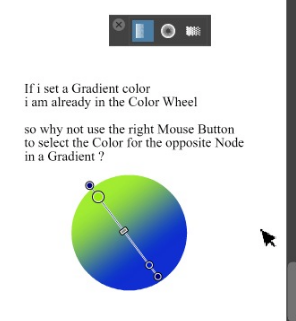
                                          0_1659963375279_Right Mouse for Gradient.png

                                          But that aside - I actually think this would work after some coffee woke up my mind. A bit like left and right mouse button selects stroke and fill in coreldraw, right, just first and last stop?

                                          🍏 macOS Sequoia Apple Silicon

                                          b77B 1 Reply Last reply Reply Quote 2
                                          • b77B Offline
                                            b77 @Ingolf
                                            last edited by b77

                                            Useful to know for everybody:

                                            When the Gradient Editor tool (G) is active, Option-clicking (Mac) or Alt-clicking (Win) any object or the canvas picks that color for the selected color stop.
                                            (If no color stop is selected, it will assign the picked color as a solid fill).

                                            MacBook Pro (Intel) running Monterey 12.6.4

                                            S 1 Reply Last reply Reply Quote 2
                                            • First post
                                              Last post
