Weird rulers
-
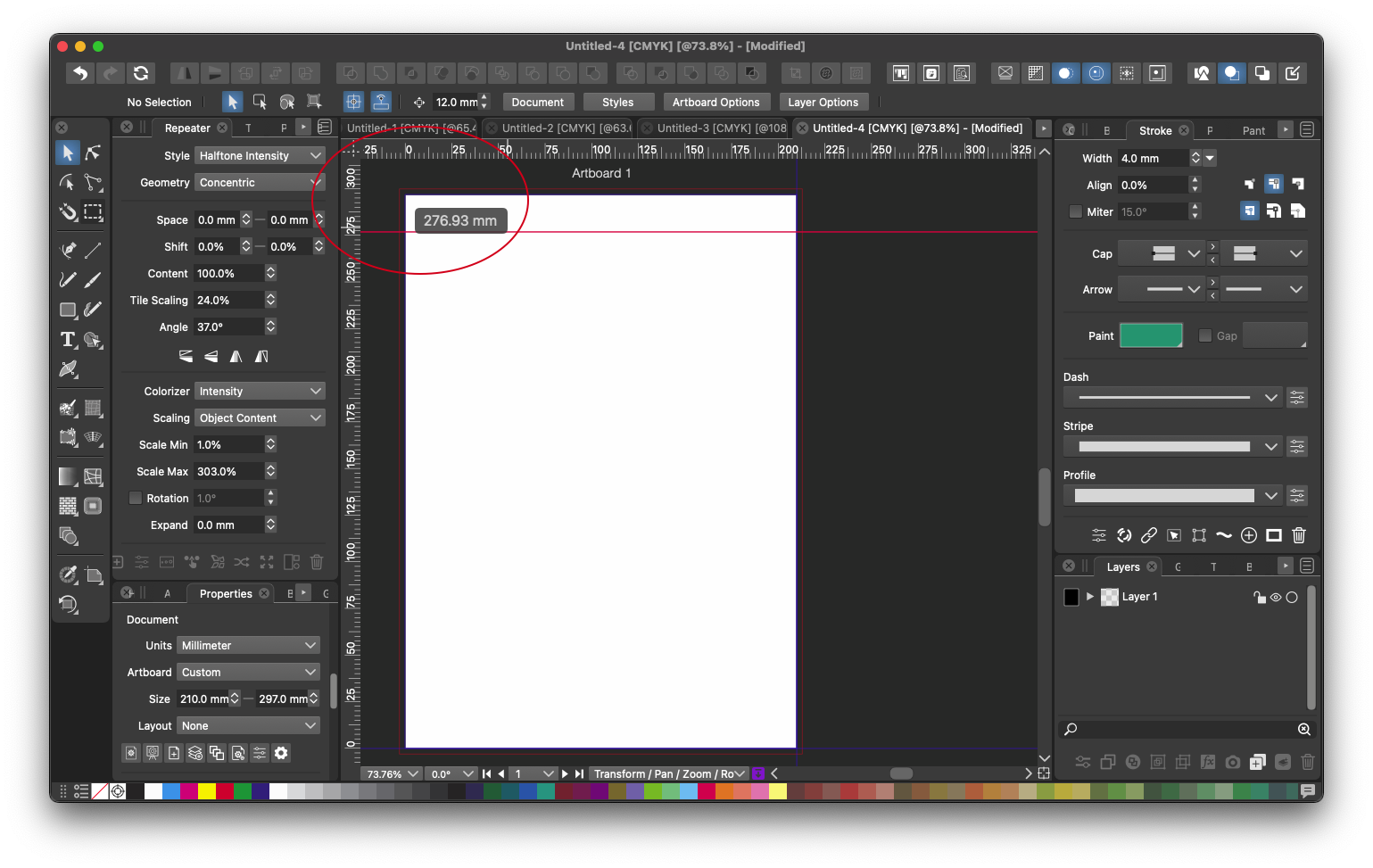
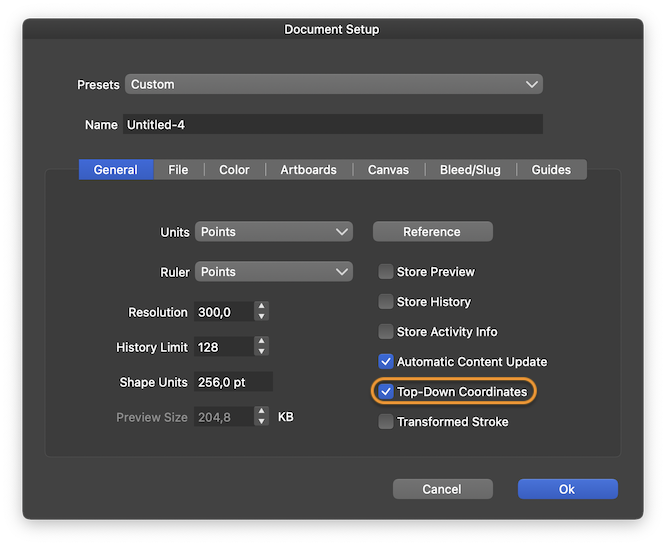
@Dazmondo You can enable the 'Top-Down Coordinates' option in Document Setup > General tab:
Last time I checked, CDR and Inkscape had the same coordinates system by default.
MacBook Pro (Intel) running Monterey 12.6.4
-
@Dazmondo No
 it is on the right direction. But of course we are used to top-down in design programs, so in Document Setup -> General view it is possible to enable "Top-Down Coordinates" to have the ruler and the UI show values in top-down direction.
Explanation: the internal coordinate systems (and everything stored in a document) of VectorStyler is the traditional mathematical (Cartesian) coordinate system. BTW: this is the same in PostScript and PDF (internally).
-
Excellent stuff
-
Just curious. Why/when would end users want this? Why enabled for all users - it is the default. And as per document setting.
EDIT - best explanation I could find...
UI and the origins of its originBut I believe it should be an opt-in instead of default?
-
Last time I checked, CDR and Inkscape had the same coordinates system by default.
The question is why and for whom? I guess Inkscape has because it mainly is used for SVG for webdevelopers etc.
-
@Ingolf Just to clarify: CorelDRAW has the traditional Cartesian coordinates system.
Why? Probably because it makes more sense (moving an object or node up increases the Y value, not the other way around) and besides that, they have a technical drawing suite based on CDR. And there's also CorelCAD.
Indeed it looks like Inkscape joined AI and doesn't have the Cartesian coordinates by default anymore… hmm….
Why? I guess the top-down coordinates work better for operating cutter-plotters or something?

-
@b77 said in Weird rulers:
@Ingolf Just to clarify: CorelDRAW has the traditional Cartesian coordinates system.
Why? Probably because it makes more sense (moving an object or node up increases the Y value, not the other way around) and besides that, they have a technical drawing suite based on CDR. And there's also CorelCAD.Possibly Corel knows their customers and their output and requirements well. Although I hear many complaints from them.
I also believe that their customer base has become significantly fewer and mostly exists in a few sectors of the design world.Indeed it looks like Inkscape joined AI and doesn't have the Cartesian coordinates by default anymore… hmm….
Knowing the open source world well (and I do), some hardcore engineers must have been convinced/pressured to adapt to the needs of users. And not their own ideas.
That's what's happening with Inkscape. Usability is on the way in, crap is on the way out.
Why? I guess the top-down coordinates work better for operating cutter-plotters or something?
As I said; I think Inkscape bowed to massive feedback.
I still don't think it's needed by default in an all-round graphics program. But I'm curious to know if I'm wrong.
-
@Ingolf said in Weird rulers:
Possibly Corel knows their customers and their output and requirements well. Although I hear many complaints from them.
I also believe that their customer base has become significantly fewer and mostly exists in a few sectors of the design world.If they indeed have fewer customers I don't think it's because of the Cartesian coordinates. It's other cheaper apps eating away at their market share, and maybe Adobe as well.
Knowing the open source world well (and I do), some hardcore engineers must have been convinced/pressured to adapt to the needs of users. And not their own ideas.
That's what's happening with Inkscape. Usability is on the way in, crap is on the way out.
@VectorStyler Maybe resizing the page/artboard cannot be made to move the objects along with it from the top so that you can keep working in the "normal" Cartesian format, for those who need it?
In any case, if VS implements canvas dimensioning and dimension labels down the road, it will get used for 2D floor plan designs and other technical drawings, as a sort of 2D CAD app.
For all that, working with top-down coordinates would break anybody's brain.

MacBook Pro (Intel) running Monterey 12.6.4
-
Here is how you can change the default ruler in CorelDRAW - I believe Affinity copied this approach to defaults.

-
@Ingolf Option-dragging from the ruler's origin moves them where you want (at the top-left corner, for instance) but it doesn't also switch from cartesian to top-down as it seems to be doing in CDR.
MacBook Pro (Intel) running Monterey 12.6.4
-
@b77 said in Weird rulers:
@Ingolf said in Weird rulers:
If they indeed have fewer customers I don't think it's because of the Cartesian coordinates. It's other cheaper apps eating away at their market share, and maybe Adobe as well.Hehe, probably not - but I think they're down in single digits in market share. At the low end.
Their marketing shows they are now no better than Xara. They really have to focus on their products. And I believe they totally missed web- and tablet users. Purchasing Gravit - an entirely different program - as their web and tablet offering fianally convinced me that they lost the initiative big time. Purchasing WordPerfect and other fossils was not a clever move suggesting a glorius future either.
Shame. My relationship with CorelDRAW was once excellent.
-
@b77 said in Weird rulers:
@Ingolf Option-dragging from the ruler's origin moves them where you want (at the top-left corner, for instance) but it doesn't also switch from cartesian to top-down as it seems to be doing in CDR.
I think the way you change the defaults in Corel (and Affinity) is clumsy anyway. Corel implemented it much better, but still.
In VS, I would personally prefer the default to be non-cartesian (I believe most will prefer that, but guessing) and an opt-in per document. And if needed even more, enabled in a template.
But again - I honestly don't know who prefers and needs what.
-
If I understand correctly, web designers do prefer the top-down coordinates format (because resizing an artboard doesn't take/"glue" the objects to the top along with it), more technical (think 2D CAD) designers prefer the cartesian format for obvious reasons, and those who do freehand drawing don't care and won't complain.
I'm curious, is the ruler origin snapping to the corner of the page or not in CDR?
I hope it does (not that clumsy then), without having to enable their version of 'Snap to Artboards'.MacBook Pro (Intel) running Monterey 12.6.4
-
@b77 said in Weird rulers:
I'm curious, is the ruler origin snapping to the corner of the page or not in CDR?
I hope it does (not that clumsy then), without having to enable their version of 'Snap to Artboards'.It doesn't - it sucks.
-
@b77 said in Weird rulers:
If I understand correctly, web designers do prefer the top-down coordinates format (because resizing an artboard doesn't take/"glue" the objects to the top along with it), more technical (think 2D CAD) designers prefer the cartesian format for obvious reasons, and those who do freehand drawing don't care and won't complain.
Some make an entire page/poster/folder/cover/whatever in a design program. I guess they prefer what is default in a DTP app and in their case cartesian makes little sense.
-
@Ingolf The reason behind VS use of the Cartesian coordinate systems are as follows:
- it is easier to deal with when coding (for the most part),
- it is the coordinate system in PostScript / PDF (fundamentals to any graphics app).
- it is the also so in MacOS/Cocoa graphics, not that important but:
- it is the correct graphics coordinate system.
But once the document setup "top-down" settings is changed, subsequent documents will use it.
Having the default set to off, was to raise the users awareness that this is how VS works.
-
@VectorStyler said in Weird rulers:
@Ingolf The reason behind VS use of the Cartesian coordinate systems are as follows:
- it is easier to deal with when coding (for the most part),
- it is the coordinate system in PostScript / PDF (fundamentals to any graphics app).
- it is the also so in MacOS/Cocoa graphics, not that important but:
- it is the correct graphics coordinate system.
But once the document setup "top-down" settings is changed, subsequent documents will use it.
Having the default set to off, was to raise the users awareness that this is how VS works.
Wow this is the first I’ve heard about the Cartesian coordinate system.
I remember in the early 2000s working as a graphic designer / illustrator / drum scanner operator for a very busy Nottingham Repro company - the only regular PC based stuff that would come through was from Serif (page plus, draw plus box layouts) that ran direct to film through an Hyphen RIP from a floppy (.PRN format?) - the other was from the bus tour company across the road that produced their catalogs twice a year, in house, in Coreldraw then sent them over to us, then one of the Mac operators would wheel out the PC from the store room - then you’d hear all kinds of foul language coming from the Mac studio - I remember Bob getting a few of us, even management, to have a look at the Coreldraw measurement system, and non of us had a clue - in the end we got the guy who layed out the catalog to come over and sort it before running to film — This was back in the days when all jobs would run direct from either Quark or Freehand, before PDF became a standard.
You learn something new every day

-
@VectorStyler said in Weird rulers:
@Ingolf The reason behind VS use of the Cartesian coordinate systems are as follows:
- it is easier to deal with when coding (for the most part),
- it is the coordinate system in PostScript / PDF (fundamentals to any graphics app).
- it is the also so in MacOS/Cocoa graphics, not that important but:
- it is the correct graphics coordinate system.
But once the document setup "top-down" settings is changed, subsequent documents will use it.
Having the default set to off, was to raise the users awareness that this is how VS works.
You all know exactly what I'm going to answer here, so I'll spend my time on something else.
-
Aren't we really just missing that in VS you can do as in Illustrator, CorelDRAW and even Affinity, which also offers the possibility to adjust like this (I didn't know you could until now):
Now that the big or popular apps work like this, I guess you can reasonably expect they'll try the same in VS. And so I still think that the most used (cart or not) should be the default
Illustrator CC + InDesign CC

Affinity Designer + Publisher

CorelDRAW
-
@Ingolf This should be possible in VS by Option+Press and drag from the ruler corner. But it will not change the direction, only the location of the origin.



