VectorStyler
    • Categories
    • Unread
    • Recent
    • Tags
    • Popular
    • Register
    • Login

    Cursor becomes an X - not sure what setting controls this

    Scheduled Pinned Locked Moved Questions and Support
    4 Posts 2 Posters 4.6k Views 1 Watching
    Loading More Posts
    • Oldest to Newest
    • Newest to Oldest
    • Most Votes
    Reply
    • Reply as topic
    Log in to reply
    This topic has been deleted. Only users with topic management privileges can see it.
    • BoldlineB Offline
      Boldline
      last edited by Boldline

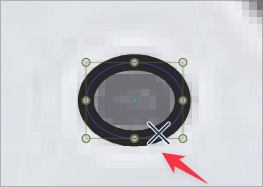
      I've been using the default preferences again for a while as I test things out - I ran into this issue - my cursor becomes an "X" when hovering over a path and then and seems to want to follow that path. Is there something I can do to swap this?
      0_1658579149831_3d794850-a631-4513-9ccf-7f14ed156a39-BLD 2022-07-23 at 08.16.17.png

      EDIT: Now it has stopped doing that - but I don't know what I did if anything to make that no longer be an X

      🍎 macOS Tahoe 26.2, Mac mini (M1, 2020), Chip Apple M1, Memory 16 GB
      Cintiq 27QHD Display and LG Ultra HD Display

      VectorStylerV 2 Replies Last reply Reply Quote 0
      • VectorStylerV Offline
        VectorStyler @Boldline
        last edited by

        @Boldline Yes, this is a new feature: when hovering over a path, an x shows on the path at a location from where the path can be dragged and snapped (if Snap to Point / Shape is enabled) to other points / shapes.

        1 Reply Last reply Reply Quote 1
        • VectorStylerV Offline
          VectorStyler @Boldline
          last edited by

          @Boldline Can be disabled in Preferences -> Changing Options -> Detect Hovering Node

          BoldlineB 1 Reply Last reply Reply Quote 0
          • BoldlineB Offline
            Boldline @VectorStyler
            last edited by

            @VectorStyler thanks - I will try it out, now that I'm aware of what it does

            🍎 macOS Tahoe 26.2, Mac mini (M1, 2020), Chip Apple M1, Memory 16 GB
            Cintiq 27QHD Display and LG Ultra HD Display

            1 Reply Last reply Reply Quote 0
            • First post
              Last post
