VectorStyler
    • Categories
    • Unread
    • Recent
    • Tags
    • Popular
    • Register
    • Login

    Can live text on a curved path be skewed?
    Scheduled Pinned Locked Moved Questions and Support
    6 Posts 3 Posters 5.6k Views 2 Watching
    Loading More Posts
    • Oldest to Newest
    • Newest to Oldest
    • Most Votes
    Reply
    • Reply as topic
    Log in to reply
    This topic has been deleted. Only users with topic management privileges can see it.
    • BoldlineB Offline
      Boldline
      last edited by

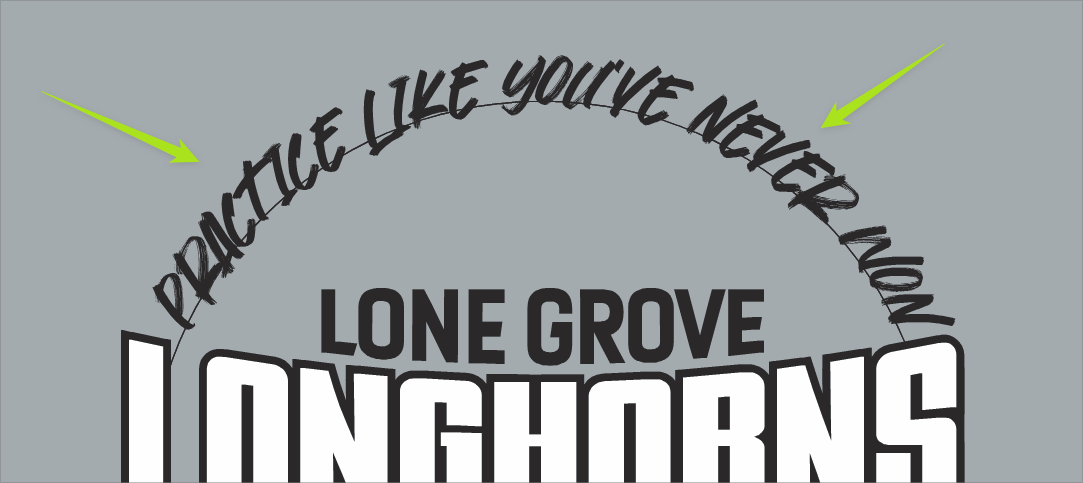
      If I have text that is italicized placed on a curve, is there an easy way to skew it back to look like the font is straight up and down - not italicized? I know I could do it if I wrote the text out first and then linked it to the circle - but is there an easy way to do it while it's on the path?

      0_1657325397102_fc864452-0d87-4142-bfa4-1fecf5118d1b-BLD 2022-07-08 at 19.51.18.png

      🍎 macOS Tahoe 26.2, Mac mini (M1, 2020), Chip Apple M1, Memory 16 GB
      Cintiq 27QHD Display and LG Ultra HD Display

      VectorStylerV 1 Reply Last reply Reply Quote 0
      • VectorStylerV Offline
        VectorStyler @Boldline
        last edited by

        @Boldline How was the text skewed?
        If the Character skewing option was used then just select the text and change the skewing amount in the Character panel (next to the underlined X icon)

        When using text on path, the transformations of the text object are ignored.

        b77B 1 Reply Last reply Reply Quote 0
        • b77B Offline
          b77 @VectorStyler
          last edited by

          @VectorStyler The font itself is skewed (it imitates handwriting). Boldline wants to straighten it up a bit after placing it on the path.

          MacBook Pro (Intel) running Monterey 12.6.4

          VectorStylerV BoldlineB 2 Replies Last reply Reply Quote 2
          • VectorStylerV Offline
            VectorStyler @b77
            last edited by

            @b77 said in Can live text on a curved path be skewed?:

            @VectorStyler The font itself is skewed (it imitates handwriting). Boldline wants to straighten it up a bit after placing it on the path.

            Then the horizontal skew option in the Character panel could help.

            b77B 1 Reply Last reply Reply Quote 1
            • b77B Offline
              b77 @VectorStyler
              last edited by

              @VectorStyler Indeed it works, thanks!

              0_1657365221232_skw.png

              MacBook Pro (Intel) running Monterey 12.6.4

              1 Reply Last reply Reply Quote 1
              • BoldlineB Offline
                Boldline @b77
                last edited by Boldline

                @b77 said in Can live text on a curved path be skewed?:

                @VectorStyler The font itself is skewed (it imitates handwriting). Boldline wants to straighten it up a bit after placing it on the path.

                Yes this is what I was intending to communicate 🙂 Can there be a way to slant/skew live text on a circular path.
                @VectorStyler you mentioned "When using text on path, the transformations of the text object are ignored." - and that is also the case not only with the circular path but a straight or open-ended path. Is this something worth extending some transformations to?

                EDIT - just tried the horizontal skew option in the Character panel- that should work fine - thanks!
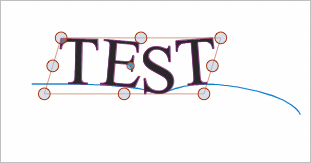
                0_1657365514717_df092cc2-9bbe-4ac3-ae4f-f011bfc67b19-BLD 2022-07-09 at 07.18.18.png

                🍎 macOS Tahoe 26.2, Mac mini (M1, 2020), Chip Apple M1, Memory 16 GB
                Cintiq 27QHD Display and LG Ultra HD Display

                1 Reply Last reply Reply Quote 1
                • First post
                  Last post
