Best way to Crop an Image?
-
Why not simply double-click an image to enter crop mode?
What is most important is that…
- cropping is done quickly, it's intuitive (the less people need to RTM or ask Support about it, the better) and…
- it's non-destructive — the original bitmap can be cropped again.
I don't think rasterizing bitmaps in the document is important, except for extreme cases — huge image from which you need a very small part/slice.
Rasterizing can be done at export, and it's enough.
MacBook Pro (Intel) running Monterey 12.6.4
-
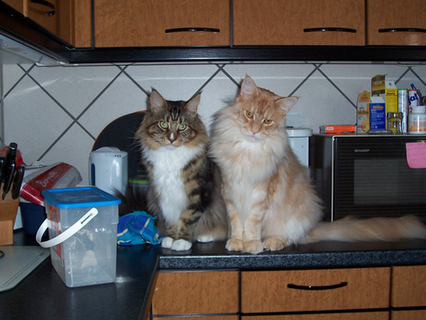
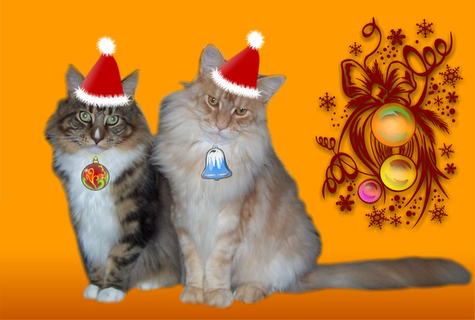
When I saw the cat picture, I remembered an image conversion
I once did for a friend.Everything was done with Vectortools, no bitmap program was involved.
The cats were cropped using the clipping method.I have done this in Magix Graphix Designer (formely known as Xara)
original picture
Christmas conversion
-
@Subpath said in Best way to Crop an Image?:
@Victor-Vector ....I tried the example of the Boolean Intersect....
Here's how the Boolean method works:
The Order of Selection matters.
Thank you for expanding my knowledge on the subtleties of selection order! It was not intuitive and was a bit of an awakening for me. Usually a user imports an image first, then creates the crop shape. Selecting both with the box select will always put the image first and the shape second, so the boolean result would never yield your result. I appreciate you sharing this nuance about selection order.
Usability issues aside, I also noticed that in your example the boolean intersect technique actually resizes the image into fill the shape, something that is rarely desired in an image cropping scenario.@Subpath said in Best way to Crop an Image?:
When I saw the cat picture, I remembered an image conversion
I once did for a friend.That's pretty impressive to tackle that fun holiday cat project all with vector tools. I imagine the cat's cutout shape would take a lot time. It's truly inspirational what can be achieved with vectors.
For the record, I am not a cat fanatic!

-
@b77 said in Best way to Crop an Image?:
Why not simply double-click an image to enter crop mode?
What is most important is that…
- cropping is done quickly, it's intuitive (the less people need to RTM or ask Support about it, the better) and…
- it's non-destructive — the original bitmap can be cropped again.
I like your idea of the double-click to enter crop mode. VS already has that functionality with isolation mode, so it would be a great place to put all the controls without overcomplication.
Great points! They are indeed the most important with this functionality.
-
...Thank you for expanding my knowledge on the subtleties of selection order!...
Anytime gladly.
That the order of the selection of objects plays a role, is as
far as I know always with Boolean. At least I know it that way.
Because finally it must be somehow recognizable which part is cut off
from which. That is why the selection rectangle does not work, in any case.... I imagine the cat's cutout shape would take a lot time...
You'd be surprised how fast it goes. Of course, you can't keep up
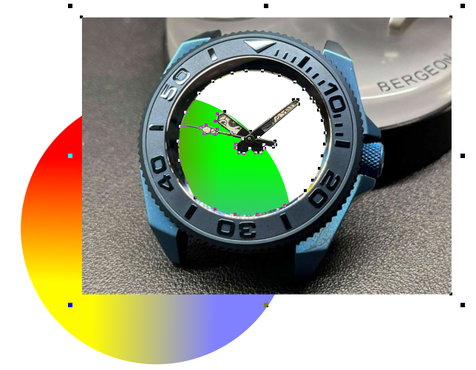
with today's selection tools. Can only recommend experimenting a bit yourself.Here is another Example with combined Shapes
-
@Victor-Vector
... I imagine the cat's cutout shape would take a lot time ...Victor
To answer your question, I have been traced the Cats again
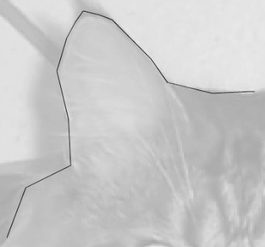
by hand and counted the time. It took me 7/8 minutes in VS.I have to say that when I trace a bitmap by hand.
I usually just use straight lines to get the shape.Then I select all the nodes and convert them to
curves and move or delete nodes where should
be curves.something like this:
Video: Hand tracing
Magix Graphics Designer also has an advantage over VS,
in MGD you can blur the shape on its outer contour.
This way the fur of the cats looks better. While VS blurs
the whole bitmap in the shape.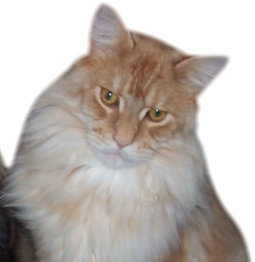
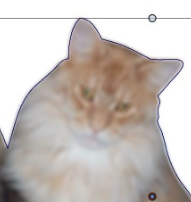
Edit:
... must correct me while i get some Infos from @vectoradmin
i doesnt know before. If you set "Preserve Colors" to checked
and "Preserve Alpha" unchecked you would get a better result. Like this here.

Win 11
CPU: AMD Ryzen 5 9600X, 6-core.
GPU: Nvidia Geforce RTX 5070. -
@Subpath Why not try the Spikes distortion effect on the cat's fur.

-
Didnt know it
(Thanks for you Tip, will give it a try)But no, I was mainly trying to recreate a project in VS.
that I had created some time ago in Magix Graphics Designer.
And in this case I had used the Blur function of MGD. -
@Subpath That's what I love about this forum. I ask something embarrassingly basic and I learn a ton of new things!
I appreciate you sharing the outlining technique. I have learned over the years to use node handles and break node handles, to draw complicated shapes. I had never thought about just drawing it with straight lines and converting them to curves. Add to that a "simplify path" if needed, and it's a very quick and accurate way to trace an image. Thank you for sharing that technique.@b77 I experimented with your effect concept and the closest I could get was a Shape Effect called "Outline Zigzag" on the image within the shape. I couldn't get the edge fine enough. It's close, but it ain't no blur!

@vectoradmin if you ever find yourself craving to add yet another effect to the enormous roster of Image/Shape Effects (haha), perhaps this would be a useful one. Call it "Edge Feather"? "Edge Fuzz"?

Or perhaps there is a way to do this with masks and other tricks?
-
@Victor-Vector said in Best way to Crop an Image?:
if you ever find yourself craving to add yet another effect to the enormous roster of Image/Shape Effects (haha), perhaps this would be a useful one. Call it "Edge Feather"? "Edge Fuzz
I will look into what is going on with the blur effect with image masks.
-
@Victor-Vector It was a suggestion I made half-jokingly — the Spikes effect AND slight Blur would work nice on cat fur, I think.
-
You are welcome.
Well, I don't know which method is better.
I think it depends on what vector program you are using.
In Affinity Designer this method does not work,
as far as I know.VectorStyler works very similar to CorelDraw in this case.
Where the straight lines will fall into the correct curve
if you put your nodes in the right place and delete them later
to get the Curve. -
@b77 said in Best way to Crop an Image?:
@Victor-Vector It was a suggestion I made half-jokingly — the Spikes effect AND slight Blur would work nice on cat fur, I think.
although semi-joking. could still be helpful, along with blurring in some cases.
-
I just downloaded the demo and the first thing I did was look for a crop tool to try out. I am glad I didn't purchase it.
No real, easy to use, crop tool - no purchase and no point in going forward in using VectorStyler. I am going to uninstall the program right now.
-pw
-
@pw said in Best way to Crop an Image?:
I just downloaded the demo and the first thing I did was look for a crop tool to try out. I am glad I didn't purchase it.
No real, easy to use, crop tool - no purchase and no point in going forward in using VectorStyler. I am going to uninstall the program right now.
-pw
Would you like to know how an easy to use Crop tool should look/work ?
Or what it should be able to do ?
-
@pw That was unnecessary harsh, since there's an easy way to (non-destructively) crop an image or any selection of objects:
- draw a rectangle (or any closed shape) over the image or shape(s) you want cropped;
- select them all, and…
- click the Move Inside Last button:
Quick video here:

… .. .
(And the developer didn't say anywhere that a Crop tool is not coming). -
I don't think this was a serious rant. Whether it was or not, there's sure to be more trolling on the forum at some point as VS begins to grow.
I can safely admit that finding a dedicated and easy to use crop tool would never be my top priority nor would it be what I judge a vector based application by.
If by "crop' he's referring to "clipping" - that is more relevant but still not something to uninstall the entire application over lol -
@Boldline said in Best way to Crop an Image?:
I don't think this was a serious rant. Whether it was or not, there's sure to be more trolling on the forum at some point as VS begins to grow.
I think you are not far from the truth.
Found the post also a bit curios.I dont see that much of a difference between
Crop and Clipping and i have done more Photo clipping
in Xara (back in the days) as in PhotoshopAnd VS is also very useful in this case
Win 11
CPU: AMD Ryzen 5 9600X, 6-core.
GPU: Nvidia Geforce RTX 5070. -
Illustrator, CorelDRAW and Affinity have destructive crop tools built-in. Useful for posters and other applications that include bitmap images. And good to have at hand.
Now I've always finished and cropped images in Photoshop first, but it's heavy detour if you just need to remove some of the image.
One should not underestimate that many designs are a mix of both vector and pixels.
-
@Ingolf said in Best way to Crop an Image?:
Illustrator, CorelDRAW and Affinity have destructive crop tools built-in. Useful for posters and other applications that include bitmap images. And good to have at hand.
Being that most of my work over the years has been 100% vector, the need to destructively crop an image in illustrator or another vector program for me has been minor to none. Just applying a clipping mask was easy and destructive
If I remember correctly, the roadmap in VS mentions the ability to open and edit an image in VS in that native program to make further edits, such as cropping.




