Blend Modes Reference Guide
-
Hello,
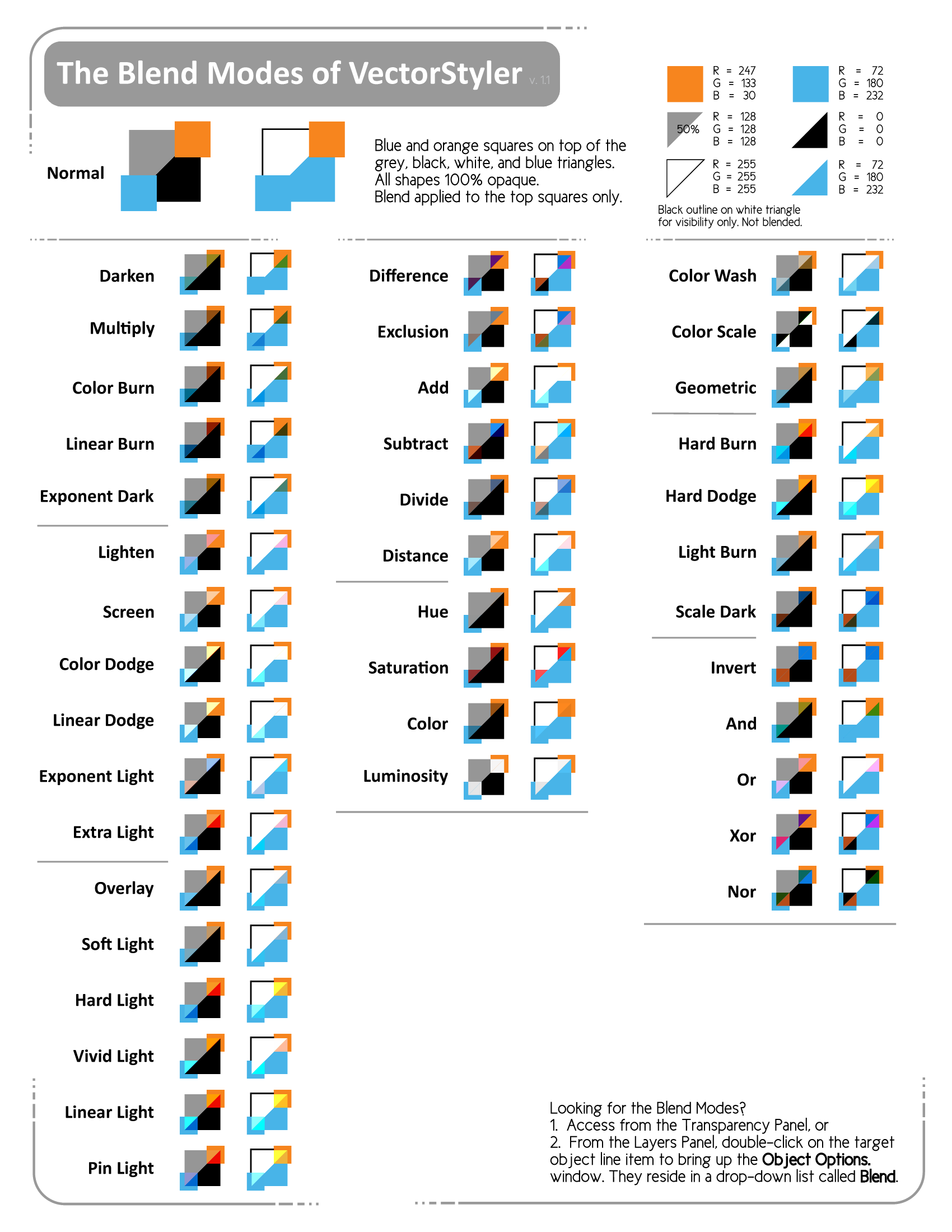
Finding an appropriate blend mode in any digital image editing software can be a challenge and one can spend an inordinate amount of time just looking for the right one. The blend modes are almost always in a drop-down list which automatically makes them less accessible. Thank goodness most software lets the user step through the list with a live preview, otherwise the process would be extra tedious. Combine this lack of accessibility, with not having the names exposed in the main interface so as to become familiar with them, and blend modes can be a bit of a mystery. Also, identically-termed blend modes can often display differently between software and, in the case of VectorStyler, there are many more modes to choose from.Here is an attempt to create a convenient one-sheet to illustrate all of VectorStyler's blend modes at a glance.
I kept the list in the same order, with the same delineated groupings as VS, for ease of use.
I spent a great deal of time selecting the two grouped shapes to best visually illustrate what is going on. I wanted to keep the shapes as basic as possible so it was easy to grasp the principle of each mode. I did experiment with gradients and more colors, but that just became a visual muddy mess. So while the visual feedback does not show every possibility, I think it shows enough to be useful.Any feedback would be welcome and I am willing to further refine this idea to make it useful. I present it here as a .PNG for best representation (use the link below to get a large version). PDF Export in VectorStyler will not render all of the blend modes. If you want to only see the Blend Modes that will export to PDF, go to Edit > Preferences > Changing Options > "Show PDF Blend Modes" .
Thank you for your interest and enjoy experimenting with unfettered blending!
Blend Modes Reference Guide 1.1.PNG

WHERE ARE THE BLEND MODES? Access from the Transparency Panel, or from the Layers Panel, double-click on the target object line-item to bring up the Object Options window. They reside in a drop-down list called Blend.
-
@Victor-Vector I guess the PDF format doesn't support all the blend modes available in VS.
Blend modes can be selected in the Transparency panel and they have a preview — hovering the name in the menu shows the effect on the canvas:

MacBook Pro (Intel) running Monterey 12.6.4
-
Well done, if you continue at this pace we will soon
have a nice illustrated VS manual
-
@b77 thank you for letting me know where about the other location of the blend modes. It seems like this is a more obvious spot to find them so I will update the document with that info. I didn't have the Transparency Panel open in my interface

Hopefully I can get some more info on the PDF Exporting. I was hoping there was a setting to make the entire document an image within the PDF, but then, might as well just use PNG... -
Looks great. I take a look to find an idea where to include it in the PDF manual. My idea is the chapter Transparency. For the export. Maybe you can use a PDF-Printer or use the SVG export. I also think you can report the PDF export problems as a bug.
-
-
@freggern As it turns out, neither SVG or PDF can accurately render all the blend modes of VectorStyler, so the best option is a PNG. You can either use the one from the link, or I can send you either a higher resolution one, or the .vstyler file via the chat. Do you use the chat function on this forum?


