VectorStyler
    • Categories
    • Unread
    • Recent
    • Tags
    • Popular
    • Register
    • Login

    I would like to make a brush... a simple brush

    Scheduled Pinned Locked Moved Questions and Support
    28 Posts 5 Posters 33.6k Views 5 Watching
    Loading More Posts
    • Oldest to Newest
    • Newest to Oldest
    • Most Votes
    Reply
    • Reply as topic
    Log in to reply
    This topic has been deleted. Only users with topic management privileges can see it.
    • B Offline
      B-Vs-V
      last edited by

      I'm afraid I'm too used to the simplicity of AD and I have a lot of trouble with VS.
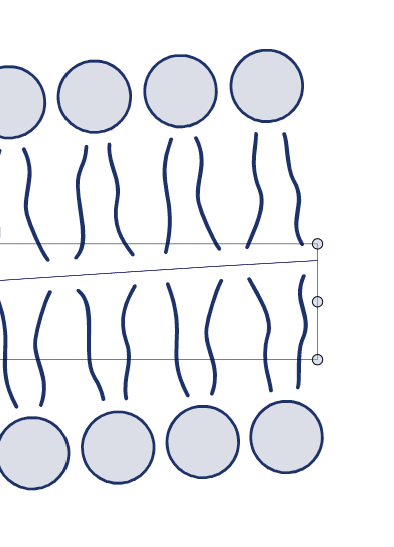
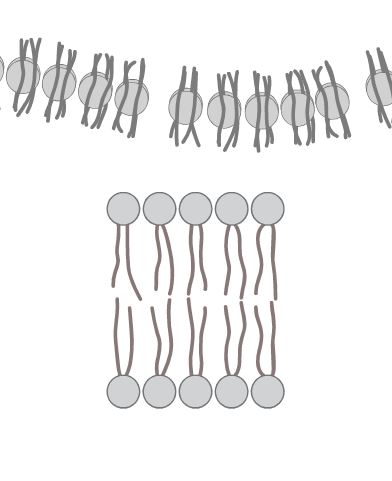
      I am trying to make a brush with this shape so that I can use it in various patterns.
      I blend the circles first and I made simple strokes, done in a minute. But no matter how much I read the manual to make a brush, I can't do it. This is what I get:

      • above, the set of uncombined shapes
      • below, after combining them... all wrong
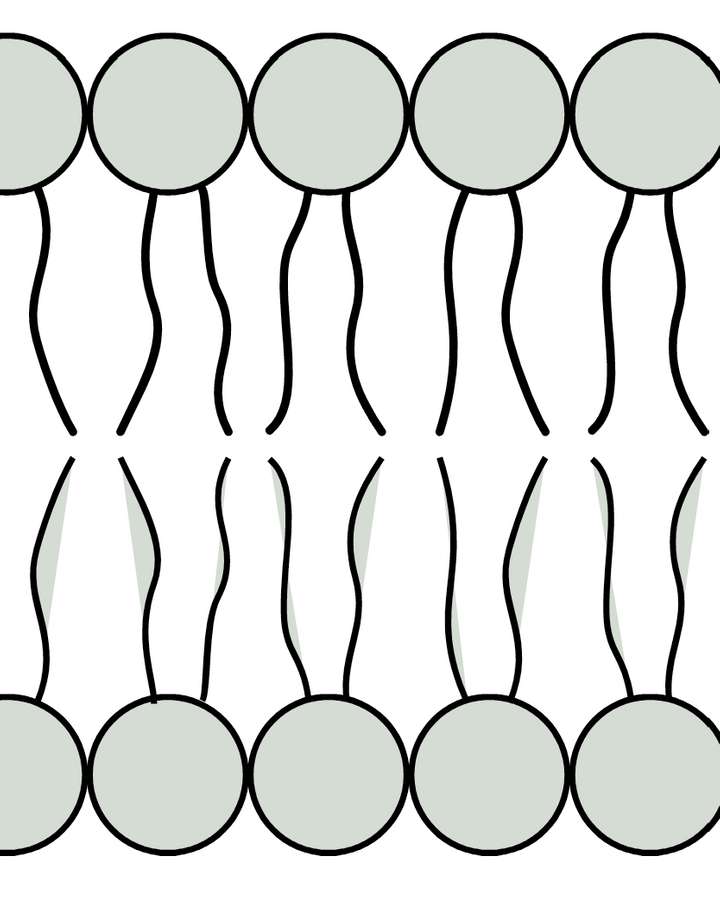
      0_1648225017494_69ae5cfb-9a50-4e6d-8d7b-668f5f583e2b-image.png

      Thanks for any help.
      Patrick

      PS :

      W11 Pro 25H2 - 12th Gen Intel(R) i7-12700K 3.61 GHz - RAM 64 Go - NVIDIA GF GTX 4070 Ti - Intuos - Dell UP3216Q / Eizo ColorEdge
      W11 Pro 25H2 - 12th Gen Intel(R) i7-12700KF 3.60 GHz -RAM 64 Go - NVIDIA GF GTX 3080 - IntuosPro- ProArt PA329C

      VectorStylerV 2 Replies Last reply Reply Quote 0
      • VectorStylerV Offline
        VectorStyler @B-Vs-V
        last edited by VectorStyler

        @PatrickM What command was used to combine them? I think in this case it only needs a grouping.

        EDIT: do not combine these with Object -> Combine -> Combine, as they will all share the same stroke / fill style.

        1 Reply Last reply Reply Quote 1
        • B Offline
          B-Vs-V
          last edited by

          Ok, first time I tried, I did get a weird result.
          Now I get that and how do I let repeat the motif to avoid its enlargment or shrinking ?
          Thanks
          0_1648226813678_a3cbb407-9f19-41bf-9aef-aabe7888e5de-image.png

          W11 Pro 25H2 - 12th Gen Intel(R) i7-12700K 3.61 GHz - RAM 64 Go - NVIDIA GF GTX 4070 Ti - Intuos - Dell UP3216Q / Eizo ColorEdge
          W11 Pro 25H2 - 12th Gen Intel(R) i7-12700KF 3.60 GHz -RAM 64 Go - NVIDIA GF GTX 3080 - IntuosPro- ProArt PA329C

          VectorStylerV 2 Replies Last reply Reply Quote 0
          • VectorStylerV Offline
            VectorStyler @B-Vs-V
            last edited by

            @PatrickM Here is an example on how to do it with pattern brushes: https://recordit.co/zSVBnwR2i1

            • select all those objects that will be used in the brush.
            • group them (Object -> Group)
            • open the Brushes panel menu.
            • select Create Pattern Brush Style (this will be a style inside a document, use Preset instead of style to have it available in other documents ).
            • set a Name for the style, and other options if needed (can be edited later).
            • confirm. the brush will be in the Brushes panel brush type drop down.
            • select a shape to add the brush.
            • select the brush in the drop down list of the Brushes panel.
            • styles are typically at the front of the list, while presets are added towards the end.
            • adjust the brush size, or enable the "Proportional" property to keep the content proportional to the original content.
            • I also set the tint option so that the brush can be assigned a color.
            • attached the example file: 0_1648226648079_patternbrush1.vstyler
            F 1 Reply Last reply Reply Quote 1
            • VectorStylerV Offline
              VectorStyler @B-Vs-V
              last edited by

              @PatrickM In the Pattern Brush editor view (click the button next to the drop down), press the Options button.
              This will open the effect options view.
              Enable "Rigid Shapes" and confirm the brush options.

              1 Reply Last reply Reply Quote 0
              • VectorStylerV Offline
                VectorStyler @B-Vs-V
                last edited by

                @PatrickM Here is the example with rigid shapes: https://recordit.co/7JWPDgv7tI

                B 1 Reply Last reply Reply Quote 0
                • B Offline
                  B-Vs-V @VectorStyler
                  last edited by

                  @vectoradmin thanks but it doesn't work like I would like and one can see it in your video: objects become separated :
                  0_1648229063397_de5ab6fc-8313-4389-a6aa-1e40cba46dd1-image.png

                  0_1648229110807_19f835e0-de2c-4bee-b9c3-18bddb94c375-image.png

                  W11 Pro 25H2 - 12th Gen Intel(R) i7-12700K 3.61 GHz - RAM 64 Go - NVIDIA GF GTX 4070 Ti - Intuos - Dell UP3216Q / Eizo ColorEdge
                  W11 Pro 25H2 - 12th Gen Intel(R) i7-12700KF 3.60 GHz -RAM 64 Go - NVIDIA GF GTX 3080 - IntuosPro- ProArt PA329C

                  VectorStylerV 2 Replies Last reply Reply Quote 0
                  • VectorStylerV Offline
                    VectorStyler @B-Vs-V
                    last edited by

                    @PatrickM Of course the objects become separated, the transformation along the path positions these shapes.

                    1 Reply Last reply Reply Quote 0
                    • VectorStylerV Offline
                      VectorStyler @B-Vs-V
                      last edited by

                      @PatrickM said in I would like to make a brush... a simple brush:

                      thanks but it doesn't work like I would like:

                      What would be a good way to have in this case?

                      B 2 Replies Last reply Reply Quote 0
                      • B Offline
                        B-Vs-V @VectorStyler
                        last edited by

                        @vectoradmin like in AD or AI, a repetition of the same motif
                        exemples :
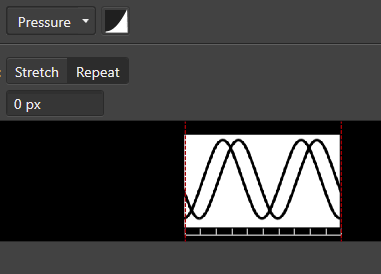

                        0_1648229541856_44fbe5f0-492f-4535-a994-a4785bfc094b-image.png
                        0_1648229597573_f715f8d4-c8d9-4908-9d7a-12ee6c925dce-image.png

                        0_1648229870525_c138ecb7-5396-4bc8-8e94-697b67fa05bc-image.png

                        W11 Pro 25H2 - 12th Gen Intel(R) i7-12700K 3.61 GHz - RAM 64 Go - NVIDIA GF GTX 4070 Ti - Intuos - Dell UP3216Q / Eizo ColorEdge
                        W11 Pro 25H2 - 12th Gen Intel(R) i7-12700KF 3.60 GHz -RAM 64 Go - NVIDIA GF GTX 3080 - IntuosPro- ProArt PA329C

                        VectorStylerV 1 Reply Last reply Reply Quote 1
                        • VectorStylerV Offline
                          VectorStyler @B-Vs-V
                          last edited by

                          @PatrickM Align objects along a path is the closest I can think of in VS, but it is not linking the objects dynamically to the path.

                          In the example below, how is it possible to turn the corner downwards without stretching the circles a bit?

                          B 1 Reply Last reply Reply Quote 0
                          • B Offline
                            B-Vs-V @VectorStyler
                            last edited by

                            @vectoradmin said in I would like to make a brush... a simple brush:

                            @PatrickM Align objects along a path is the closest I can think of in VS, but it is not linking the objects dynamically to the path.

                            In the example below, how is it possible to turn the corner downwards without stretching the circles a bit?

                            I did this in AI years ago and it worked perfectly but I don't have a licence anymore and -problem of a subscription- I can't check my file... if I still have it.
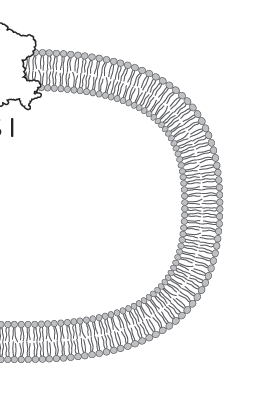
                            0_1648230776619_3c76cc17-8c8a-487e-b5ea-e303e6e1dc27-image.png

                            It's more problematic in AD and I can't do such curves either.

                            W11 Pro 25H2 - 12th Gen Intel(R) i7-12700K 3.61 GHz - RAM 64 Go - NVIDIA GF GTX 4070 Ti - Intuos - Dell UP3216Q / Eizo ColorEdge
                            W11 Pro 25H2 - 12th Gen Intel(R) i7-12700KF 3.60 GHz -RAM 64 Go - NVIDIA GF GTX 3080 - IntuosPro- ProArt PA329C

                            VectorStylerV 2 Replies Last reply Reply Quote 0
                            • VectorStylerV Offline
                              VectorStyler @B-Vs-V
                              last edited by VectorStyler

                              @PatrickM You can open old AI files in VS 🙂

                              EDIT: or new ones also.

                              B 1 Reply Last reply Reply Quote 1
                              • B Offline
                                B-Vs-V @VectorStyler
                                last edited by

                                @vectoradmin said in I would like to make a brush... a simple brush:

                                @PatrickM You can open old AI files in VS 🙂

                                EDIT: or new ones also.

                                Well, fine but if I find the file on one of my external hard disk, what usefull information can I get since VS deal with brushes in a diffrent way ? Anyway, I'll check when I can.

                                W11 Pro 25H2 - 12th Gen Intel(R) i7-12700K 3.61 GHz - RAM 64 Go - NVIDIA GF GTX 4070 Ti - Intuos - Dell UP3216Q / Eizo ColorEdge
                                W11 Pro 25H2 - 12th Gen Intel(R) i7-12700KF 3.60 GHz -RAM 64 Go - NVIDIA GF GTX 3080 - IntuosPro- ProArt PA329C

                                1 Reply Last reply Reply Quote 0
                                • VectorStylerV Offline
                                  VectorStyler @B-Vs-V
                                  last edited by

                                  @PatrickM said in I would like to make a brush... a simple brush:

                                  In this image, the circles are bent a little bit. If the issue is the size (width) of the brush, than that can be fixed by either creating a smaller group first, or by setting the Scaling in the Pattern Brush view to a smaller value.

                                  0_1648230776619_3c76cc17-8c8a-487e-b5ea-e303e6e1dc27-image.png

                                  B 1 Reply Last reply Reply Quote 0
                                  • B Offline
                                    B-Vs-V @VectorStyler
                                    last edited by B-Vs-V

                                    @vectoradmin said in I would like to make a brush... a simple brush:

                                    @PatrickM said in I would like to make a brush... a simple brush:

                                    In this image, the circles are bent a little bit. If the issue is the size (width) of the brush, than that can be fixed by either creating a smaller group first, or by setting the Scaling in the Pattern Brush view to a smaller value.

                                    yes, sure, it is not perfect but there is not so much objects' distortion. To be honnest, I don't remember how I did this in AI & the kind of brush I'd chosen.

                                    Sure I will continue to dig in VS... I won't give up but I need more time to test all these brushes setup, time I don't have much right now 😓 .

                                    PS : I've tried to open an old AI file (not related to this issue) and VS crashed. I suppose VS send you the crash report.

                                    W11 Pro 25H2 - 12th Gen Intel(R) i7-12700K 3.61 GHz - RAM 64 Go - NVIDIA GF GTX 4070 Ti - Intuos - Dell UP3216Q / Eizo ColorEdge
                                    W11 Pro 25H2 - 12th Gen Intel(R) i7-12700KF 3.60 GHz -RAM 64 Go - NVIDIA GF GTX 3080 - IntuosPro- ProArt PA329C

                                    VectorStylerV 1 Reply Last reply Reply Quote 0
                                    • VectorStylerV Offline
                                      VectorStyler @B-Vs-V
                                      last edited by

                                      @PatrickM Got the crash report. I will try to fix based on that, if you can send me the file by email to csraba at vectorstyler.com it would help replicating the issue (file will be removed, once the bug is fixed).

                                      1 Reply Last reply Reply Quote 0
                                      • B Offline
                                        B-Vs-V @VectorStyler
                                        last edited by

                                        @vectoradmin said in I would like to make a brush... a simple brush:

                                        @PatrickM said in I would like to make a brush... a simple brush:

                                        thanks but it doesn't work like I would like:

                                        What would be a good way to have in this case?

                                        @vectoradmin Would it be possible to add this option to repeat the pattern for this type of brushes?

                                        W11 Pro 25H2 - 12th Gen Intel(R) i7-12700K 3.61 GHz - RAM 64 Go - NVIDIA GF GTX 4070 Ti - Intuos - Dell UP3216Q / Eizo ColorEdge
                                        W11 Pro 25H2 - 12th Gen Intel(R) i7-12700KF 3.60 GHz -RAM 64 Go - NVIDIA GF GTX 3080 - IntuosPro- ProArt PA329C

                                        VectorStylerV 1 Reply Last reply Reply Quote 1
                                        • VectorStylerV Offline
                                          VectorStyler @B-Vs-V
                                          last edited by

                                          @PatrickM said in I would like to make a brush... a simple brush:

                                          Would it be possible to add this option to repeat the pattern for this type of brushes?

                                          The pattern is repeated along the path. If I understand correctly the problem is that the shapes get stretched.
                                          On the other hand, if we do not stretch the shapes (rigid shapes), then they get overlapped.

                                          If we would keep the whole pattern content rigid (not possible at this time), then the overlapping would get worse.

                                          I think the best option is that I will try to figure out the difference between what VS does and what is in the example form that AI file. For that it would be great if you could send me the AI file, and would also help in finding the reason for the crash 🙂

                                          B 1 Reply Last reply Reply Quote 0
                                          • B Offline
                                            B-Vs-V @VectorStyler
                                            last edited by

                                            @vectoradmin I did test the same simple drawing in VS and AD.

                                            Although not vector, the brush is fine in AD in a sense I get what I wish:
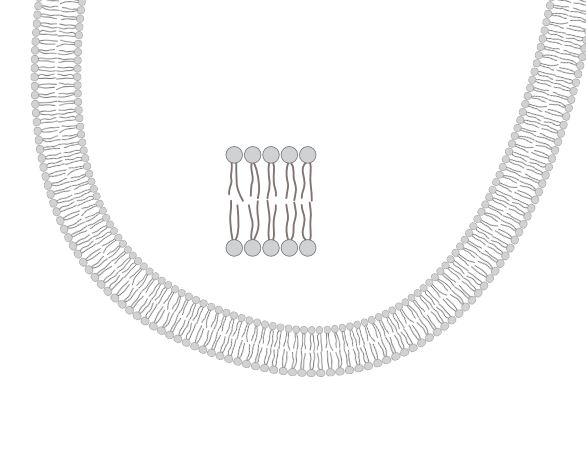
                                            0_1648454985349_AD.JPG

                                            This is wrong in VS:
                                            0_1648455005385_VS.JPG
                                            and I don't know how to get it

                                            I don't have time to go further but every one can try this.
                                            P.

                                            W11 Pro 25H2 - 12th Gen Intel(R) i7-12700K 3.61 GHz - RAM 64 Go - NVIDIA GF GTX 4070 Ti - Intuos - Dell UP3216Q / Eizo ColorEdge
                                            W11 Pro 25H2 - 12th Gen Intel(R) i7-12700KF 3.60 GHz -RAM 64 Go - NVIDIA GF GTX 3080 - IntuosPro- ProArt PA329C

                                            VectorStylerV 1 Reply Last reply Reply Quote 0
                                            • First post
                                              Last post