Quicker Access to Toggling Node Removal Curvature?
-
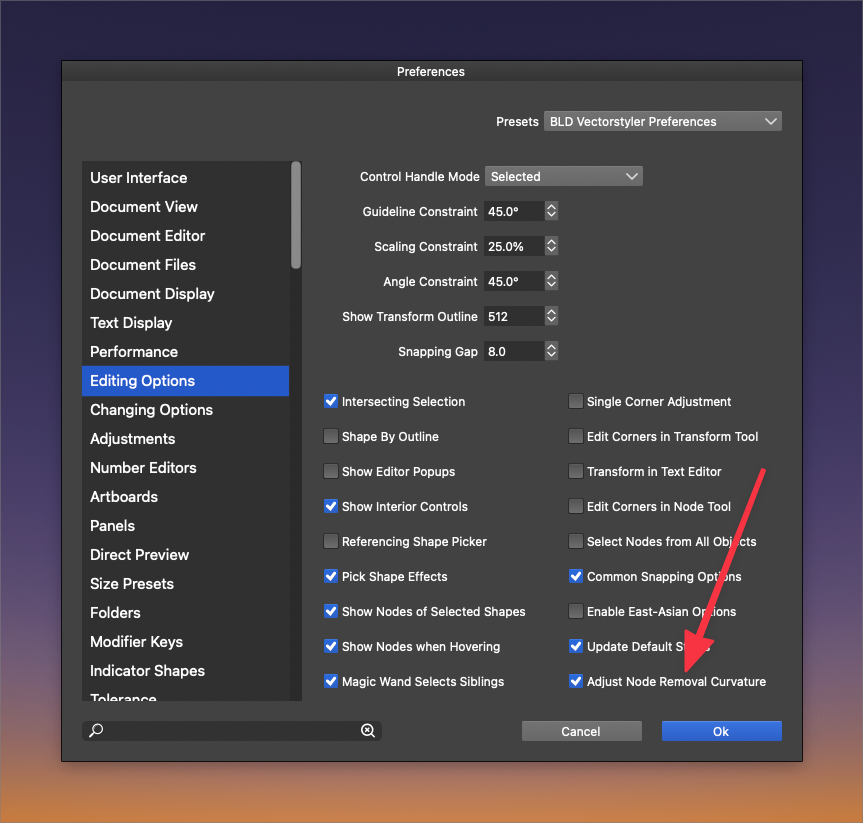
At first, I was not interested in using the "Node Removal Curvature" in my work. Usually I wanted nodes deleted and did not like that it did not give me crisp results. Later I realized there was a great value in being able to use it to make quick edits to curved paths in particular. I still find myself needing to switch back and forth between having this feature on and off based on what I am editing. If I am deleting nodes from a straight path, I like to have the setting off so it does not make the line wonky. When I am editing curved segments, I like to leave it on... I switch often enough that I wish the toggle was not buried in the preferences. I also do not want to clog up the space in VS UI.
-
@Boldline Should Shift-Delete be used for this — if 'Adjust Node Removal Curvature' is enabled you would get a straight path, and vice versa (a curvature) if the option is disabled?
(In the current beta Option/Alt + Delete when node editing will remove the node, the segments and disconnect the path).
MacBook Pro (Intel) running Monterey 12.6.4
-
@b77 I think it's the opposite way from what you said - if I enable that setting in preferences, then each time I go delete nodes, the remaining path and nodes adjust. This is great for curved paths in particular.... but when I want to do no-nonsense just delete nodes and make the path that remains straight, I turn it off.
I just tested the Option/Alt + Delete option you suggested but that is overkill and as you mentioned, it also disconnects the path.
i think what I'm wanting is a way to quickly toggle between the node removal curvature and standard deleting of nodes while maintaining the integrity of the path if that makes sense.
I will do a video and share what I mean. -
@Boldline I'm in no way suggesting that Option-Delete is a workaround for what you ask — I just mentioned what Option-Delete does so you know that the Option key is used already, and also because it's newly implemented in the latest beta (thanks, @vectoradmin!).
Anyway, a keyboard modifier would be the best in my opinion — Shift + Delete probably.
-


