VectorStyler
    • Categories
    • Unread
    • Recent
    • Tags
    • Popular
    • Register
    • Login

    VectorStyler Manual | PDF

    Scheduled Pinned Locked Moved Tutorials
    70 Posts 10 Posters 240.7k Views 9 Watching
    Loading More Posts
    • Oldest to Newest
    • Newest to Oldest
    • Most Votes
    Reply
    • Reply as topic
    Log in to reply
    This topic has been deleted. Only users with topic management privileges can see it.
    • F Offline
      freggern
      last edited by

      New update of the manual (https://k00.fr/xucgr0j9)

      • tables now support to hide the first column of the modifier-tables (is hidden on the website per CSS-rule)
      • column and row now separated by lines
      • there was a bug where it was possible that fields get combined.
      • redesign the info box
      • disable all separator lines
      • fix a bug where \ in the text doesn't display correct
      • add 1 cm to the textlinewidth

      Included changes of the HTML pages (thx @vectoradmin)

      • Updated some images like color palette and layer panel
      • Add shortcuts
      1 Reply Last reply Reply Quote 7
      • F Offline
        freggern
        last edited by

        New update, only include changes of the HTML pages (thx @vectoradmin) - (https://k00.fr/xucgr0j9).

        • Add shortcuts
        1 Reply Last reply Reply Quote 2
        • F Offline
          freggern
          last edited by

          New update with all the changes @vectoradmin did to the documentation.

          • Added: Shape Effects -> Outline -> Node Bump
          • Added: Path Panal -> Describe fourth row
          • Updated: Images for like Preferences
          • Update Shortcuts (was already in an unannounced release of the PDF manual)
          • Typos
          1 Reply Last reply Reply Quote 3
          • BoldlineB Online
            Boldline
            last edited by

            @freggern You're doing an awesome job keeping the pdf manual updated and available. thank you for all your hard work.
            A spacing issue I wanted to bring to your attention - not sure if there's an easy fix.
            i noticed a few cases in the table of contents, especially as the number switch from two digits to three -the space gets tight and the letters join together.

            further down there's some similar spacing issues as the secondary numbers hit three digits
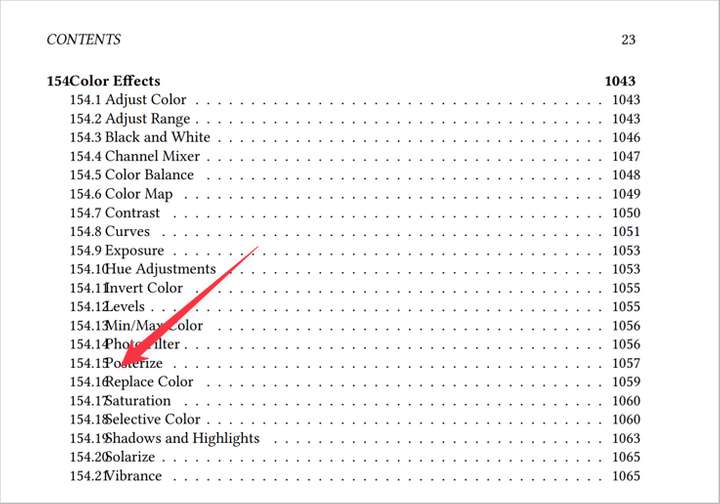
            0_1647966738302_ba205407-dc4e-47ed-a502-95e712e6d0b5-BLD 2022-03-22 at 12.30.05.png

            🍎 macOS Sequoia 15.3, Mac mini (M1, 2020), Chip Apple M1, Memory 16 GB
            Cintiq 27QHD Display and LG Ultra HD Display

            1 Reply Last reply Reply Quote 1
            • F Offline
              freggern
              last edited by

              @Boldline I updated the PDF with a different spacing configuration for the TOC, so the overlap should not happen anymore.

              BoldlineB 1 Reply Last reply Reply Quote 1
              • BoldlineB Online
                Boldline @freggern
                last edited by

                @freggern That looks so much better - thanks for getting that fixed up.

                🍎 macOS Sequoia 15.3, Mac mini (M1, 2020), Chip Apple M1, Memory 16 GB
                Cintiq 27QHD Display and LG Ultra HD Display

                F 1 Reply Last reply Reply Quote 0
                • F Offline
                  freggern @Boldline
                  last edited by

                  @Boldline 👍 If you notice something else or have another idear to improve, let me know.

                  1 Reply Last reply Reply Quote 0
                  • F Offline
                    freggern
                    last edited by

                    New bigger Update:

                    Content

                    • Thanks to @Victor-Vector I added the Boolean Operations Reference Guide Images to the PDF-Manual. More information here: https://www.vectorstyler.com/forum/topic/1758/boolean-operations-reference-guide

                    A lot of redesigns
                    In this update, I focus on the design that I duck out because of needed code changes of the import script.

                    • Redesign the chapter title at the beginning of a chapter
                    • Redesign completely the tables to a modern design and support for table headers (when exists)
                    • Redesign the information boxes that it match to the table and chapter design
                    • Update the title page with a date and sources, and adjust the size of the title.
                    • Update the page header

                    Bugs

                    • Fix a bug in the table
                    Victor VectorV 1 Reply Last reply Reply Quote 3
                    • Victor VectorV Offline
                      Victor Vector @freggern
                      last edited by

                      @freggern I like the redesign changes you made. Thanks for the new version!

                      1 Reply Last reply Reply Quote 1
                      • F Offline
                        freggern
                        last edited by

                        New Update

                        • Thanks to @Victor-Vector I added the Blend Modes Reference Guide Images to the chapter Transparency of the PDF-Manual. More information here: https://www.vectorstyler.com/forum/topic/1827/blend-modes-reference-guide
                        • Includes same small fixes that @vectoradmin did to the documentation like: master -> clone source
                        S 1 Reply Last reply Reply Quote 6
                        • S Offline
                          Subpath @freggern
                          last edited by Subpath

                          @freggern

                          Cant thank you enough for creating a PDF-Helpfile.
                          Very helpful. Great work as always.

                          Special thanks to @Victor-Vector

                          Win 11
                          CPU: AMD Ryzen 5 9600X, 6-core.
                          GPU: Nvidia Geforce RTX 5070.

                          1 Reply Last reply Reply Quote 3
                          • F Offline
                            freggern
                            last edited by

                            New Update

                            • Thanks to @Victor-Vector I added the Shape Effects Inventory - a Reference Guide to the PDF-Manual. More information here: https://www.vectorstyler.com/forum/topic/2011/shape-effects-inventory-a-reference-guide
                            • Rename vectoradmin to VectorStyler on the title page source material list
                            1 Reply Last reply Reply Quote 4
                            • F Offline
                              freggern
                              last edited by

                              New update:

                              Included changes of the HTML pages (thx @VectorStyler)

                              • Update shortcuts (Win/Mac)
                              S 1 Reply Last reply Reply Quote 6
                              • S Offline
                                Subpath @freggern
                                last edited by Subpath

                                @freggern

                                great as always
                                and I am still very grateful that you
                                creating this PDF version 👍

                                really love it

                                Win 11
                                CPU: AMD Ryzen 5 9600X, 6-core.
                                GPU: Nvidia Geforce RTX 5070.

                                1 Reply Last reply Reply Quote 1
                                • S Offline
                                  Subpath
                                  last edited by

                                  @freggern

                                  Could you tell me where the latest PDF Manual
                                  download is. Because i am a bit lost

                                  Allways in the your Top Post ?

                                  Win 11
                                  CPU: AMD Ryzen 5 9600X, 6-core.
                                  GPU: Nvidia Geforce RTX 5070.

                                  F 1 Reply Last reply Reply Quote 0
                                  • F Offline
                                    freggern @Subpath
                                    last edited by

                                    @Subpath Yes, you always find the latest version under this link from the top post: https://k00.fr/xucgr0j9

                                    S 1 Reply Last reply Reply Quote 3
                                    • S Offline
                                      Subpath @freggern
                                      last edited by

                                      @freggern

                                      Thanks, good to know

                                      Win 11
                                      CPU: AMD Ryzen 5 9600X, 6-core.
                                      GPU: Nvidia Geforce RTX 5070.

                                      1 Reply Last reply Reply Quote 1
                                      • F Offline
                                        freggern
                                        last edited by

                                        New update:

                                        • Small images are now better sized (python script works now with the image dimensions)
                                        • Table of Content: Better representation of subpages of the manual. (Now no longer every subpage has its own chapter, only pages of the first level)

                                        Included changes of the HTML pages (thx @VectorStyler)

                                        • removed "Text on Path Tool"
                                        1 Reply Last reply Reply Quote 5
                                        • F Offline
                                          freggern
                                          last edited by

                                          New update:
                                          Included changes of the HTML pages (thx @VectorStyler)

                                          • Change of the license agreement: added: "[...]A single user license can be used to install VectorStyler on multiple personal computers, used by You or your family members. For multiple seat [...]"
                                          1 Reply Last reply Reply Quote 6
                                          • VectorWhizV Offline
                                            VectorWhiz @freggern
                                            last edited by

                                            @freggern Thanks for composing and editing this large document. This is very useful.

                                            Digital Art & Creative Text - https://vectorwhiz.com | Portfolio blog - https://communicats.blogspot.com

                                            1 Reply Last reply Reply Quote 4
                                            • First post
                                              Last post