Using Save-As on an existing document automatically pulls up existing file location
-
In Illustrator, if I opened an existing file with the "File> open file" command or especially if I opened an existing file from the "File>open recent" option, and made edits and wanted to do a "save-as", it would automatically pull up the save location of the original file I edited. This was handy for two reasons; first, because it was a fast way to keep like files together. second, because if I opened a file from the "file>open recent" and later wanted to find where it existed, just hitting "save-as" made it easy to see it's location. Could this be added in VS?
🍎 macOS Tahoe 26.2, Mac mini (M1, 2020), Chip Apple M1, Memory 16 GB
Cintiq 27QHD Display and LG Ultra HD Display -
@Boldline I will look into this, added it to the backlog.
-
@Boldline Actually programs not working like you describe frustrates users a lot. I see it all the time.
Whatever program I work in I work from and to one folder (with subfolders for output and source graphics), and whenever I am prompted to save, export to, import from etc. etc. another folder like 'Documents' I lose my temper.
-
@vectoradmin Regarding this, where the open files is located on disk, recently I looked for that information in a open file.
The document setup is heavily populated with tabs and probably not the right place for that info, perhaps this info could be stored in something like a document info box with title, author, keywords whatever for the document and path to the document with file size info etc.?
-
And a button for "Show in Finder" next to document path would be great as well.
-
@Ingolf said in Using Save-As on an existing document automatically pulls up existing file location:
And a button for "Show in Finder" next to document path would be great as well.
I like the idea of adding a button for "Show in Finder" for whatever document is currently active - I'm not sure what you meant by "next to document path" @Ingolf. It's not you it's me

Until I understand what location he was referring to, my vote is to put it in the file menu near the "validate document" section; it seems to fit there in my current opinion
Where it goes, this will be a handy addition as I mentioned, I open things from the recent folder often and also files get opened, used and left there open for a while - it can be nice to check it's saved location to decide to save again or to save-as it elsewhere, etc.
-
[ file path (string) ] [ Open in Finder (button) ]
-
@Ingolf ok thanks that makes sense now. and sounds like you were thinking the same relative placement.
I wouldn't want it buried deep in the menus -
I was thinking that the file path + Finder button and whatever relevant to the file (size, created date) could be included in a Document Info dialog like this one from Photoshop.
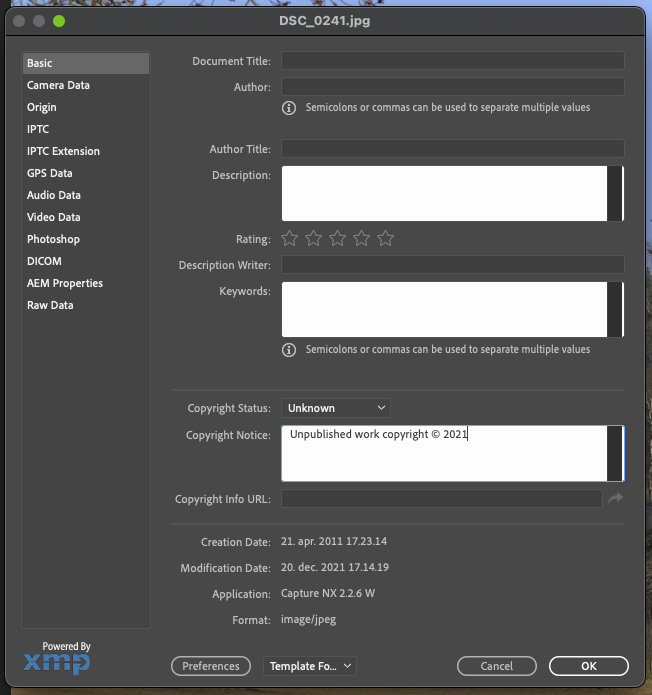
-
@Ingolf This topic of a document info box linked to each VS file has been brought up before (though I can't find it in a quick search I just did). I like your idea for it though in VS it may not need to be too elaborate - title, author, description, keywords....
It would be nice if the keywords section in particular was something that the computer could search for.I don't think I'd personally want the "find in finder" button in the document info box - it's something I'd want to access from the file menu itself
I'm sure whatever @vectoradmin eventually does with both the document info idea and the "find in finder" will work well -
@Ingolf @vectoradmin Rehashing slightly what was said before to clarify my overall opinion - I like the way Illustrator assumes you want to paste a save-as in the same location as the original file. I was using that feature as an unorthodox way to see where a file was located if I had opened it from a list without that location displayed (such as from the recently opened") or if the file had been open amongst the tabs in my workflow for a while and I forgot!
The idea of adding the "find in finder" (or maybe call it "locate saved file" so it's universal for windows and Mac users) is a great one because it's straightforward and there's no risk of accidentally saving a file where you didn't want to just to find it's location of origin. -
@Boldline Should be fixed in build 1.1.002 beta


