Reference on duplicate


-
I've found this super interesting thing but it's not working as I expected it.
If I try to scale the "master" object all the clones are indeed scaled, but on a different "center point".
Only with scale I find this problem, if I rotate all is fine.
Am I missing something?Thanks.


MacBook M1 Pro 10/16 - Monterey
-
Non proportional scaling using the transform panel seems to work tho...
In the above example I scaled the master object manually -
@Torakikiii Yes this is how scaling from a corner works: the object is scaled, and then moved.
The issue here is that the object movement is not considered by references.
For example if the original is moved, all references stay at their place.
Same happens with rotate also, if the pivot point is not at the center. -
Indeed, the master is moving.
I manage it to get a even Result if i go this way:
Create your Master and your Clones.
Select your Master
Go to Menu > Panels > Properties and open it
In the Properties Panel go to Scale, it is below Size
Now change the Value in Scale and you will get a even ResultHere a Screenshot:
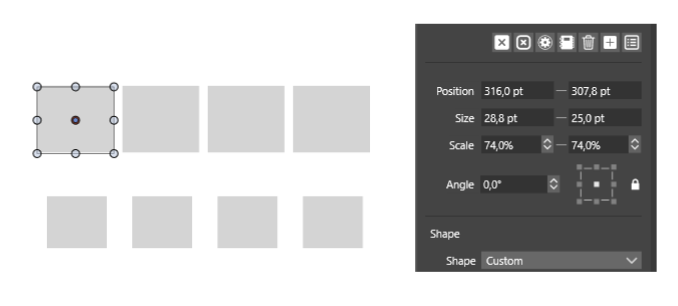
-
@vectoradmin I guess it makes sense, the center of the master is also moving when scaling from a corner. In fact center scaling doesn't move clones.
But... since doing it via the transform panel works, it seems there are 2 different ways in place to interpreter this action. But It goes from center, that's why,
Not a big issue tho!
-
@vectoradmin Is there any difference in properties or expectations if I make a clone from a master versus making a clone from an existing clone of that master?
Update: I partially answered my own question - if I edit the clone I uses to make new clones from, only those offspring have further edits - like a cascading style sheet. If I edit the master of course, all are changed... makes sense
-
@Boldline said in Reference on duplicate:
Update: I partially answered my own question - if I edit the clone I uses to make new clones from, only those offspring have further edits - like a cascading style sheet. If I edit the master of course, all are changed... makes sense
Exactly, it always inherits from the master, even if that in turn is also a clone.
There are some additional tricks:
- Object -> Cloned Properties: to check / uncheck what is cloned. This can be used to restore some attribute of a clone object to the cloned state (if it was changed).
- Object -> Select Master: this can be used to change the master of a clone, but first it needs some other objects marked with the "Master Object" role (Object -> Object Options -> Role -> More Roles -> Master Object enabled)