Vector object display not keeping up with nodes
-
@vectoradmin This is on my new M1 Mac - sometimes the visual for the vector object lags behind the nodes as I move things around
I saved and restarted VS but then it gave me a file recovery option, which I should not have needed, because I saved it before I quit VS. Whether I opened the recovery file or opened the original file after that point, my canvas area was totally white (should be dark gray) and it felt like VS had frozen up - nothing was working.
I moved the file to my Intel Mac and VS opened it fine there. I don't know how much of what I described is one bug or multiple🍎 macOS Tahoe 26.2, Mac mini (M1, 2020), Chip Apple M1, Memory 16 GB
Cintiq 27QHD Display and LG Ultra HD Display -
@Boldline Is 'Direct Preview of Changes' enabled in Prefs > Performance on the M1 Mac?
-
@b77 yes
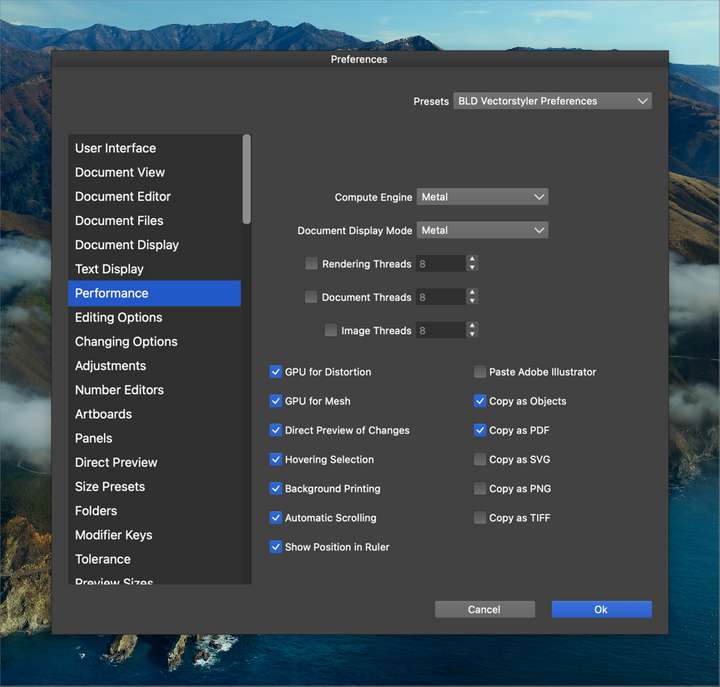
-
@Boldline This could be some configuration option (if settings or workspace was reused from te other computer).
One thing to try is to (first backup) remove the ~/Library/Application Support/NumericPath/VectorStyler1.0 folder (it is also sufficient to rename it).
This will result in a clean / new start of VS. -
I see this from time to time on macOS although when dragging nodes. Only happened on some objects and not always. Got the impression that what I experienced happens after VS has been running for some time and something has been triggered along the way before this happens.
I have a handful of observations I suspect are bugs but need more evidence and observations before I can establish a (probable) pattern and report them.



