Flip Rulers
-
Rulers appear to measure with the old PostScript measurement system (Bottom Left is Zero, Top Left is Zero) ala Aldus Freehand vs old Adobe Illustrator 1.1 - not sure the true naming convention. However many (most?) other layout / design apps the "norm"? seems to be to measure XY from the Top/Left. Positioning elements with this previous mindset makes work counter intuitive (to me at least) - is there a way to change the Zero point to reset the rulers somehow?
-
The ruler origin cannot be changed (added this to the bug list)
The coordinate direction can be changed with Document Setup -> General (tab) -> Top-Down Coordinates. -
Ruler origin support has been added:
- on top-down coordinates the ruler origin is at the top-left corner of the default artboard size (will not move if the artboard is later edited).
- ruler origin can be moved interactively by Option+press the mouse in the ruler corner and drag to the document area.
- ruler origin can also be set in the Document Setup -> General tab Origin X/Y fields.
- ruler number signs also follow the top-down option.
-
@vectoradmin this is looking good!
In beta 159, setting the transform origin for an element to top left - then positioning the element to 0, 0 in transform results in Y coordinate using the height of the artboard. This incorrectly positions the element off the artboard.
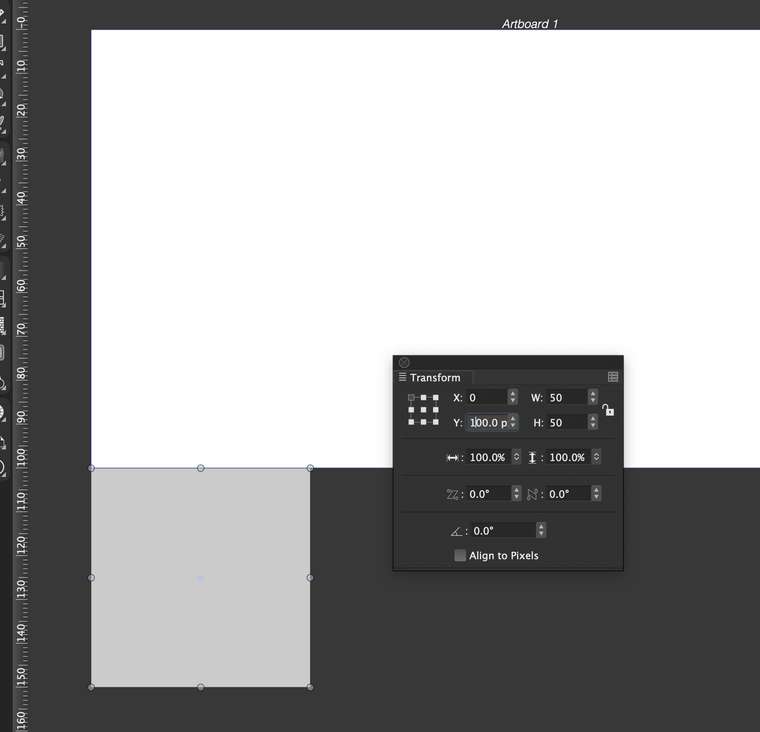
-
Did replicate this, it is a bug. Fix will be in the next release.
-
build 160 fixes this, and several other issues regarding the ruler and coordinate system direction.

