VectorStyler
    • Categories
    • Unread
    • Recent
    • Tags
    • Popular
    • Register
    • Login

    Font Dropdown Default cursor Active

    Scheduled Pinned Locked Moved Implemented Features
    6 Posts 3 Posters 11.1k Views 2 Watching
    Loading More Posts
    • Oldest to Newest
    • Newest to Oldest
    • Most Votes
    Reply
    • Reply as topic
    Log in to reply
    This topic has been deleted. Only users with topic management privileges can see it.
    • BoldlineB Offline
      Boldline
      last edited by

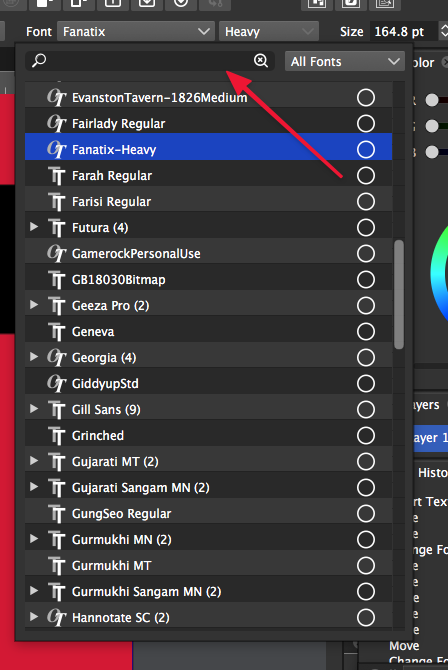
      Where did we end up with the discussion a while back about making the drop-down font selection box have an active cursor in the name section? Is that something that was ultimately decided against or in the plans for a future build?
      0_1636332197169_5f347d1c-e5c3-46db-af82-1d1e1c933ae7-image.png

      🍎 macOS Tahoe 26.2, Mac mini (M1, 2020), Chip Apple M1, Memory 16 GB
      Cintiq 27QHD Display and LG Ultra HD Display

      VectorStylerV 2 Replies Last reply Reply Quote 0
      • VectorStylerV Offline
        VectorStyler @Boldline
        last edited by

        @Boldline It is still in the plans.

        1 Reply Last reply Reply Quote 1
        • VectorStylerV Offline
          VectorStyler @Boldline
          last edited by

          @Boldline This feature is available now in 1.1.002 (beta)

          1 Reply Last reply Reply Quote 1
          • BoldlineB Offline
            Boldline
            last edited by

            @vectoradmin I am not seeing the Default cursor active when I go to change the font. Am I missing a step?

            I also noticed sometimes when I use the option key to drag out my initial font size, I get a box at the bottom of the screen. It doesn't occur for all fonts - I assume when something is missing?

            Here is the video showing both issues

            🍎 macOS Tahoe 26.2, Mac mini (M1, 2020), Chip Apple M1, Memory 16 GB
            Cintiq 27QHD Display and LG Ultra HD Display

            b77B 1 Reply Last reply Reply Quote 0
            • b77B Offline
              b77 @Boldline
              last edited by b77

              @Boldline Indeed there is no visible blinking cursor, but typing directly (no need to click inside the search field) will write into it and narrow the font selection accordingly.

              @vectoradmin A small limitation:
              Sometimes if you type just three letters you already narrow the font selection to the font you want.
              In that case hitting Enter should assign that font to the selected text object.

              MacBook Pro (Intel) running Monterey 12.6.4

              BoldlineB 1 Reply Last reply Reply Quote 1
              • BoldlineB Offline
                Boldline @b77
                last edited by

                @b77 Oh ok - that makes more sense now that you explained it. It wasn't obvious to me prior, but maybe that's just me expecting one thing and not realizing it worked another way. It's fine now as it is - it works for me - thanks for sharing that info.


                🍎 macOS Tahoe 26.2, Mac mini (M1, 2020), Chip Apple M1, Memory 16 GB
                Cintiq 27QHD Display and LG Ultra HD Display

                1 Reply Last reply Reply Quote 1
                • First post
                  Last post