Lock-aspect-ratio does not stay locked
-
Version 1.1.026
Couldn't get "Enable or disable the proportional resizing of the shape" to do what I want. It goes back to "unlocked".Goal:
Lock the aspect ratio and resize a shape, keeping the aspect ratio.What I got instead:
Aspect ratio is always unlocked (changeable). Resizing a shape (I tried it wih a circle) changes the aspect ratio.Reproduce problem:
- Create circle.
- Click on the "dot dot dot" button so that the dialog appears with the padlock symbol in the bottom right corner. The padlock is open.
- Click the symbol, now the padlock is closed.
- Go out of the dialog, go back into the dialog. The padlock symbol should still show as being locked, but it's open.
-
@markus Confirmed here. As a workaround until this is fixed, hold the Shift key when resizing to keep the aspect ratio.
Btw, there's also an option in Preferences, where resizing objects keeps the aspect ratio by default when dragging from the corners, without pressing Shift. (Prefs > Changing Options > Proportional Object Scaling).
-
@markus said in Lock-aspect-ratio does not stay locked:
Enable or disable the proportional resizing of the shape
Yes this can be replicated. Will be fixed ASAP.
-
@markus This problem should be fixed in build 1.1.048
-
Hi again, I'd prefer to reply to this old topic as I'm more dependant on the lock feature than other users. I have problems with holding shift while dragging the mouse, so when I increase the size of a shape, I can barely hold shift at the same time, and I usually get bad results.
Anothter thing to mention is the Windows feature sticky keys, which has been more or less abandoned by Microsoft, with ridiculous bugs in and around it (one needs to use it on a Windows pro machine to stop auto cleanup of the tray bar in a group policy, and even then it behaves eratically in any case. I don't think anyone on earth uses it at all, except you train using it for like 2-4 weeks maybe, given that you understand it at all).
So, I have downloaded Vetcorstyler again just now, and this aspect lock is greyed out for some reason. It's disabled.
What I did: Create two rectangles, make a union out of them. Then, under "..." look for the aspect lock on the very right. There it is, greyed out. I must admit, that I'm not sure why it's greyed out.
Thank you
-
@markus For this case (resizing path shapes) you need to use the Transform panel.
The shape panel (opened with the "..." icon) uses the size lock only for the rectangle and ellipse panels. This is because the Shape panel edits the properties of a parametric shape (a.k.a live shape).
After creating a union of 2 shapes, the rectangles become a path shape.
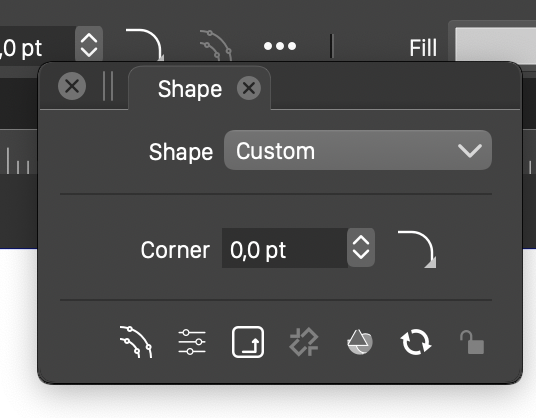
This is the shape panel for a path object, nothing much to edit here of a path:
This is the transform panel, here it is possible to set the size (and lock it):
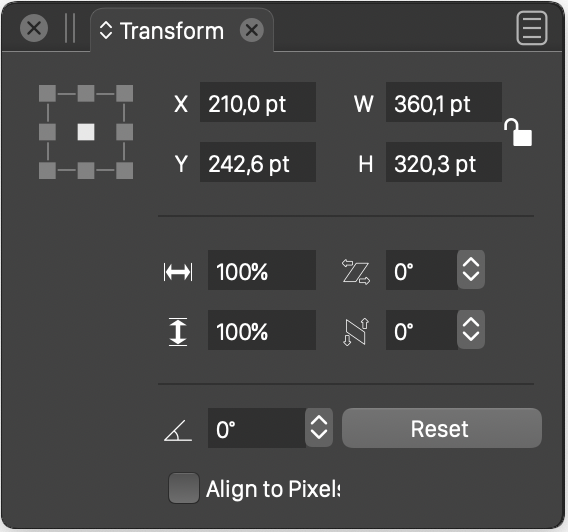
The Shape panel lock icon is at the wrong place, and should not even be visible when path shapes are selected.
-
@VectorStyler I guess Markus would like for the aspect lock button in the Transform panel to
constrain the aspect ratio not only when editing the number fields in the panel but also when
scaling the object on the canvas directly. -
@b77 Ok, this could be a new feature. Added it to the backlog.

