VectorStyler
    • Categories
    • Unread
    • Recent
    • Tags
    • Popular
    • Register
    • Login

    Text Frames copied with CRTL+D cause performance hit when text is edited.

    Scheduled Pinned Locked Moved Resolved Issues
    9 Posts 3 Posters 8.3k Views 3 Watching
    Loading More Posts
    • Oldest to Newest
    • Newest to Oldest
    • Most Votes
    Reply
    • Reply as topic
    Log in to reply
    This topic has been deleted. Only users with topic management privileges can see it.
    • Victor VectorV Offline
      Victor Vector
      last edited by Victor Vector

      Hello,
      This is an odd one.

      1. I opened a file, made a one word-sized text frame, copy pasted a second text frame and moved it below the first.
      2. I then used CTRL+D to make a whole column of them, about 32 frames. Duplication Mode is set to "Copy on Duplicate".
      3. I then started double-clicking each frame and entering in a new text.
      4. As I moved down the list, the text entry became slower and slower, eventually grinding the process to a halt. At object "{Text Frame} Copy 18", it is almost frozen.

      @vectoradmin, may I please send you the file for you to test?
      It's on a Win 11 machine, VS 1.1.026.

      VectorStylerV 2 Replies Last reply Reply Quote 0
      • VectorStylerV Offline
        VectorStyler @Victor Vector
        last edited by

        @Victor-Vector Got the file and the problem can be replicated. Will be fixed ASAP.

        Victor VectorV 1 Reply Last reply Reply Quote 1
        • Victor VectorV Offline
          Victor Vector @VectorStyler
          last edited by Victor Vector

          @vectoradmin
          A bit of extra info if it helps you: I converted all the Text Frames into Shape Text and tried again, thinking it might be an exclusive Text Frame issues, but it behaves the same on Shape Text.

          In another test, it seems to be a issue with the CTRL+D Duplicate function. I tried using copy and paste 32x instead, and editing the text did not incur any performance hit like using CTRL+D.

          1 Reply Last reply Reply Quote 1
          • S Offline
            Subpath
            last edited by Subpath

            @Victor-Vector
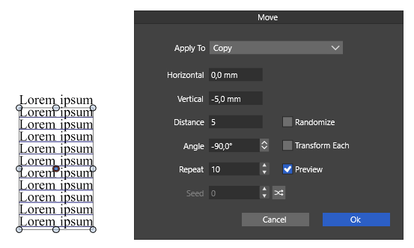
            Maybe you already know this, but I would like to point out that
            you could also use Menu > Object > Transform > Move for these copies.
            0_1648662832839_Move-1.png

            Win 11
            CPU: AMD Ryzen 5 9600X, 6-core.
            GPU: Nvidia Geforce RTX 5070.

            Victor VectorV 1 Reply Last reply Reply Quote 3
            • Victor VectorV Offline
              Victor Vector @Subpath
              last edited by

              @Subpath Thank you for sharing the valuable tip. I was leaning heavily on the distribute functions, but this is way more functional for so many applications. Awesome! 🎈

              S 1 Reply Last reply Reply Quote 1
              • S Offline
                Subpath @Victor Vector
                last edited by

                @Victor-Vector
                your welcome

                The Praise goes, as always, to VS alias Vectoradmin 🙂

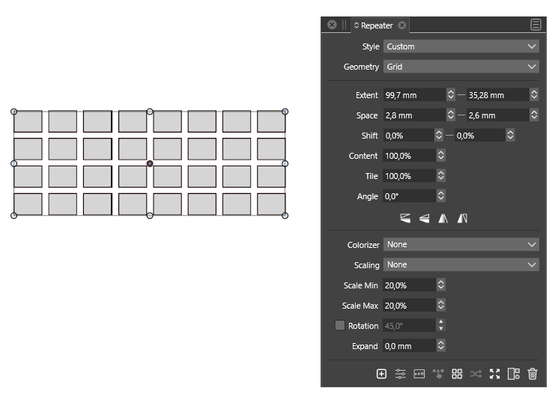
                Btw, if you need this kind of distribution then also take
                a look at the repeater.
                0_1648674062955_Repeater.png

                Win 11
                CPU: AMD Ryzen 5 9600X, 6-core.
                GPU: Nvidia Geforce RTX 5070.

                Victor VectorV 1 Reply Last reply Reply Quote 3
                • Victor VectorV Offline
                  Victor Vector @Subpath
                  last edited by

                  @Subpath Admittedly I didn't even know about the repeater. I am glad you shared this one with me as well. Having this much control over shapes so very valuable! Thank you 🍦

                  S 1 Reply Last reply Reply Quote 1
                  • S Offline
                    Subpath @Victor Vector
                    last edited by

                    @Victor-Vector

                    Glad it was helpful.

                    I explore VS myself and am often surprised
                    what Vectoradmin has built into VS.

                    Even though there are some frustrating areas,
                    all in all there are a lot of good ideas.

                    Win 11
                    CPU: AMD Ryzen 5 9600X, 6-core.
                    GPU: Nvidia Geforce RTX 5070.

                    1 Reply Last reply Reply Quote 1
                    • VectorStylerV Offline
                      VectorStyler @Victor Vector
                      last edited by

                      @Victor-Vector This problem should be fixed in build 1.1.048

                      1 Reply Last reply Reply Quote 1
                      • First post
                        Last post
