VectorStyler
    • Categories
    • Unread
    • Recent
    • Tags
    • Popular
    • Register
    • Login

    Scale Strokes and Effects

    Scheduled Pinned Locked Moved Questions and Support
    63 Posts 12 Posters 158.2k Views 9 Watching
    Loading More Posts
    • Oldest to Newest
    • Newest to Oldest
    • Most Votes
    Reply
    • Reply as topic
    Log in to reply
    This topic has been deleted. Only users with topic management privileges can see it.
    • VectorStylerV Offline
      VectorStyler @danegeld
      last edited by

      @danegeld Welcome!
      To transform stroke: select the object and In the Appearance panel select the Stroke row. In the Panel menu, enable the Transform Content option.

      1 Reply Last reply Reply Quote 0
      • D Offline
        danegeld
        last edited by

        Thanks for the reply. I found the Transform Content option and it does work. The issue I had was that I was trying to use it on shapes, rather than curves. It works perfectly on curves, but not for shapes. It also seems to only affect strokes and not any effects applied to the object. I tried it on a blurred path and it had no effect. I frequently use blurred paths for shading.

        While it's not likely to be related, I'm also seeing some screen glitches with Metal acceleration. It doesn't happen with OpenGL, but with OpenGl, a gaussian blur makes the object disappear altogether.

        VectorStylerV 1 Reply Last reply Reply Quote 1
        • VectorStylerV Offline
          VectorStyler @danegeld
          last edited by

          @danegeld There is a bug which causes the stroke not to be scaled with rectangles and ellipses (as the shapes are directly resized, instead of the object) The fix for this is already done, and will be in the next build (there are weekly builds).

          The transform content does not change the image effect parameters for now. Will get back on this one later.

          About the Metal issues: what kind of glitches are there? This is important, as it is the main acceleration tech on MacOS.
          Is with an effect, or just displaying some vectors?
          And what is the mac config this occurs on?

          If there is an example file resulting in glitches, it would be great. (send it to beta@vectorstyler.com)

          Thanks!

          1 Reply Last reply Reply Quote 0
          • D Offline
            danegeld
            last edited by

            Good to know it's not something stupid I'm doing. I'll look forward to the fix for scaling image effects.
            I should also clarify that I goofed the last sentence of the previous reply. It should have read "It doesn't happen with Metal, but with OpenGL, a gaussian blur makes the object disappear altogether."
            The screen tearing isn't serious, but only seems to happen when moving objects around, and in the top half of the screen.

            VectorStylerV 2 Replies Last reply Reply Quote 1
            • VectorStylerV Offline
              VectorStyler @danegeld
              last edited by

              @danegeld Got it. Thanks!

              1 Reply Last reply Reply Quote 0
              • VectorStylerV Offline
                VectorStyler @danegeld
                last edited by

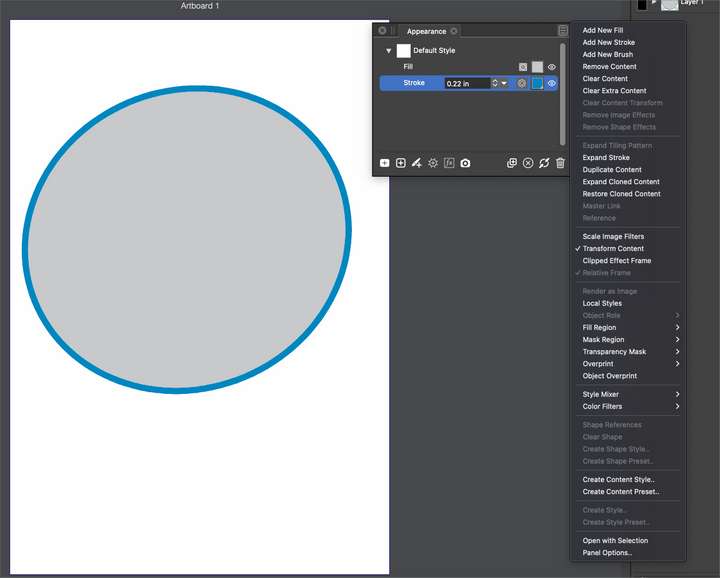
                @danegeld A new Scale Image Effect is added to the Appearance panel menu to enable scaling of image effect parameters.

                Victor VectorV BoldlineB 2 Replies Last reply Reply Quote 0
                • Victor VectorV Offline
                  Victor Vector @VectorStyler
                  last edited by Victor Vector

                  @vectoradmin

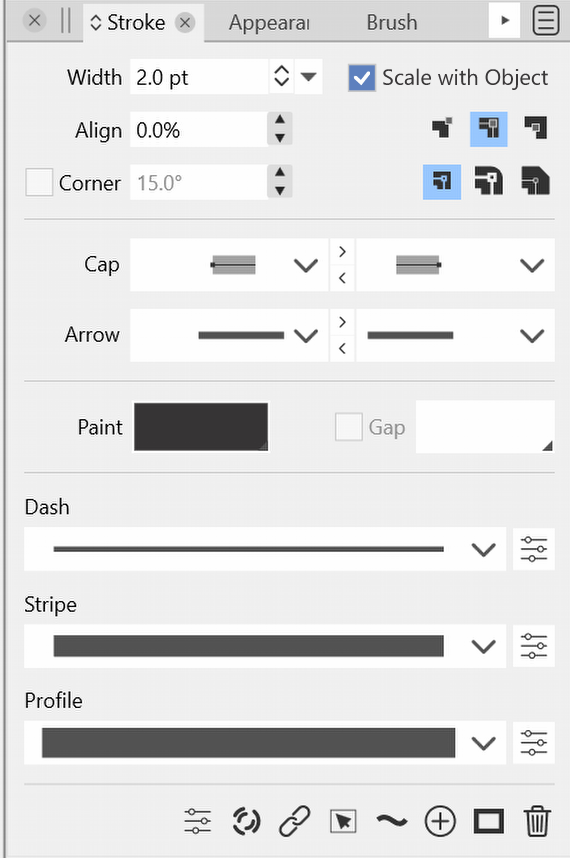
                  As a newcomer to VectorStyler, I was hunting for the stroke scaling function for a while. I like to poke around the interface to determine how intuitively accessible certain functions are. I finally had to look it up, which is what lead me here.
                  So a humble suggestion: Perhaps "scale stroke with object" could be located a bit more intuitively. May I propose here?
                  0_1647210331726_Scale with object Stroke Panel2.png

                  Thanks for considering.

                  BoldlineB 1 Reply Last reply Reply Quote 1
                  • BoldlineB Offline
                    Boldline @VectorStyler
                    last edited by

                    @vectoradmin said in Scale Strokes and Effects:

                    @danegeld A new Scale Image Effect is added to the Appearance panel menu to enable scaling of image effect parameters.

                    @vectoradmin Where do I find the new setting in build 20? This is what I see when I click on the panel menu when the stroke is selected in the appearance panel - did I miss it?
                    0_1647210719984_0a7cebc2-6ac3-4db4-9ce8-409371cebf60-BLD 2022-03-13 at 18.30.58.png

                    🍎 macOS Tahoe 26.2, Mac mini (M1, 2020), Chip Apple M1, Memory 16 GB
                    Cintiq 27QHD Display and LG Ultra HD Display

                    b77B 1 Reply Last reply Reply Quote 0
                    • b77B Offline
                      b77 @Boldline
                      last edited by

                      @Boldline I guess it was renamed to 'Scale Image Filters'.

                      MacBook Pro (Intel) running Monterey 12.6.4

                      1 Reply Last reply Reply Quote 1
                      • BoldlineB Offline
                        Boldline
                        last edited by

                        Thanks @b77 I saw that option but it did not make sense to me and I had been looking for @vectoradmin 's title for it verbatim

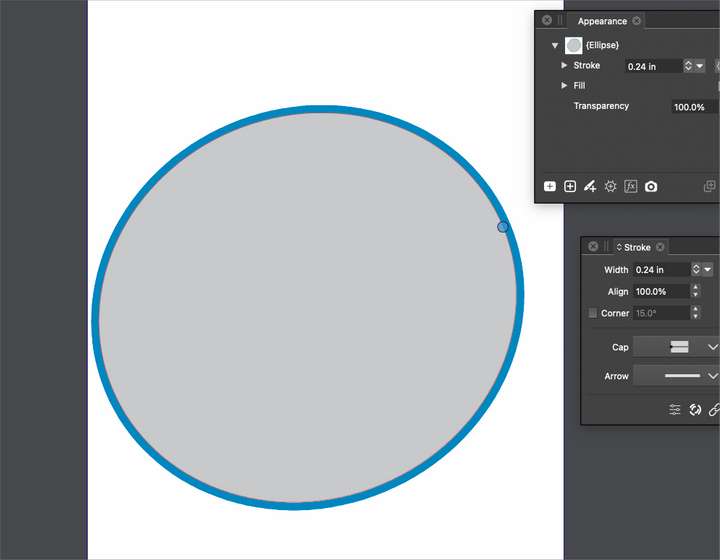
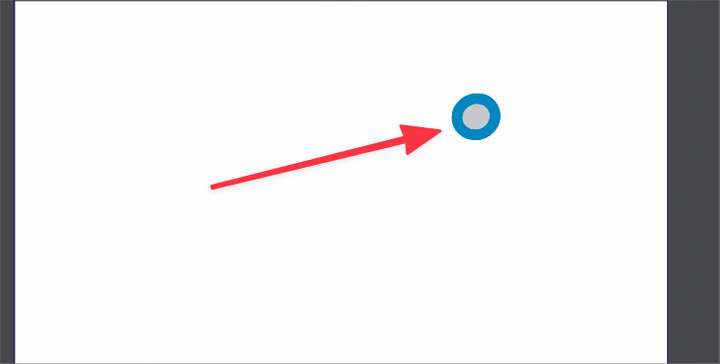
                        I'm still confused by the scale strokes in VS because the stroke does not seem to stay sized proportionally to the fill when you scale it down. Here I have a video showing my attempts to scale down a circle with stroke and although the stroke does decrease in size as the overall shape is shrunk down, it's not remaining proportional to the shape. I also included a couple screen shots to show the ratio of the stroke to the gray circle before and after shrinking. I would expect the smaller circle to have a MUCH smaller stroke
                        0_1647211537936_916144c5-cd94-4cff-9ae1-5e8ea4f99bbb-BLD 2022-03-13 at 18.45.27.png
                        0_1647211505777_c6d4afc5-04c4-42ff-ae1a-31ac306b43d0-BLD 2022-03-13 at 18.44.39.png

                        🍎 macOS Tahoe 26.2, Mac mini (M1, 2020), Chip Apple M1, Memory 16 GB
                        Cintiq 27QHD Display and LG Ultra HD Display

                        b77B 1 Reply Last reply Reply Quote 1
                        • BoldlineB Offline
                          Boldline @Victor Vector
                          last edited by Boldline

                          @Victor-Vector I agree with you on this point - it would be nice to have easy access to the scaling strokes option. This seems like a logical place to look for it and find it.

                          🍎 macOS Tahoe 26.2, Mac mini (M1, 2020), Chip Apple M1, Memory 16 GB
                          Cintiq 27QHD Display and LG Ultra HD Display

                          1 Reply Last reply Reply Quote 1
                          • b77B Offline
                            b77 @Boldline
                            last edited by b77

                            @Boldline It looks like a bug — scaling with the object doesn't work for strokes aligned to inside or outside.

                            MacBook Pro (Intel) running Monterey 12.6.4

                            BoldlineB 1 Reply Last reply Reply Quote 1
                            • BoldlineB Offline
                              Boldline @b77
                              last edited by Boldline

                              @b77 Yes! When I moved the stroke back to the center-align, it scales correctly now. thanks.
                              @vectoradmin - would you prefer I move this over the the "bug report" section as it's own thread or leave it here?

                              🍎 macOS Tahoe 26.2, Mac mini (M1, 2020), Chip Apple M1, Memory 16 GB
                              Cintiq 27QHD Display and LG Ultra HD Display

                              VectorStylerV 1 Reply Last reply Reply Quote 0
                              • VectorStylerV Offline
                                VectorStyler @Boldline
                                last edited by

                                @Boldline @b77 @Victor-Vector The aligned stroke scaling is a regression (from two builds ago). I added it to the backlog (no need to move the post).

                                1 Reply Last reply Reply Quote 1
                                • VectorStylerV Offline
                                  VectorStyler @danegeld
                                  last edited by

                                  @danegeld A new option in build 1.1.024: Transform Stroke in the Appearance panel menu, must select object in the panel (also in Object Options).
                                  Will transform all subsequent stroke attributes inside that object

                                  BoldlineB 1 Reply Last reply Reply Quote 0
                                  • BoldlineB Offline
                                    Boldline @VectorStyler
                                    last edited by

                                    @vectoradmin this works well for customizing it on an individual file and individual object level, but is there a way to make scaling stroke size with object the default so that we're not having to go in to change the setting with every be document?

                                    🍎 macOS Tahoe 26.2, Mac mini (M1, 2020), Chip Apple M1, Memory 16 GB
                                    Cintiq 27QHD Display and LG Ultra HD Display

                                    VectorStylerV 1 Reply Last reply Reply Quote 0
                                    • VectorStylerV Offline
                                      VectorStyler @Boldline
                                      last edited by

                                      @Boldline said in Scale Strokes and Effects:

                                      @vectoradmin this works well for customizing it on an individual file and individual object level, but is there a way to make scaling stroke size with object the default so that we're not having to go in to change the setting with every be document?

                                      No such feature now, but I think one could be made for new objects.

                                      BoldlineB 1 Reply Last reply Reply Quote 0
                                      • BoldlineB Offline
                                        Boldline @VectorStyler
                                        last edited by

                                        @vectoradmin Only speaking for myself, I rarely want to stroke to stay the same size when I am scaling things - typically I design with the stroke being sized in relation to the fill object it's attached to. So selfishly, I'd prefer VS default to scaling strokes and effects and let the new option in the appearance panel allow that selected object and future objects on that document be the opposite.
                                        To appease all, I'd love to see it as a new document setup/document setup toggle. and the opposite takes affect if you go in and manually modify the setting in the appearance panel
                                        I don't know if that's feasible

                                        🍎 macOS Tahoe 26.2, Mac mini (M1, 2020), Chip Apple M1, Memory 16 GB
                                        Cintiq 27QHD Display and LG Ultra HD Display

                                        Victor VectorV 1 Reply Last reply Reply Quote 2
                                        • Victor VectorV Offline
                                          Victor Vector @Boldline
                                          last edited by

                                          @Boldline said in Scale Strokes and Effects:

                                          @vectoradmin Only speaking for myself, I rarely want to stroke to stay the same size when I am scaling things - typically I design with the stroke being sized in relation to the fill object it's attached to. So selfishly, I'd prefer VS default to scaling strokes and effects and let the new option in the appearance panel allow that selected object and future objects on that document be the opposite.
                                          To appease all, I'd love to see it as a new document setup/document setup toggle. and the opposite takes affect if you go in and manually modify the setting in the appearance panel
                                          I don't know if that's feasible

                                          I too would prefer the stroke to be scalable by default, and yes, having an option in the "New Document Setup" and/or in "Preferences", for the users to decide how they would like to roll, is a nice way to handle this. I think AI had this in their preferences, but I cannot remember as it was a long time ago, haha.

                                          I still think Transformed Stroke (scale stroke with object) needs to be more accessible rather than in a panel menu. Would it be helpful to also have it in the Stroke panel, next to the Width field?

                                          1 Reply Last reply Reply Quote 2
                                          • J Offline
                                            Jayanta Das
                                            last edited by Jayanta Das

                                            Is scale stroke with object works for you guys? It is not working here.

                                            Recording

                                            Mac Mini M4 Pro | 24Gb
                                            WIndows 11 | Intel i5 11Gen
                                            Wacom Intuos Pro

                                            b77B 1 Reply Last reply Reply Quote 0
                                            • First post
                                              Last post