VectorStyler
    • Categories
    • Unread
    • Recent
    • Tags
    • Popular
    • Register
    • Login

    Document Structure

    Scheduled Pinned Locked Moved Questions and Support
    4 Posts 2 Posters 4.7k Views 2 Watching
    Loading More Posts
    • Oldest to Newest
    • Newest to Oldest
    • Most Votes
    Reply
    • Reply as topic
    Log in to reply
    This topic has been deleted. Only users with topic management privileges can see it.
    • 861475_VctSt8 Offline
      861475_VctSt
      last edited by

      v.1.1.020
      Mac

      When new document set up.
      0_1646369933065_スクリーンショット 2022-03-04 13.53.28.png
      The document structure is strange.
      Is this correct?
      From which version did this happen?

      0_1646370062812_2022-03-04.png

      LIc. 0 OS10.15.8
      MacBook Air (13-inch, Mid 2012) / Intel Core i5, 8GB / Intel HD Graphics 4000
      LIc. 1 OS15.7.4
      MacBook Pro (14-inch, 2023) / Apple M2 Pro, 16GB / Apple GPU

      VectorStylerV 1 Reply Last reply Reply Quote 0
      • VectorStylerV Offline
        VectorStyler @861475_VctSt
        last edited by

        @861475_VctSt
        Here the "Canvas" panel is active (not the Layers panel). It might be that you wanted to use the Layers panel?

        This was present from the beginning. Typically the "Canvas" panel is not used, it is a VS specific feature.
        A VS document contains multiple canvases, and each canvas has its own Layer hierarchy.
        For a single canvas see the Layers panel for its content.

        Multiple canvases can be used to setup "master page" like features (master canvas), and to have symbols or other design assets on "Reference" canvases, etc.

        861475_VctSt8 1 Reply Last reply Reply Quote 0
        • 861475_VctSt8 Offline
          861475_VctSt @VectorStyler
          last edited by

          @vectoradmin

          Let me go back to the beginning because I did not explain myself well enough.

          Suppose I am trying to create a single-page artwork.
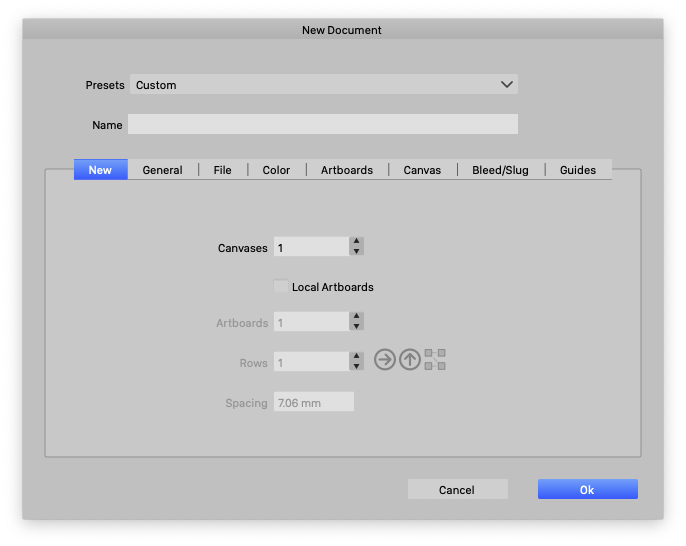
          First, when I do New Document Setup
          The value of Canvases defaults to "1".

          0_1646377673684_2022-03-04 01.png

          If the document is created as is.
          The work will start from artboard2.

          0_1646377699336_2022-03-04 02.png

          I only need one artboard, but I work from "2" and go to ....?
          Am I the only one who finds this odd?

          In this case, if I enter "0

          0_1646377752201_2022-03-04 03.png

          I can work from artwork1.

          0_1646377780856_2022-03-04 04.png

          Is this correct?

          LIc. 0 OS10.15.8
          MacBook Air (13-inch, Mid 2012) / Intel Core i5, 8GB / Intel HD Graphics 4000
          LIc. 1 OS15.7.4
          MacBook Pro (14-inch, 2023) / Apple M2 Pro, 16GB / Apple GPU

          VectorStylerV 1 Reply Last reply Reply Quote 0
          • VectorStylerV Offline
            VectorStyler @861475_VctSt
            last edited by

            @861475_VctSt said in Document Structure:

            Is this correct?

            That part is a bug. The first Artboard (just under Artwork Canvas) should not exists in a default document.
            I will fix this. (this also causes a printing issue).

            1 Reply Last reply Reply Quote 0
            • First post
              Last post
