VectorStyler
    • Categories
    • Unread
    • Recent
    • Tags
    • Popular
    • Register
    • Login

    VS artboard/doc looks odd when exported to PDF
    Scheduled Pinned Locked Moved Questions and Support
    11 Posts 4 Posters 15.5k Views 3 Watching
    Loading More Posts
    • Oldest to Newest
    • Newest to Oldest
    • Most Votes
    Reply
    • Reply as topic
    Log in to reply
    This topic has been deleted. Only users with topic management privileges can see it.
    • RaaskotR Offline
      Raaskot
      last edited by

      I am testing VS as my prospective new vector drawing software and are completely noob yet with experience from Inkscape, Affinity Designer and AI.

      Just to try something I have created some curves wiyh variabel widths

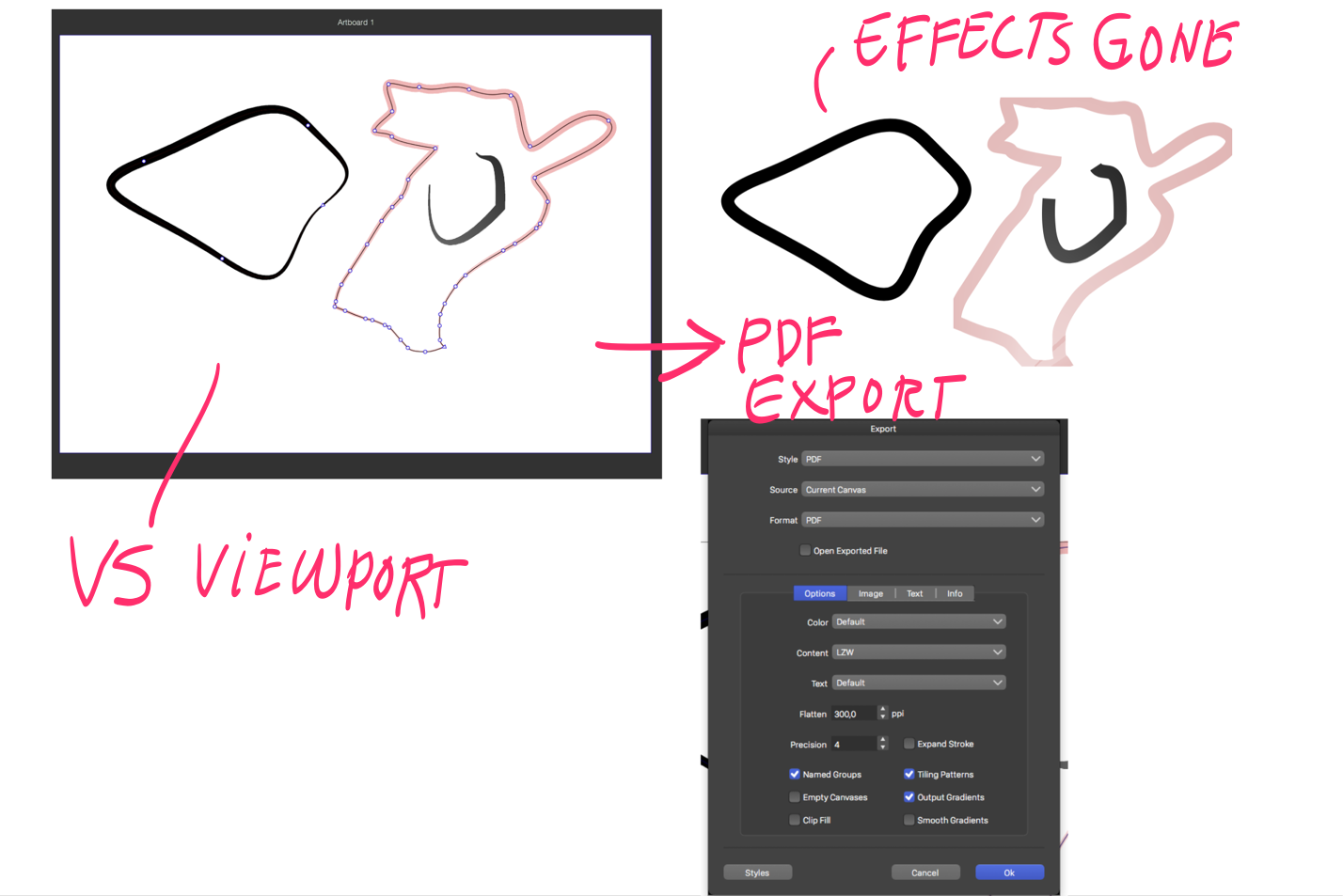
      Yet I'm puzzled by the bad quality of a simple exported pdf which appear very odd according image below. Have I missed something?

      Kind regards, Raaskot

      0_1645880460163_6f8f9223-d6e7-486e-b45e-69bf5bc4ac9a-billede.png

      b77B 1 Reply Last reply Reply Quote 0
      • b77B Offline
        b77 @Raaskot
        last edited by b77

        @Raaskot Click 'Expand Stroke' in the Export window and the paths should preserve their profiles.

        @vectoradmin I think this should be enabled by default.

        MacBook Pro (Intel) running Monterey 12.6.4

        RaaskotR 1 Reply Last reply Reply Quote 2
        • RaaskotR Offline
          Raaskot @b77
          last edited by

          Thank you, @b77 🙂

          Wonderful, much better!
          Yet the right shape appears cropped. Any idea how to prevent this?

          0_1645886778372_84cde8a7-56df-463f-8f2f-0f3e922cc3e8-billede.png

          b77B 1 Reply Last reply Reply Quote 0
          • b77B Offline
            b77 @Raaskot
            last edited by

            @Raaskot It doesn't happen to me here. Can you post the file somewhere (Dropbox)?

            MacBook Pro (Intel) running Monterey 12.6.4

            RaaskotR 1 Reply Last reply Reply Quote 0
            • RaaskotR Offline
              Raaskot @b77
              last edited by Raaskot

              @b77
              Here it is:
              https://www.jottacloud.com/s/1276fc4bf27a765475e8835ffcc5e21cc9d
              Crop seems to match the bounding box area:

              0_1645895545364_Skærmbillede 2022-02-26 kl. 18.11.57.png

              BoldlineB 1 Reply Last reply Reply Quote 0
              • BoldlineB Online
                Boldline @Raaskot
                last edited by

                @Raaskot it's requesting permission to access the file on your drive

                🍎 macOS Tahoe 26.2, Mac mini (M1, 2020), Chip Apple M1, Memory 16 GB
                Cintiq 27QHD Display and LG Ultra HD Display

                RaaskotR 1 Reply Last reply Reply Quote 0
                • RaaskotR Offline
                  Raaskot @Boldline
                  last edited by

                  @Boldline
                  Hm, strange. Google link is supposed to be public.

                  Here is another attempt:
                  https://www.jottacloud.com/s/1276fc4bf27a765475e8835ffcc5e21cc9d

                  BoldlineB 1 Reply Last reply Reply Quote 0
                  • BoldlineB Online
                    Boldline @Raaskot
                    last edited by Boldline

                    @Raaskot that worked.
                    I went ahead and expanded the strokes (the black stroke inside the pink outline is clipped
                    I exported as a pdf and turned out as expected, not missing areas

                    0_1645896543369_9d3b87f6-1c86-4292-951b-548d3a4457fc-BLD 2022-02-26 at 12.27.38.png

                    I was able to replicate your issue if I had an active selection of the paths and did not expand the stroke first when exporting as a pdf
                    0_1645896639916_7cd76fe4-f84b-42eb-96a0-be2b5ddc0b3c-BLD 2022-02-26 at 12.30.06.png

                    🍎 macOS Tahoe 26.2, Mac mini (M1, 2020), Chip Apple M1, Memory 16 GB
                    Cintiq 27QHD Display and LG Ultra HD Display

                    RaaskotR 1 Reply Last reply Reply Quote 1
                    • RaaskotR Offline
                      Raaskot @Boldline
                      last edited by

                      Thanks, @Boldline
                      Very good, I see. Now it works. Made it work after applying ctrl-shift-s (expand stroke)

                      Yet strange that this issue doesn't appear for the left shapes part:

                      0_1645897422510_6fa497e2-1a1a-456f-ac0b-d2a36ecc6720-billede.png
                      0_1645897445641_a8f1eead-32fb-4c53-9cf6-e088d96957bc-billede.png

                      VectorStylerV 1 Reply Last reply Reply Quote 0
                      • VectorStylerV Offline
                        VectorStyler @Raaskot
                        last edited by

                        @Raaskot Looks like the cropped shape issue is a bug. Will be fixed ASAP.

                        RaaskotR 1 Reply Last reply Reply Quote 2
                        • RaaskotR Offline
                          Raaskot @VectorStyler
                          last edited by Raaskot

                          @vectoradmin
                          Cool! Thanks 🙂

                          Otherwise: Very useful and nice programme compared to both Affinity Designer, Inkscape and AI.

                          1 Reply Last reply Reply Quote 1
                          • First post
                            Last post
