Improving Path Brush tool
-
The Path Brush tool has come a long way - I love how much smoother it is now and less jittery.
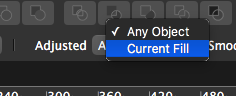
I wanted to see if we could add another setting to the 'Adjusted" option in the contextual toolbar when using the path brush.
Could there be an option setting that whatever the current fill color shape is, the brush will use it but not automatically become one with that existing color below if it is there and not change the underlying color shape to the color currently used by the path brush tool?
Call it "independent" or something like that - and option for independent autonomous path brush creation without affecting or being affected by the colors of shapes below it
-
@Boldline How about if the underlying object was painted with the path brush just before?
-
@vectoradmin Good question - To me, the "independent" setting would imply that each time you lift up and apply again creates a new independent shape regardless of what is below.
What if we added the shift modifier? So if the independent mode was on, it added to what was already there, so long as the shift remained actively pressed?Would you be willing to elaborate on what the two existing settings mean? (any object, current fill)
-
@vectoradmin on a separate by related note, would it make more sense to have the path brush tool located in the brush toolbar set? That's a more natural place for me to look for it. Right now it feels thrown in with the other tools at it's current location
-
@Boldline It is possible to have the tool in the brush tool set.
The main reason it ended up in the other group is that they are the same kind of tools in terms of implementation.But the path brush and the path eraser tool are strongly related (one expands, the other reduces using boolean operation).
Should the eraser tool stay with its current group?Also the suggested improvement will be in the next build, and it work as follows:
- the context panel drop down will contain a Selected Object mode, that activates this new mode
- if one or more objects are selected, the path brush tool can modify these, regardless of style.
- if none are selected, the path brush tool results in a new object, that remains selected for further painting.
- the Esc key can be used while in the path brush tool to deselect any selection and start with a new path.
-
@vectoradmin Thanks for explaining all of that. I look forward to trying out the new settings for the path brush tool in the next build and I'll give you my feedback.
On the topic of path brush location, it's interesting because you're thinking of it from a developer standpoint and I'm viewing it as a designer.
I certainly do not claim to know the best place for it. I think it would make sense in a literal way for the path brush and vector eraser to be in the brush section, but I'd love to hear other thoughts

