A Different Way to Control Path Width
-
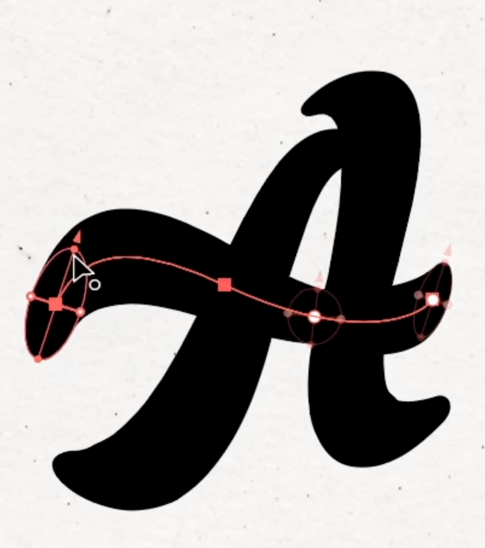
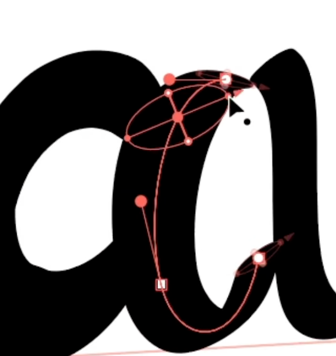
I recently found an Illustrator plugin called IllustKit. It has quite a few features, but the one that caught my attention uses an adjustable oval or circle to control a path’s width.
It immediately reminded me of VectorStyler’s Path Width tool. Both let you shape strokes visually instead of being limited to a uniform width, which makes it easier to create more natural or calligraphic lines.
VectorStyler gives you detailed control directly along the path. IllustKit takes a different approach, using an oval to control the stroke’s width and angle. Adjusting the oval lets you quickly change the weight, direction, and overall character of the stroke without rebuilding the path or fighting with anchor points.
This could be especially useful for lettering and illustration work. I could see a similar oval control becoming a useful feature option within VectorStyler’s Path Width tool in the future.
https://illustkit.totallypic.com/en#features
https://www.instagram.com/p/DX_j9jpEdhN/
🍎 macOS Tahoe 26.2, Mac mini (M1, 2020), Chip Apple M1, Memory 16 GB
Cintiq 27QHD Display and LG Ultra HD Display -
IllustKit offers an interesting feature Kit

-
@Boldline This is the calligraphic pen shape, VectorStyler can do this but cannot edit it on the canvas.
If you go to the Stroke panel menu Edit Stroke, you can edit the calligraphic ellipse in the right side of the view, this translates to a scale and angle values

