VectorStyler
    • Categories
    • Unread
    • Recent
    • Tags
    • Popular
    • Register
    • Login

    Distributing objects with a set distance doesn't work

    Scheduled Pinned Locked Moved Questions and Support
    4 Posts 3 Posters 25 Views 3 Watching
    Loading More Posts
    • Oldest to Newest
    • Newest to Oldest
    • Most Votes
    Reply
    • Reply as topic
    Log in to reply
    This topic has been deleted. Only users with topic management privileges can see it.
    • RaaskotR Offline
      Raaskot
      last edited by

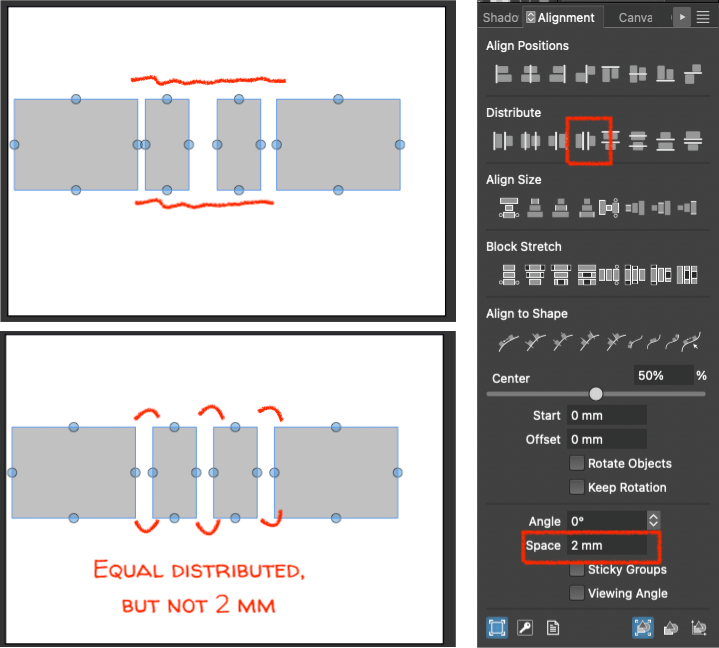
      I can't make VS distribute objects with a set distance (ie. 2 mm space). I can only make them distribute evenly. What am I doing wrong?
      fea3bcc0-e18c-48e3-99db-7959f090c25d-image.png

      H 1 Reply Last reply Reply Quote 1
      • H Offline
        Honor @Raaskot
        last edited by

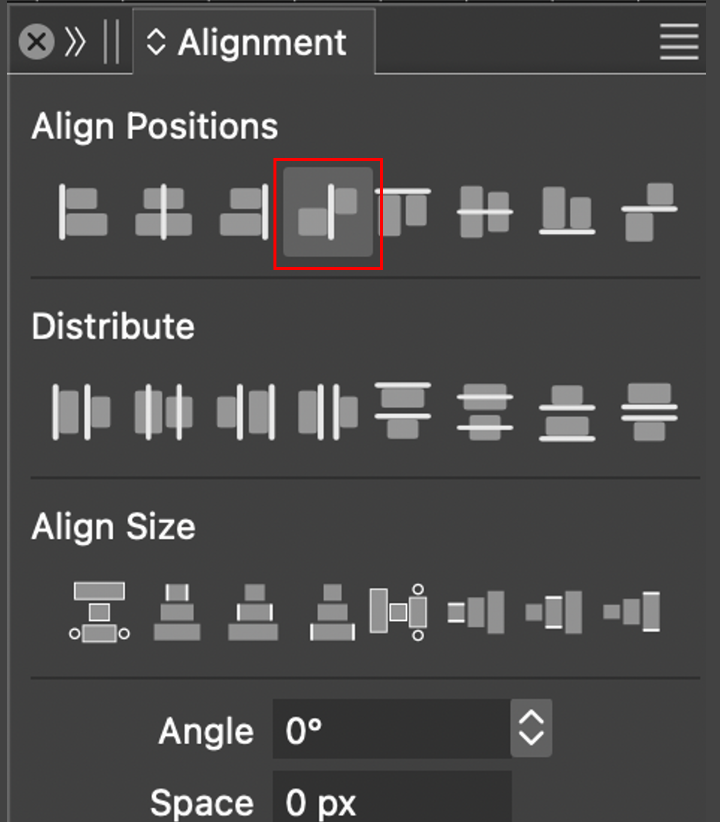
        @Raaskot Try this distribution button.
        Ekran Resmi 2026-06-22 02.13.07.png

        RaaskotR 1 Reply Last reply Reply Quote 2
        • RaaskotR Offline
          Raaskot @Honor
          last edited by

          @Honor
          Very good, exactly what I was looking for. Thanks.😊
          But it puzzles me what the Distribute section is for. It works quite erratic.

          12d5eee7-1aa2-4d92-b09c-9a925ebec3a9-image.png

          VectorStylerV 1 Reply Last reply Reply Quote 1
          • VectorStylerV Offline
            VectorStyler @Raaskot
            last edited by

            @Raaskot

            But it puzzles me what the Distribute section is for. It works quite erratic.

            Distribute should do an equal spacing between the selected margins (shown in the icon)

            1 Reply Last reply Reply Quote 0
            • First post
              Last post
