Import svg patterns
-
When importing files containing svg patterns, VectorStyler did not render the pattern as expected (nor did Affinity, but Inkscape did render correctly). Is there a setting I missed ?
By pattern, I'm referring to a pattern which can be defined in defs and applied to multiple shapes as a url fill. Like defined in : https://developer.mozilla.org/en-US/docs/Web/SVG/Reference/Element/pattern
Test file :

zipped : 0_1768562757314_test_svg.svg.zip
-
@EricP I opened a bug on this
-
@VectorStyler release 1.3.008 fixed the pattern import. Thanks for that.
I found an issue, working with imported patterns. They don't seem to behave like native VS patterns and make the imported document difficult to edit.
I think there are 2 main issues remaining :
1/ expanding pattern tiles makes VectorStyler very slow (up to freeze on large designs)
I'm attaching a VS document where a design has been imported from a svg file (with svg pattern).
VS document : 0_1768726791597_imported svg with pattern fill.vstylerHere is the original imported SVG document : 0_1768726876271_exported (42).svg.zip
After expansion of the pattern into a clipping mask, the object becomes slow to manipulate or recolor. On larger design files, the application simply removes the pattern upon expanding it, or freezes.
Here is an example of a design where VS doesn't expand the pattern at all (leaving it blank) : 0_1768727368297_exported (40).svg.zip
I noticed that imported svg patterns expand into a much more nested grouping structure than native VS patterns, which could explain the slowness
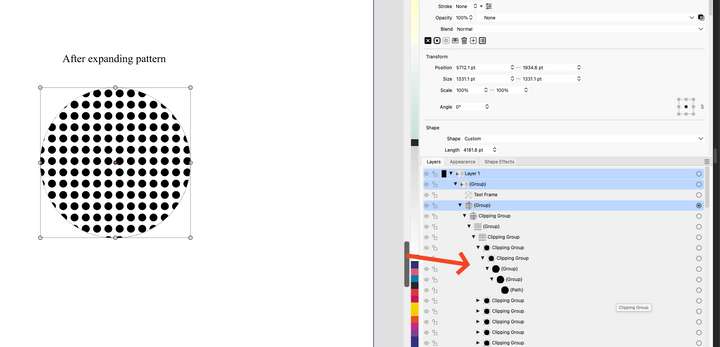
Native VS dot pattern after expansion

2/ render (minor) : imported patterns don't render well, until the canvas is zoomed. Rendering comes and goes as we work on the document and zoom in and out. Not a major issue but would be nice if it could be improved

after zoom

-
@EricP I opened a bug on this
-
@EricP I can replicate this last error with the slowdown. The object that was filled with the pattern is large and when expanding creates a lot of small clipping groups.
This is slow to render for now.
I will try to improve this later, but for now I have no solution for this.The grey fill at zoom out is just for display, the level at which this happens can be set in display options.
-
@VectorStyler said in Import svg patterns:
The object that was filled with the pattern is large and when expanding creates a lot of small clipping groups.
This is slow to render for now.Thanks for checking on this.
Yes, the pattern has a lot of objects but it looks like imported patterns are expanded using more nested clipping group layers than patterns created within VS.
If the pattern expansion could be improved to remove un-necessary grouping, it could improve performance



