VectorStyler
    • Categories
    • Unread
    • Recent
    • Tags
    • Popular
    • Register
    • Login

    Adding modifiers in attached file have no effect

    Scheduled Pinned Locked Moved Questions and Support
    9 Posts 2 Posters 866 Views 2 Watching
    Loading More Posts
    • Oldest to Newest
    • Newest to Oldest
    • Most Votes
    Reply
    • Reply as topic
    Log in to reply
    This topic has been deleted. Only users with topic management privileges can see it.
    • RaaskotR Offline
      Raaskot
      last edited by Raaskot

      Two questions;

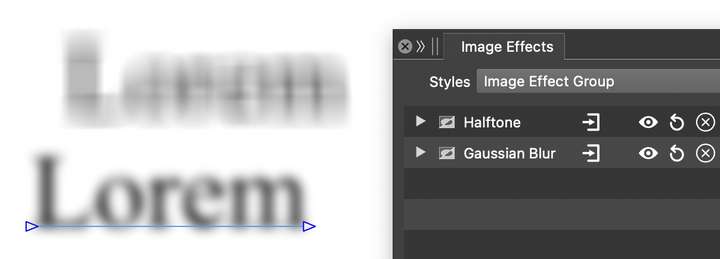
      I want halftone screen effect text in VS, but adding modifiers in attached file have no effect whatsoever. Tried to swap their modifier position in the effect-layer panel.

      1, What is the best approach?

      1. In Inkscape you can blur vektorobjects (and live text) non-destructively without rasterisation. How is this possible in VS?

      0_1767625595425_dictum.vstyler

      VectorStylerV 1 Reply Last reply Reply Quote 0
      • VectorStylerV Offline
        VectorStyler @Raaskot
        last edited by

        @Raaskot The Image Effects panel can be used to blur to any vector object.

        RaaskotR 1 Reply Last reply Reply Quote 1
        • RaaskotR Offline
          Raaskot @VectorStyler
          last edited by

          @VectorStyler
          You're right, thanks.

          I want to add halftone effect in the panel but I can't make it work with type – neither live nor vectorised. Do I miss something out?
          0_1767727717011_fa40bf37-7e91-4998-89fe-253303ed5427-image.png

          VectorStylerV 1 Reply Last reply Reply Quote 1
          • VectorStylerV Offline
            VectorStyler @Raaskot
            last edited by

            @Raaskot The Halftone as an image effect will not do anything with a full black text, for these you need some gray level or color.

            But another way to get this is to first create a vector halftone effect (Panels -> Effects -> Halftone), and then add a blur on the resulting object, as in this example:

            0_1767730701638_halftoneblur.vstyler

            you need to adjust the blur strength, and the halftone options

            RaaskotR 2 Replies Last reply Reply Quote 2
            • RaaskotR Offline
              Raaskot @VectorStyler
              last edited by

              @VectorStyler
              Fine, thanks. Using repeater is an option off course ...

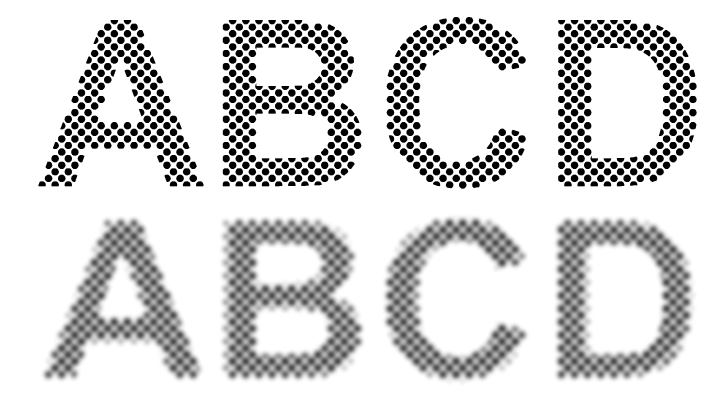
              Yet I want the dots appear sharp, not blurred. The vector image ought to be blurred before halftone. I understand, that this is not available?
              0_1767757608986_fd4e4ec4-cbfa-4f46-b2af-20577ac183f5-image.png

              VectorStylerV 1 Reply Last reply Reply Quote 1
              • RaaskotR Offline
                Raaskot @VectorStyler
                last edited by

                @VectorStyler
                And other thing I've noticed ...

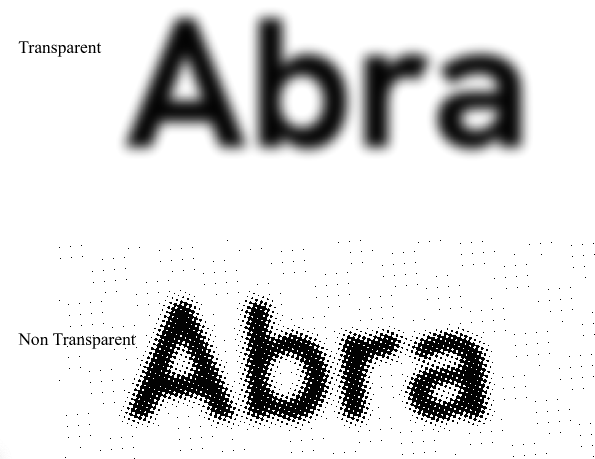
                When importing a transparent png and applying Halftone no results appear.

                Masks are not affected. Bug or by design?
                0_1767758788982_Archive.zip

                0_1767758759858_ee17a92b-0ffc-4607-aae0-33cf2f558297-image.png

                VectorStylerV 2 Replies Last reply Reply Quote 1
                • VectorStylerV Offline
                  VectorStyler @Raaskot
                  last edited by

                  @Raaskot said in Adding modifiers in attached file have no effect:

                  The vector image ought to be blurred before halftone

                  Then you have to create a single object group with the blurred text and apply the halftone on that group.
                  I will add single object group creation to the next build

                  1 Reply Last reply Reply Quote 2
                  • VectorStylerV Offline
                    VectorStyler @Raaskot
                    last edited by

                    @Raaskot said in Adding modifiers in attached file have no effect:

                    When importing a transparent png and applying Halftone no results appear.

                    I will test this.

                    1 Reply Last reply Reply Quote 1
                    • VectorStylerV Offline
                      VectorStyler @Raaskot
                      last edited by

                      @Raaskot said in Adding modifiers in attached file have no effect:

                      Masks are not affected. Bug or by design?

                      I tested this, and unfortunately this is by design. The Halftone effect will work on the image part only, not the mask.

                      This case can only be handled with vector halftones

                      1 Reply Last reply Reply Quote 1
                      • First post
                        Last post
