VectorStyler
    • Categories
    • Unread
    • Recent
    • Tags
    • Popular
    • Register
    • Login

    Which specific VS setting for printing horisontal pages?

    Scheduled Pinned Locked Moved Questions and Support
    9 Posts 2 Posters 954 Views 2 Watching
    Loading More Posts
    • Oldest to Newest
    • Newest to Oldest
    • Most Votes
    Reply
    • Reply as topic
    Log in to reply
    This topic has been deleted. Only users with topic management privileges can see it.
    • RaaskotR Offline
      Raaskot
      last edited by Raaskot

      I can’t make VS print a horisontal page: it is placed on a vertical page and thus trucated. If I save the page as pdf from the print modal it comes out correctly when printed from other app..

      I think I have been through every VS parameter. Do any have a hint to solve the issue? Which specific setting do you use in VS to print horisontal?

      0_1767611471292_agge-sko.vstyler

      0_1767609614204_b492a32f-e69b-402a-8f2c-eced06966398-image.png

      VectorStylerV 2 Replies Last reply Reply Quote 1
      • VectorStylerV Offline
        VectorStyler @Raaskot
        last edited by

        @Raaskot I opened a bug on this. The Landscape checkbox should do this.

        1 Reply Last reply Reply Quote 1
        • VectorStylerV Offline
          VectorStyler @Raaskot
          last edited by

          @Raaskot I tested this and Landscape printing works here. Of course I can only test with a small number of printers.

          What I did: opened the file (already landscape), and selected Landscape in the Output section of the Printing view.

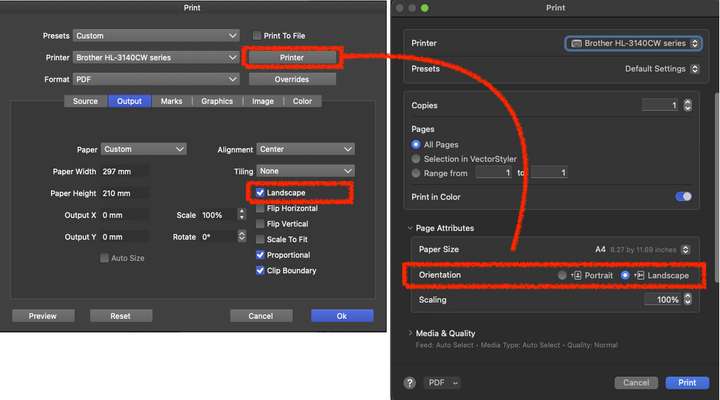
          One thing to try: the printer specific settings can be accessed with the "Printer" button next to the printer list.
          Try selecting the Landscape mode also there (but also enable it in the Output section)

          RaaskotR 2 Replies Last reply Reply Quote 1
          • RaaskotR Offline
            Raaskot @VectorStyler
            last edited by Raaskot

            @VectorStyler
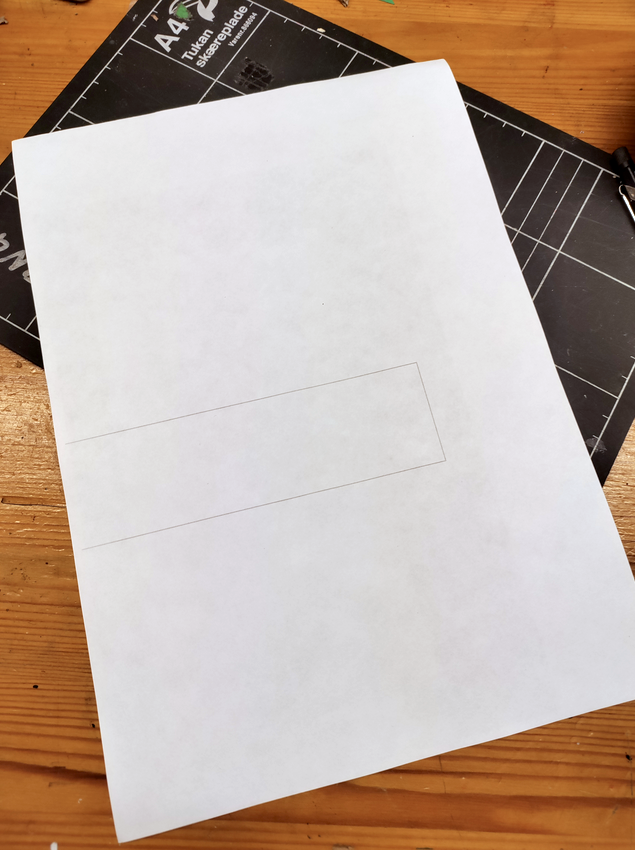
            Thanks, tried your suggestion, but it didn't apply. Output still odd
            0_1768156485544_4018f35a-3134-48ba-bc3d-62b4ff18c72a-image.png
            0_1768156828519_32ade3e7-d75f-493f-bc6a-95a8413d6855-image.png

            1 Reply Last reply Reply Quote 0
            • RaaskotR Offline
              Raaskot @VectorStyler
              last edited by Raaskot

              @VectorStyler

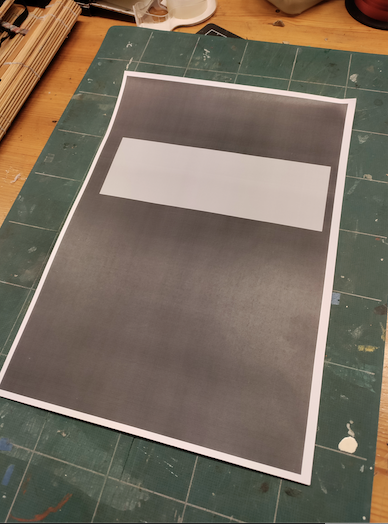
              After experimenting with the printer driver, all of a sudden I experience another really strange issue. It appeared after I chose Print Grid and turned it off again:

              I cannot get rid of a massive, black artboard background. Please help. Can you see why this happens in the VS-file? 1_1768159794746_black-boks.vstyler
              0_1768159794746_black-boks.pdf
              0_1768159748977_63d30645-90b9-4cd0-ba68-1d87292273d6-image.png

              VectorStylerV 2 Replies Last reply Reply Quote 1
              • VectorStylerV Offline
                VectorStyler @Raaskot
                last edited by VectorStyler

                @Raaskot Try reseting all VectorStyler settings. I will try to find out what can cause this

                Remove files from the c:\Users<user-name>\AppData\Local\NumericPath\VectorStyler1.3\vector\data\resources\ folder

                1 Reply Last reply Reply Quote 1
                • VectorStylerV Offline
                  VectorStyler @Raaskot
                  last edited by

                  @Raaskot Can be replicated, the fix will be in the next build.

                  As a workaround: reseting settings, and starting a new document should fix the issue.

                  RaaskotR 1 Reply Last reply Reply Quote 1
                  • RaaskotR Offline
                    Raaskot @VectorStyler
                    last edited by Raaskot

                    @VectorStyler

                    Thanks, very good😊

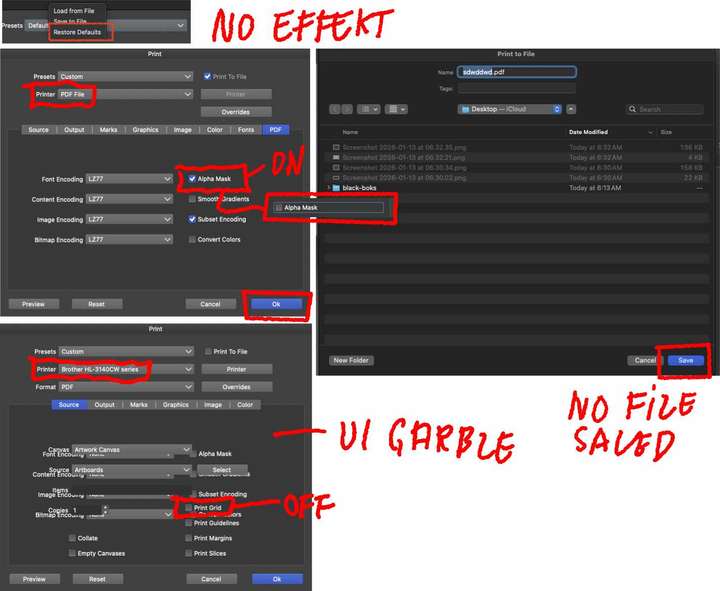
                    Glad you could replicate it. Yet, before I read your last notices I tested the printer dialog again observing several bugs:

                    1. VS' paper orientation problem (vertical vs. horisontal) on print remains.
                    2. Occationally garbled UI (see dumps)
                    3. File not saved from printer dialog
                    4. Persistent black background output

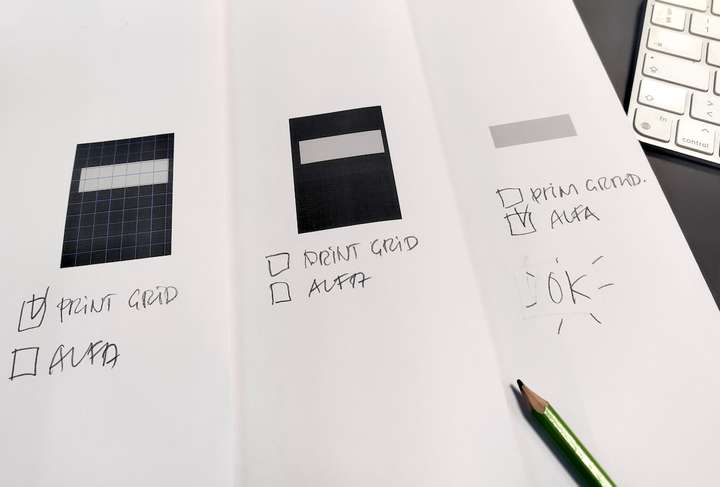
                    Concerning the latter I made the background work again by chosing:

                    – change to pdf-driver instead of brother-driver.
                    – check Alpha Mask under tab PDF
                    – “Save” (yet resulting no file saved)
                    – change back to brother-driver (garbled UI)

                    The Print Grid option was thus switched off and the page printed correctly again. Choosing “Print Grid” recycled the bug.
                    0_1768294146251_2ef78faa-fc61-454d-9a31-a473dd7f206b-IMG_20260113_094648.jpg

                    0_1768293789144_forum-info.jpg

                    VectorStylerV 1 Reply Last reply Reply Quote 1
                    • VectorStylerV Offline
                      VectorStyler @Raaskot
                      last edited by

                      @Raaskot I will try to replicate these

                      1 Reply Last reply Reply Quote 1
                      • First post
                        Last post
