VectorStyler
    • Categories
    • Unread
    • Recent
    • Tags
    • Popular
    • Register
    • Login

    How to simplify a path?

    Scheduled Pinned Locked Moved Questions and Support
    10 Posts 4 Posters 1.0k Views 4 Watching
    Loading More Posts
    • Oldest to Newest
    • Newest to Oldest
    • Most Votes
    Reply
    • Reply as topic
    Log in to reply
    This topic has been deleted. Only users with topic management privileges can see it.
    • M Offline
      marce
      last edited by

      Im customed to simplify path in inkscape reducing the amount of nodes, while mantaining the original shape as much is possible. Im not sure how something similar can be done in VS. I make a comparison here
      https://icedrive.net/s/WhgXY1yzgigFRgVRZ4BTXQFh3N38

      Ryzen 9 3900X on Asus prime x570-p
      Memory 48gb ddr4
      Nvidia gtx 970 on an Asus strix, 4gb gddr5
      NVMe CT100p 1TB

      S VectorStylerV 2 Replies Last reply Reply Quote 0
      • S Offline
        Subpath @marce
        last edited by Subpath

        @marce

        I know two ways in VS to do something like that

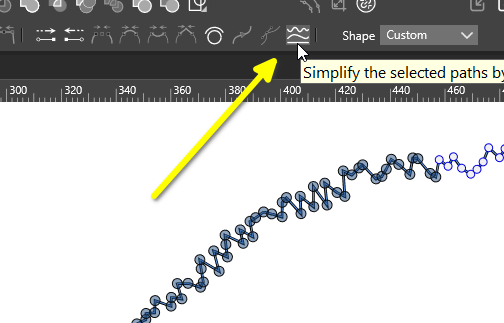
        Select the Node Tool and select some Nodes
        and above you see this Icon. Double click on it
        to get the Settings Panel.
        0_1766716561976_simplify path.png
        .
        .
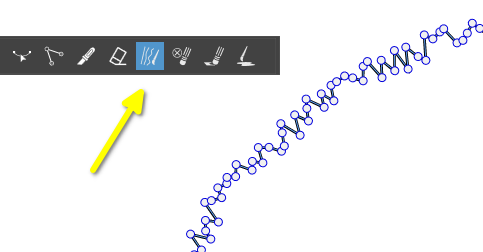
        Another way is using the Path Simplifier Tool
        again double click on the Tool brings a settings panel up
        0_1766716699061_smooth path.png

        Win 11
        CPU: AMD Ryzen 5 9600X, 6-core.
        GPU: Nvidia Geforce RTX 5070.

        M 1 Reply Last reply Reply Quote 0
        • M Offline
          marce @Subpath
          last edited by

          @Subpath Hi friend. In the first case, even if i select some nodes, the simplify apply to all the drawing. In the second case, where you paint over the desired section, is very cool. Thanks very much

          Ryzen 9 3900X on Asus prime x570-p
          Memory 48gb ddr4
          Nvidia gtx 970 on an Asus strix, 4gb gddr5
          NVMe CT100p 1TB

          S C 2 Replies Last reply Reply Quote 2
          • S Offline
            Subpath @marce
            last edited by

            @marce

            of course, your welcome
            Indeed they are both helpful, but to be able to smooth out
            a desired section of a path is cool.

            Win 11
            CPU: AMD Ryzen 5 9600X, 6-core.
            GPU: Nvidia Geforce RTX 5070.

            1 Reply Last reply Reply Quote 0
            • C Offline
              Comet @marce
              last edited by

              @marce said in How to simplify a path?:

              @Subpath Hi friend. In the first case, even if i select some nodes, the simplify apply to all the drawing. In the second case, where you paint over the desired section, is very cool. Thanks very much

              I find the first method simplifies only the selected nodes on the first click, but if you change any of the settings in the options it simplifies the whole path (unselected nodes too).

              M 1 Reply Last reply Reply Quote 2
              • M Offline
                marce @Comet
                last edited by

                @Comet oh, you nailed it. I don't know if it is supposed to be that way

                Ryzen 9 3900X on Asus prime x570-p
                Memory 48gb ddr4
                Nvidia gtx 970 on an Asus strix, 4gb gddr5
                NVMe CT100p 1TB

                C 1 Reply Last reply Reply Quote 0
                • C Offline
                  Comet @marce
                  last edited by

                  @marce said in How to simplify a path?:

                  @Comet oh, you nailed it. I don't know if it is supposed to be that way

                  I don't think it is supposed to be that way, seems strange.

                  1 Reply Last reply Reply Quote 1
                  • VectorStylerV Offline
                    VectorStyler @marce
                    last edited by

                    @marce Can you send me that shape?

                    M 1 Reply Last reply Reply Quote 0
                    • M Offline
                      marce @VectorStyler
                      last edited by

                      @VectorStyler I dont save it! I will draw it again.

                      Ryzen 9 3900X on Asus prime x570-p
                      Memory 48gb ddr4
                      Nvidia gtx 970 on an Asus strix, 4gb gddr5
                      NVMe CT100p 1TB

                      M 1 Reply Last reply Reply Quote 0
                      • M Offline
                        marce @marce
                        last edited by

                        @marce Here goes the shape, the video shows how is different the simplify between inkscape and VS. Inkscape start to delete nodes, making smooth the shape until it become totally lost. VS reduce some nodes, but shape become more kind of square.
                        https://icedrive.net/s/Gv6S2gw45ygCi6Wv6CXvBFShhuVP
                        0_1766886331745_Test Simplify.svg 0_1766886340876_Test Simplify.vstyler

                        Ryzen 9 3900X on Asus prime x570-p
                        Memory 48gb ddr4
                        Nvidia gtx 970 on an Asus strix, 4gb gddr5
                        NVMe CT100p 1TB

                        1 Reply Last reply Reply Quote 1
                        • First post
                          Last post
