VectorStyler
    • Categories
    • Unread
    • Recent
    • Tags
    • Popular
    • Register
    • Login

    Not sure how to create a line tapering repeater

    Scheduled Pinned Locked Moved Questions and Support
    2 Posts 2 Posters 1.0k Views 1 Watching
    Loading More Posts
    • Oldest to Newest
    • Newest to Oldest
    • Most Votes
    Reply
    • Reply as topic
    Log in to reply
    This topic has been deleted. Only users with topic management privileges can see it.
    • BoldlineB Offline
      Boldline
      last edited by

      I want to create a repeater using a thin line fill rectangle to look like this when applied to a gradient: 0_1764956063659_a8b2b05e-5e6f-4a53-907f-de75748a8223-CleanShot 2025-12-05 at 12.32.46.png

      What is the best way to create this because when I do it the usual way, nothing happens.
      I am guessing it has to do with the length of the symbol not being the same or smaller than the gradient box. I tried again with a smaller thing rectangle "line" and it "worked" as in, it showed a diverging path of two shrinking rectangles... I am sure I'm thinking of this in the wrong way - it's also in grid mode but I don't know what else I would use...
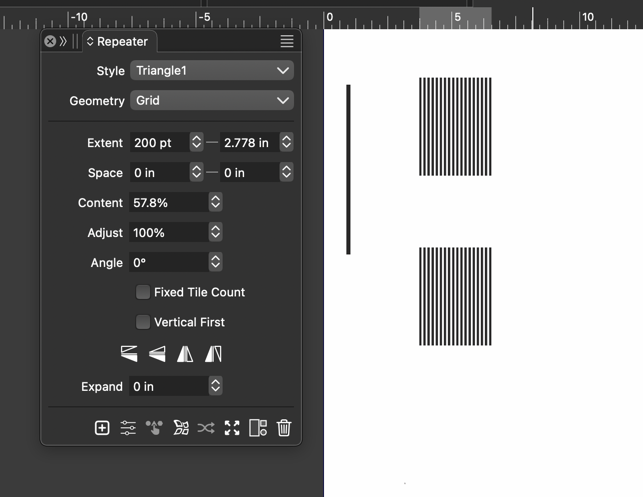
      0_1764983960846_2e49b36f-9d7b-411f-9256-8791f01c617e-CleanShot 2025-12-05 at 20.18.14.png

      🍎 macOS Tahoe 26.2, Mac mini (M1, 2020), Chip Apple M1, Memory 16 GB
      Cintiq 27QHD Display and LG Ultra HD Display

      L 1 Reply Last reply Reply Quote 0
      • L Offline
        Li Xiao @Boldline
        last edited by

        @Boldline said in Not sure how to create a line tapering repeater:

        What is the best way to create this because [when I do it the usual way, nothing happens.]

        There are at least more than five ways in Repeater to achieve the result you want. If it must be done using only a single line, with the gradient controlling the line’s thickness, the best way is to use variables. Please see the video.

        https://youtu.be/Hyg6LJTxftQ

        1 Reply Last reply Reply Quote 3
        • First post
          Last post