VectorStyler
    • Categories
    • Unread
    • Recent
    • Tags
    • Popular
    • Register
    • Login

    How do I swap an existing symbol on the artboard with another from list in panel?

    Scheduled Pinned Locked Moved Questions and Support
    3 Posts 2 Posters 1.1k Views 2 Watching
    Loading More Posts
    • Oldest to Newest
    • Newest to Oldest
    • Most Votes
    Reply
    • Reply as topic
    Log in to reply
    This topic has been deleted. Only users with topic management privileges can see it.
    • RaaskotR Offline
      Raaskot
      last edited by Raaskot

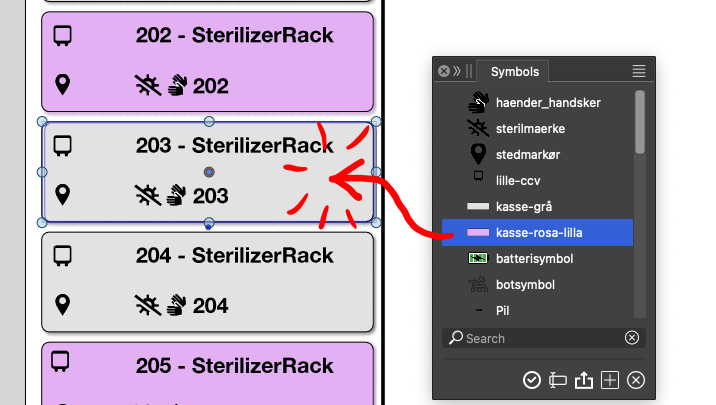
      I want to swap the existing symbol on the artboard with the item in symbol list instead. Is that possible in VS?

      Note: I dont want to alter the symbol in the list just update the gray one with the pink on the same position ...
      0_1761309875587_ddff9f3a-2c2c-4273-b06c-634aa631edfb-image.png

      VectorStylerV 1 Reply Last reply Reply Quote 0
      • VectorStylerV Offline
        VectorStyler @Raaskot
        last edited by

        @Raaskot Select the symbol on the canvas, and double click the other symbol in the panel.

        RaaskotR 1 Reply Last reply Reply Quote 0
        • RaaskotR Offline
          Raaskot @VectorStyler
          last edited by Raaskot

          @VectorStyler
          Sorry, it works somehow but offsets very odd.

          https://go.screenpal.com/watch/cT6ZIFnbMTr

          Please, try out the file ..
          0_1761311781240_1080x1750-UI-01.vstyler

          1 Reply Last reply Reply Quote 1
          • First post
            Last post
