VectorStyler
    • Categories
    • Unread
    • Recent
    • Tags
    • Popular
    • Register
    • Login

    New shortcut don’t apply problem ...

    Scheduled Pinned Locked Moved Questions and Support
    6 Posts 2 Posters 3.3k Views 2 Watching
    Loading More Posts
    • Oldest to Newest
    • Newest to Oldest
    • Most Votes
    Reply
    • Reply as topic
    Log in to reply
    This topic has been deleted. Only users with topic management privileges can see it.
    • RaaskotR Offline
      Raaskot
      last edited by Raaskot

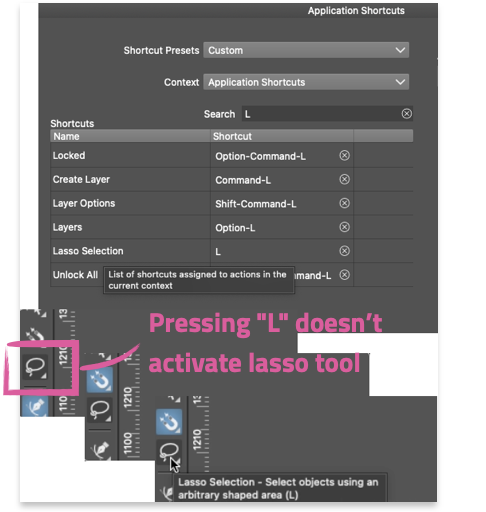
      1. I have changed the shortcut for Lasso Tool from Y to L
      2. Problem: The icon change to Lasso Tool allright but is not active.
      3. Yet when I’m switching between shortcut P and L the Pen Tool and Collider Tool get active only.

      Have I missed something?
      0_1747901866262_5139a3e5-6ed6-4786-9108-403f38fe4ad1-image.png

      VectorStylerV 1 Reply Last reply Reply Quote 1
      • VectorStylerV Offline
        VectorStyler @Raaskot
        last edited by

        @Raaskot said in New shortcut don’t apply problem ...:

        Problem: The icon change to Lasso Tool allright but is not active.

        But is the lasso selection mode working on the canvas?

        The active selection mode icons are not highlighted with blue, because they are "active" in parallel to an actual active tool.

        RaaskotR 2 Replies Last reply Reply Quote 0
        • RaaskotR Offline
          Raaskot @VectorStyler
          last edited by Raaskot

          @VectorStyler
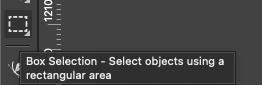
          No, when in Box Selecting mode it won't change to Lasso Selection.
          0_1747902091684_cad3aece-ef50-43c9-ac35-ca85e01df803-image.png

          1 Reply Last reply Reply Quote 0
          • RaaskotR Offline
            Raaskot @VectorStyler
            last edited by Raaskot

            @VectorStyler
            Wait ... if I press Option it does work lasso-ish, but I had no clue.

            Is it intended so? It's a bit confusing.

            VectorStylerV 1 Reply Last reply Reply Quote 1
            • VectorStylerV Offline
              VectorStyler @Raaskot
              last edited by

              @Raaskot The Option key temporarily swaps the Box / Lasso modes.

              RaaskotR 1 Reply Last reply Reply Quote 1
              • RaaskotR Offline
                Raaskot @VectorStyler
                last edited by Raaskot

                @VectorStyler
                I know, but it would be helpful for new and occasional users, that the icon changed accordingly, temporarily, whilst pressing "Option".


                1 Reply Last reply Reply Quote 1
                • First post
                  Last post