VectorStyler
    • Categories
    • Unread
    • Recent
    • Tags
    • Popular
    • Register
    • Login

    Controlling stroke/brush endings?

    Scheduled Pinned Locked Moved Questions and Support
    3 Posts 3 Posters 2.7k Views 3 Watching
    Loading More Posts
    • Oldest to Newest
    • Newest to Oldest
    • Most Votes
    Reply
    • Reply as topic
    Log in to reply
    This topic has been deleted. Only users with topic management privileges can see it.
    • RaaskotR Offline
      Raaskot
      last edited by

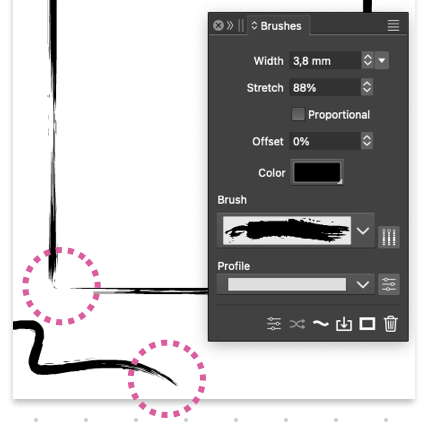
      Where do I control the stroke/brush endings? I need a brushed stroke with full - not zero - width at the start and in the end.
      0_1745832883800_e915a6b1-f3b1-439f-a4bc-88546148b9d7-image.png

      S VectorStylerV 2 Replies Last reply Reply Quote 1
      • S Offline
        Subpath @Raaskot
        last edited by Subpath

        @Raaskot

        I'd say there's no brush end control involved, because the brush
        simply reproduces the shape it has.

        The only option I can see is to create your own brush. You could
        expand a brush and change the shape to your liking, and create a
        new brush from it.

        Win 11
        CPU: AMD Ryzen 5 9600X, 6-core.
        GPU: Nvidia Geforce RTX 5070.

        1 Reply Last reply Reply Quote 2
        • VectorStylerV Offline
          VectorStyler @Raaskot
          last edited by

          @Raaskot said in Controlling stroke/brush endings?:

          I need a brushed stroke with full - not zero - width at the start and in the end

          As mentioned by @Subpath the brush just stretches a vector content.

          The only way to have what you need is to create a new custom brush where the endings contain a straight line that is the height of the brush content.
          Or use a solid stroke instead.

          1 Reply Last reply Reply Quote 0
          • First post
            Last post
