VectorStyler
    • Categories
    • Unread
    • Recent
    • Tags
    • Popular
    • Register
    • Login

    WIP - Testing Blending: not yet a tutorial but soon for beginners


    Scheduled Pinned Locked Moved Tutorials
    123 Posts 7 Posters 474.5k Views 7 Watching
    Loading More Posts
    • Oldest to Newest
    • Newest to Oldest
    • Most Votes
    Reply
    • Reply as topic
    Log in to reply
    This topic has been deleted. Only users with topic management privileges can see it.
    • B Offline
      B-Vs-V @Subpath
      last edited by

      @Subpath Thanks. I'll come back on this one later.

      W11 Pro 25H2 - 12th Gen Intel(R) i7-12700K 3.61 GHz - RAM 64 Go - NVIDIA GF GTX 4070 Ti - Intuos - Dell UP3216Q / Eizo ColorEdge
      W11 Pro 25H2 - 12th Gen Intel(R) i7-12700KF 3.60 GHz -RAM 64 Go - NVIDIA GF GTX 3080 - IntuosPro- ProArt PA329C

      1 Reply Last reply Reply Quote 0
      • B Offline
        B-Vs-V
        last edited by

        I wanted to achieve a realistic neon effect (not just a blur effect applied to a coloured line), for editable text. I achieved this effect by copy-pasting the text outlines (no fill), applying brushes and transparency to the shapes on a dark background (gradient). It's not too successful but I like the overall effect with the Repeater function on each of the shapes (of course, the text in this case is not editable):

        0_1726420805738_neon2.jpg

        W11 Pro 25H2 - 12th Gen Intel(R) i7-12700K 3.61 GHz - RAM 64 Go - NVIDIA GF GTX 4070 Ti - Intuos - Dell UP3216Q / Eizo ColorEdge
        W11 Pro 25H2 - 12th Gen Intel(R) i7-12700KF 3.60 GHz -RAM 64 Go - NVIDIA GF GTX 3080 - IntuosPro- ProArt PA329C

        S 1 Reply Last reply Reply Quote 3
        • S Offline
          Subpath @B-Vs-V
          last edited by Subpath

          @Pat

          looks not that bad too me
          how about a make the reflection Light
          on the wall more soft/blurry
          (only the letter contour)

          Win 11
          CPU: AMD Ryzen 5 9600X, 6-core.
          GPU: Nvidia Geforce RTX 5070.

          B 1 Reply Last reply Reply Quote 1
          • B Offline
            B-Vs-V @Subpath
            last edited by

            @Subpath Thanks ☺ but there is still room for improvement. I did apply blur shape effect on two outilles. I need to start differently for this neon effect.

            W11 Pro 25H2 - 12th Gen Intel(R) i7-12700K 3.61 GHz - RAM 64 Go - NVIDIA GF GTX 4070 Ti - Intuos - Dell UP3216Q / Eizo ColorEdge
            W11 Pro 25H2 - 12th Gen Intel(R) i7-12700KF 3.60 GHz -RAM 64 Go - NVIDIA GF GTX 3080 - IntuosPro- ProArt PA329C

            1 Reply Last reply Reply Quote 0
            • B Offline
              B-Vs-V
              last edited by

              I wanted to create a complex design with multiple shapes and objects, but I've reached the limit of VS usability in terms of fluidity.

              I could have obtained this with the Blend feature but I tested the Envelope option to obtain the first shape and then a transformation with clones for the general organisation.There are a lot of curves and therefore (just guessing) a lot of calculations and unfortunately VS lags too much to continue with this type of graphic.
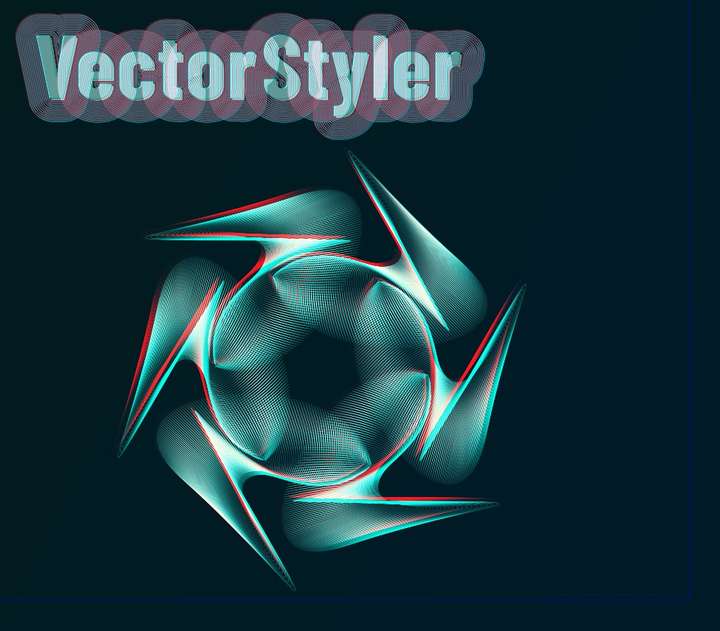
              0_1731659212963_f1.jpg

              W11 Pro 25H2 - 12th Gen Intel(R) i7-12700K 3.61 GHz - RAM 64 Go - NVIDIA GF GTX 4070 Ti - Intuos - Dell UP3216Q / Eizo ColorEdge
              W11 Pro 25H2 - 12th Gen Intel(R) i7-12700KF 3.60 GHz -RAM 64 Go - NVIDIA GF GTX 3080 - IntuosPro- ProArt PA329C

              1 Reply Last reply Reply Quote 3
              • B Offline
                B-Vs-V
                last edited by

                Tested the Envelope feature, transforming objects into clones, by varying the shapes and colours. The possibilities are endless; in just a few seconds, various designs can be produced... An alternative to other approaches (e.g. blending)...
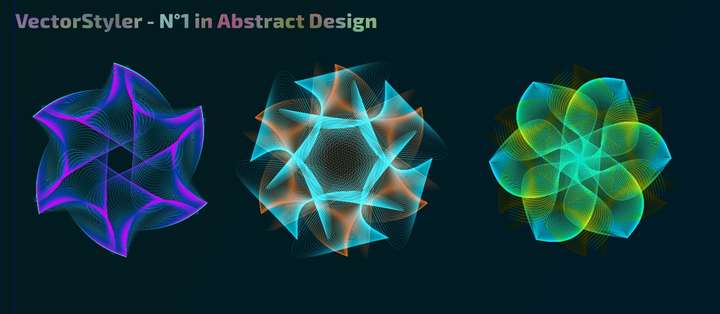
                0_1732216030401_vs1.jpg

                W11 Pro 25H2 - 12th Gen Intel(R) i7-12700K 3.61 GHz - RAM 64 Go - NVIDIA GF GTX 4070 Ti - Intuos - Dell UP3216Q / Eizo ColorEdge
                W11 Pro 25H2 - 12th Gen Intel(R) i7-12700KF 3.60 GHz -RAM 64 Go - NVIDIA GF GTX 3080 - IntuosPro- ProArt PA329C

                B 1 Reply Last reply Reply Quote 2
                • B Offline
                  B-Vs-V @B-Vs-V
                  last edited by

                  Just one last screenshot ☺ once the reference object is created, the rest only takes a few minutes, by varying the positions of the nodes(/handles)... this could be the starting point for various designs... have fun testing all this ☺

                  0_1732290109484_f1.jpg

                  W11 Pro 25H2 - 12th Gen Intel(R) i7-12700K 3.61 GHz - RAM 64 Go - NVIDIA GF GTX 4070 Ti - Intuos - Dell UP3216Q / Eizo ColorEdge
                  W11 Pro 25H2 - 12th Gen Intel(R) i7-12700KF 3.60 GHz -RAM 64 Go - NVIDIA GF GTX 3080 - IntuosPro- ProArt PA329C

                  1 Reply Last reply Reply Quote 3
                  • B Offline
                    B-Vs-V
                    last edited by

                    It's just experimenting with certain features and combining them & it's not what I had in mind but I think it's interesting.

                    Everything is editable and easy to get although VS gets slow probably due to the high number of objects. I started using different strokes with dashes (repeated 3x here with different dashes) and then used the “Repeater” feature to multiply an object/symbol.
                    Note: I didn't try changing the symbol.

                    0_1745594396819_f1.jpg

                    W11 Pro 25H2 - 12th Gen Intel(R) i7-12700K 3.61 GHz - RAM 64 Go - NVIDIA GF GTX 4070 Ti - Intuos - Dell UP3216Q / Eizo ColorEdge
                    W11 Pro 25H2 - 12th Gen Intel(R) i7-12700KF 3.60 GHz -RAM 64 Go - NVIDIA GF GTX 3080 - IntuosPro- ProArt PA329C

                    S 1 Reply Last reply Reply Quote 3
                    • S Offline
                      Subpath @B-Vs-V
                      last edited by Subpath

                      @B-Vs-V ,

                      great combination.
                      Would recommend posting a larger image with only two or three letters.
                      Because one could admire the pattern a little bit more.

                      Win 11
                      CPU: AMD Ryzen 5 9600X, 6-core.
                      GPU: Nvidia Geforce RTX 5070.

                      B 1 Reply Last reply Reply Quote 1
                      • B Offline
                        B-Vs-V @Subpath
                        last edited by

                        @Subpath Thank you ☺ clicking on the image enlarges it.

                        Here some close up with different settings, very easy to change the overall appearance:

                        0_1745604731980_f1.jpg

                        0_1745604738559_f2.jpg

                        W11 Pro 25H2 - 12th Gen Intel(R) i7-12700K 3.61 GHz - RAM 64 Go - NVIDIA GF GTX 4070 Ti - Intuos - Dell UP3216Q / Eizo ColorEdge
                        W11 Pro 25H2 - 12th Gen Intel(R) i7-12700KF 3.60 GHz -RAM 64 Go - NVIDIA GF GTX 3080 - IntuosPro- ProArt PA329C

                        1 Reply Last reply Reply Quote 3
                        • First post
                          Last post