VectorStyler
    • Categories
    • Unread
    • Recent
    • Tags
    • Popular
    • Register
    • Login

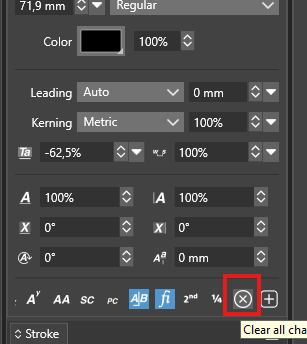
    'Clear all character overrides' - what does it do ?

    Scheduled Pinned Locked Moved Questions and Support
    4 Posts 2 Posters 3.1k Views 2 Watching
    Loading More Posts
    • Oldest to Newest
    • Newest to Oldest
    • Most Votes
    Reply
    • Reply as topic
    Log in to reply
    This topic has been deleted. Only users with topic management privileges can see it.
    • encartE Offline
      encart
      last edited by

      What is this button responsible for?
      I don't know if it's a bug, but in my case it doesn't reset any parameter from the Character panel. As the same as 'Clear character transform' available from panel's menu.
      0_1745507448911_Screenshot 2025-04-24 170807.png

      Windows 11 Home 10.0.22621

      VectorStylerV 1 Reply Last reply Reply Quote 0
      • VectorStylerV Offline
        VectorStyler @encart
        last edited by

        @encart It should clear all local character formatting options: for example a word in a text has a different font, it removes that difference.

        encartE 1 Reply Last reply Reply Quote 1
        • encartE Offline
          encart @VectorStyler
          last edited by encart

          @VectorStyler What about tracking, scaling, etc? Am I able to reset all of the parameters?

          Windows 11 Home 10.0.22621

          VectorStylerV 1 Reply Last reply Reply Quote 1
          • VectorStylerV Offline
            VectorStyler @encart
            last edited by

            @encart said in 'Clear all character overrides' - what does it do ?:

            What about tracking, scaling, etc? Am I able to reset all of the parameters?

            Everything that was applied locally (not the whole text)

            1 Reply Last reply Reply Quote 1
            • First post
              Last post
