VectorStyler
    • Categories
    • Unread
    • Recent
    • Tags
    • Popular
    • Register
    • Login

    Smart Transform

    Scheduled Pinned Locked Moved Features and Ideas
    5 Posts 3 Posters 4.5k Views 3 Watching
    Loading More Posts
    • Oldest to Newest
    • Newest to Oldest
    • Most Votes
    Reply
    • Reply as topic
    Log in to reply
    This topic has been deleted. Only users with topic management privileges can see it.
    • DanielD Offline
      Daniel
      last edited by Daniel

      This is an idea that is extremely useful during layout as well as UI design work. Because it means you can copy and paste a group of objects into a new layout, and retain their relative position when resizing. It's a very simple idea.

      Select and transform a group of objects without losing their coordinate position. This includes resizing, skewing, rotating, mirroring, and so on. https://www.youtube.com/watch?v=bmboKITG4a0 - Video here. It used to exist in Serif DrawPlus. Now sadly dead.

      Work: Windows 11 | Intel i9 14900HS (24 Cores/32 Threads) | GeForce RTX 4070 | 64 GB RAM
      Personal: Windows 11 | Amd Ryzen 9 7950X (16 Core, 32 Threads) | GeForce RTX 3060 | 32 GB RAM

      S 1 Reply Last reply Reply Quote 1
      • S Offline
        Subpath @Daniel
        last edited by

        @Daniel

        Something similar is allready possible in VectorStyler
        using "Transform Each" in Transform Panel.
        Menu > Object > Transform > Transform

        See Video here

        Win 11
        CPU: AMD Ryzen 5 9600X, 6-core.
        GPU: Nvidia Geforce RTX 5070.

        1 Reply Last reply Reply Quote 2
        • DanielD Offline
          Daniel
          last edited by

          Good stuff. Now, it's just a matter of allowing this to happen directly on cavas, without the need to get into the panel.

          Work: Windows 11 | Intel i9 14900HS (24 Cores/32 Threads) | GeForce RTX 4070 | 64 GB RAM
          Personal: Windows 11 | Amd Ryzen 9 7950X (16 Core, 32 Threads) | GeForce RTX 3060 | 32 GB RAM

          VectorStylerV 1 Reply Last reply Reply Quote 1
          • VectorStylerV Offline
            VectorStyler @Daniel
            last edited by

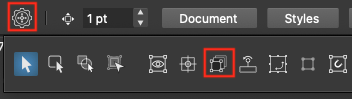
            @Daniel Sorry for the late answer, Transform Each0_1742288007278_transformeach.png is possible from the context panel:

            1 Reply Last reply Reply Quote 0
            • DanielD Offline
              Daniel
              last edited by

              Ah! Brilliant. Thanks @VectorStyler!

              Work: Windows 11 | Intel i9 14900HS (24 Cores/32 Threads) | GeForce RTX 4070 | 64 GB RAM
              Personal: Windows 11 | Amd Ryzen 9 7950X (16 Core, 32 Threads) | GeForce RTX 3060 | 32 GB RAM

              1 Reply Last reply Reply Quote 0
              • First post
                Last post