VectorStyler
    • Categories
    • Unread
    • Recent
    • Tags
    • Popular
    • Register
    • Login

    Where is the option in context bar to change default pen tool mode?

    Scheduled Pinned Locked Moved Questions and Support
    3 Posts 2 Posters 2.8k Views 1 Watching
    Loading More Posts
    • Oldest to Newest
    • Newest to Oldest
    • Most Votes
    Reply
    • Reply as topic
    Log in to reply
    This topic has been deleted. Only users with topic management privileges can see it.
    • BoldlineB Offline
      Boldline
      last edited by

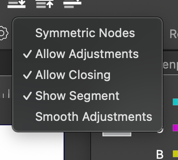
      When using the pen tool, where do I find the option in the context menu to switch it between symmetrical and smooth, etc? When I have the pen tool selected, I'm not seeing those options in the contextual menu. thanks

      🍎 macOS Tahoe 26.2, Mac mini (M1, 2020), Chip Apple M1, Memory 16 GB
      Cintiq 27QHD Display and LG Ultra HD Display

      VectorStylerV 1 Reply Last reply Reply Quote 1
      • VectorStylerV Offline
        VectorStyler @Boldline
        last edited by

        @Boldline You can hold Command+ while dragging a control point to keep the other side length fixed (not-symmetric).

        Also for the node type creation there is a button in the context panel (just before the Turning field) that opens a menu with a few options.

        1 Reply Last reply Reply Quote 1
        • BoldlineB Offline
          Boldline
          last edited by

          @VectorStyler thanks! I figured out if I turn off the symmetric nodes and the "show segment" options, I get the pen tool settings that work best for me.

          With your Command+ option, I see it can give me pure cusp nodes when using the pen tool. that can be useful
          0_1741187704160_270a437d-9824-44b9-b04c-cd1d6e78f3d0-CleanShot 2025-03-05 at 10.14.35.png

          🍎 macOS Tahoe 26.2, Mac mini (M1, 2020), Chip Apple M1, Memory 16 GB
          Cintiq 27QHD Display and LG Ultra HD Display

          1 Reply Last reply Reply Quote 2
          • First post
            Last post
