VectorStyler
    • Categories
    • Unread
    • Recent
    • Tags
    • Popular
    • Register
    • Login

    It is possible to get rid of the blue selection frame around Objects ?

    Scheduled Pinned Locked Moved Questions and Support
    3 Posts 2 Posters 2.8k Views 2 Watching
    Loading More Posts
    • Oldest to Newest
    • Newest to Oldest
    • Most Votes
    Reply
    • Reply as topic
    Log in to reply
    This topic has been deleted. Only users with topic management privileges can see it.
    • S Offline
      Subpath
      last edited by

      Would It be possible to get rid of the blue selection frame
      which is around Objects ? Maybe a bit of an unsual Question.

      But for me this frame disturbs the color of selected Objects
      and i can see the right color of them only if i deselect them.

      So in such cases it would be enough for me to have only
      the rectangle selection frame.

      Here a Picture what i mean, its not possible to see the
      right Colors on the right side.
      .
      .
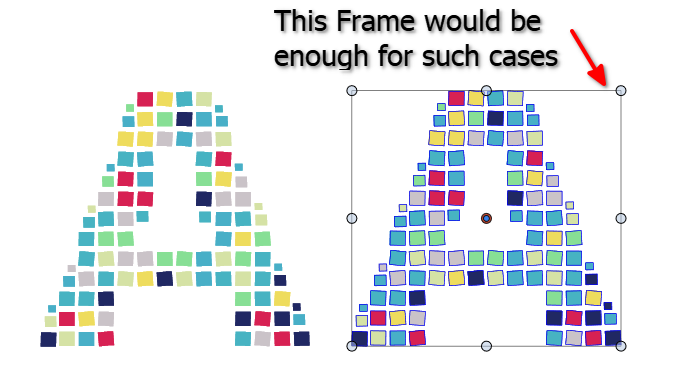
      0_1740582881723_blue selection frame.png

      Win 11
      CPU: AMD Ryzen 5 9600X, 6-core.
      GPU: Nvidia Geforce RTX 5070.

      VectorStylerV 1 Reply Last reply Reply Quote 1
      • VectorStylerV Offline
        VectorStyler @Subpath
        last edited by

        @Subpath I settings -> Indicator Styles, scroll to the "Selection Outline" (it will be in the "Selection Indicator" section). Set this to "None".

        S 1 Reply Last reply Reply Quote 2
        • S Offline
          Subpath @VectorStyler
          last edited by

          @VectorStyler

          Works great, thank you

          Win 11
          CPU: AMD Ryzen 5 9600X, 6-core.
          GPU: Nvidia Geforce RTX 5070.

          1 Reply Last reply Reply Quote 1
          • First post
            Last post
