Can we set a specific tool to be the default one on top of the tool panel options?
-
Is there a way to set a tool in the tool panel on the left side of the UI to a different default - in particular one that has to be clicked on to open secondary tools?
The issue for me is that it keeps reverting back to the default option once I click away
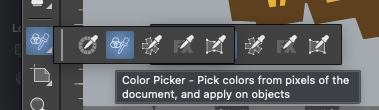
For example, I am farm more likely to use the color picker over the style picker in my daily work, and so I'd prefer for my use, that the color picker tool be set as the default in that set so I don't have to open the extended picker panel for that.
I'm not sure how difficult this would be to do, but I was envisioning the option to drag a tool in the pull out mini-panel to rearrange it.
Or an option in the settings to choose which of a multi-tool section of the mini pull out of tools is on top
-
@Boldline It should keep the last selected one as default, even after restart.
I opened a bug and will try to replicate it. -
Tried to replicate this, but for me it keeps the last selected tool as default after restart.
-
@VectorStyler @FastVector Thanks for testing. Here is an example where the color picker switches to the style picker seemingly on its own. If I select multiple objects, it will switch back to the default when i click on the "i" key.
UPDATE: In thinking on it more and doing more testing, I believe I found the issue. Switching back to the eyedropper to make it active, if I use the keyboard shortcut "i", it acts to switch back. the problem is, it means the only way to activate the eyedropper again is to click on the tool with the mouse cursor
It DOES correctly save the last tool when VS is closed and reopened
🍎 macOS Tahoe 26.2, Mac mini (M1, 2020), Chip Apple M1, Memory 16 GB
Cintiq 27QHD Display and LG Ultra HD Display -
@Boldline said in Can we set a specific tool to be the default one on top of the tool panel options?:
if I use the keyboard shortcut "i", it acts to switch back
Yes, using the keyboard shortcut will not affect the tool panel. I will try to find a solution for this.
-
@Boldline The only solution for this is to define a different shortcut for the color picker.
Since these are different tools (the style and color pickers), they are treated as different for shortcuts also.

