VectorStyler
    • Categories
    • Unread
    • Recent
    • Tags
    • Popular
    • Register
    • Login

    Bitmaps placed in VS now lack a transparent background

    Scheduled Pinned Locked Moved Questions and Support
    5 Posts 2 Posters 3.7k Views 1 Watching
    Loading More Posts
    • Oldest to Newest
    • Newest to Oldest
    • Most Votes
    Reply
    • Reply as topic
    Log in to reply
    This topic has been deleted. Only users with topic management privileges can see it.
    • BoldlineB Offline
      Boldline
      last edited by

      When I imported a one bot bitmap image today - it came in with a white background instead of transparent background - is there somehting i need to adjust in VS to make that work again?
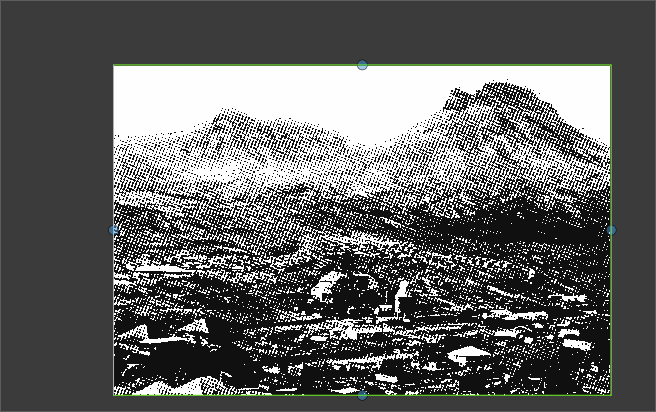
      0_1738443389008_3736d2b5-dd28-491b-9be7-0ba9857fc644-BLD 2025-02-01 at 15.55.35.png

      🍎 macOS Tahoe 26.2, Mac mini (M1, 2020), Chip Apple M1, Memory 16 GB
      Cintiq 27QHD Display and LG Ultra HD Display

      VectorStylerV 1 Reply Last reply Reply Quote 1
      • VectorStylerV Offline
        VectorStyler @Boldline
        last edited by

        @Boldline In the Links panel select the image and in the panel menu select "Image is Mask"
        I will add the automatic mask detection for import.

        1 Reply Last reply Reply Quote 1
        • BoldlineB Offline
          Boldline
          last edited by

          @VectorStyler thank you - that worked! I noticed there does not seem to be any information in the VS documentation about the "image is a mask" option.
          Is this a new feature added after the documentation updates?

          Can you elaborate on the "image is a mask" option? I tested the links panel with a transparent PNG, a white-background PNG, a transparent TIFF, and a bitmap (which initially imported with a background). The transparent PNG and TIFF displayed correctly in VS, while the white-background PNG did not, as expected. The only file requiring the "image is a mask" option was the bitmap. Are there other file types this feature would be useful for?

          🍎 macOS Tahoe 26.2, Mac mini (M1, 2020), Chip Apple M1, Memory 16 GB
          Cintiq 27QHD Display and LG Ultra HD Display

          VectorStylerV 1 Reply Last reply Reply Quote 1
          • VectorStylerV Offline
            VectorStyler @Boldline
            last edited by

            @Boldline said in Bitmaps placed in VS now lack a transparent background:

            Is this a new feature added after the documentation updates?

            I have to update the documentation.

            Are there other file types this feature would be useful for?

            Any image that has back-and-white or grayscale color mode can be treated as a mask, regardless of the import format.

            BoldlineB 1 Reply Last reply Reply Quote 3
            • BoldlineB Offline
              Boldline @VectorStyler
              last edited by

              @VectorStyler cool! just tried it out.

              thanks for the info - no rush on updating the documentation. I was making sure it was known to be added eventually


              🍎 macOS Tahoe 26.2, Mac mini (M1, 2020), Chip Apple M1, Memory 16 GB
              Cintiq 27QHD Display and LG Ultra HD Display

              1 Reply Last reply Reply Quote 1
              • First post
                Last post