1.2.054 update caused dark interface with menus/menu texts invisible (also dark), how to return to light interface?
-
@Arte
"Edit" menu last line "Settings" or default shortcut (Ctrl+,), "User Interface", "Theme", choose what you want.
If that doesn't work, try "Restore Defaults" (Help menu)
https://youtu.be/MaN8upuxMOY -
@Arte Removing the VectorStyler user files might help.
-
@Arte I tested this now on Windows, and the dark themes seem to work here.
One thing that might cause this if previous there files somehow ended up in the user settings folder (should not).The user settings (an workspace files) can be found at: c:\Users<user name>\AppData\Roaming\NumericPath\VectorStyler1.2\vector\data\resources\ folder.
-
@VectorStyler My user files for V1.2 are not in the Roaming subfolder path but in the Local subfolder path of the AppData folder
The only folder within the Roaming subfolder path are those of V1.0. Even removing it from there didn't make a difference it all remains one gray/dark theme without readable menu/texts (incl. dialogs) so I can't see whatI am selecting. See image below.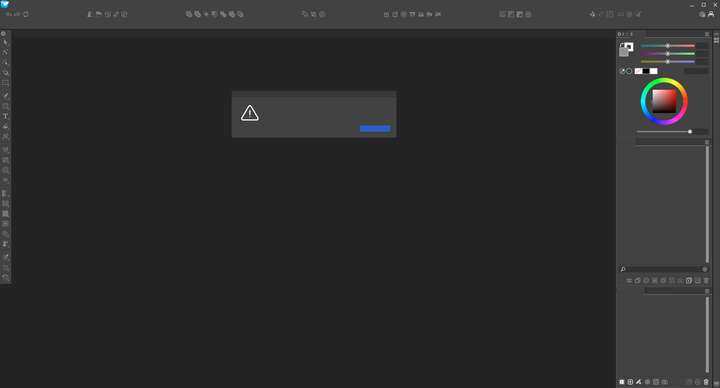
Copying the folder from the Local subfolder path to the Roaming Subfolder path didn't make a difference either.
-
@Arte This does not seem to be a theme error, and more like missing text resources.
Remove all VS data from the Local sub folder (back up the license and presets).
Also, uninstall VS completely from the Programs... folder (make sure that it is removed).
and then reinstall from the MSI file.There are known problems with MSI installers that sometimes does not update all the files correctly.
-
@Li-Xiao Thanks for the video, I managed to select the light mode now that I could locate the positions.
It made no difference other than getting the light mode, there is still no readable text like in dark mode.
@VectorStyler It seems there is something else going on other than or in addition to the dark/light mode theme setting, -
@VectorStyler Thanks, I'll do that. The license file was still there but it seems I got a license registration dialog. I can copy the files from a backup and will use those to put them back after a complete removal and reinstall. I'll let you know how this went.
-
@VectorStyler It is working again, I had also copied the config file back but that caused the problem to arise again. After deleting the backup config file it worked normal again.
It did comment about the license data loading successfully but I had to verify it by putting the userdata and license key again into the registration dialog.
Should it happen again then I'll try the above steps for a complete removal and reinstall first.
Thanks for the fast and helpful response. -
@Arte said in 1.2.054 update caused dark interface with menus/menu texts invisible (also dark), how to return to light interface?:
After deleting the backup config file it worked normal again.
was this the "config.ini" file?
-
@VectorStyler said in 1.2.054 update caused dark interface with menus/menu texts invisible (also dark), how to return to light interface?:
@Arte said in 1.2.054 update caused dark interface with menus/menu texts invisible (also dark), how to return to light interface?:
After deleting the backup config file it worked normal again.
was this the "config.ini" file?
Yes
