VectorStyler
    • Categories
    • Unread
    • Recent
    • Tags
    • Popular
    • Register
    • Login

    A small detail - Removing an unfound file from the list
    Scheduled Pinned Locked Moved Features and Ideas
    11 Posts 5 Posters 9.4k Views 4 Watching
    Loading More Posts
    • Oldest to Newest
    • Newest to Oldest
    • Most Votes
    Reply
    • Reply as topic
    Log in to reply
    This topic has been deleted. Only users with topic management privileges can see it.
    • VectorStylerV Offline
      VectorStyler @B-Vs-V
      last edited by

      @Pat Added to the backlog.

      M 1 Reply Last reply Reply Quote 0
      • M Offline
        monsterfox @VectorStyler
        last edited by

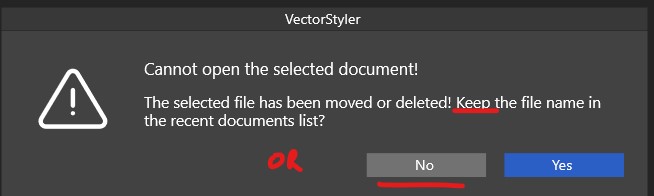
        @VectorStyler Such a dialog box. The Tab key is not working. Can it be added?

        VectorStylerV 1 Reply Last reply Reply Quote 1
        • VectorStylerV Offline
          VectorStyler @monsterfox
          last edited by

          @monsterfox said in A small detail - Removing an unfound file from the list:

          The Tab key is not working. Can it be added?

          Will do so.

          B 1 Reply Last reply Reply Quote 0
          • IngolfI Offline
            Ingolf
            last edited by

            The fact that the file is not found here and now does not necessarily mean it no longer exists. It could be that an external SSD, a USB drive, or a network drive has not been connected, which often happens in various situations on a company laptop that is on and off the network.

            All frequent scenarios for my usage and work situation.

            🍏 macOS Sequoia Apple Silicon

            BoldlineB 1 Reply Last reply Reply Quote 2
            • B Offline
              B-Vs-V
              last edited by

              VS won't let you find the file via this dialogue box anyway.

              W11 Pro 25H2 - 12th Gen Intel(R) i7-12700K 3.61 GHz - RAM 64 Go - NVIDIA GF GTX 4070 Ti - Intuos - Dell UP3216Q / Eizo ColorEdge
              W11 Pro 25H2 - 12th Gen Intel(R) i7-12700KF 3.60 GHz -RAM 64 Go - NVIDIA GF GTX 3080 - IntuosPro- ProArt PA329C

              IngolfI 1 Reply Last reply Reply Quote 1
              • IngolfI Offline
                Ingolf @B-Vs-V
                last edited by Ingolf

                @Pat said in A small detail - Removing an unfound file from the list:

                VS won't let you find the file via this dialogue box anyway.

                Not until I reconnect the drive - which I do. And then I need VS to remember the file and its path, thank you very much.

                🍏 macOS Sequoia Apple Silicon

                1 Reply Last reply Reply Quote 1
                • BoldlineB Offline
                  Boldline @Ingolf
                  last edited by

                  @Ingolf said in A small detail - Removing an unfound file from the list:

                  The fact that the file is not found here and now does not necessarily mean it no longer exists. It could be that an external SSD, a USB drive, or a network drive has not been connected, which often happens in various situations on a company laptop that is on and off the network.

                  All frequent scenarios for my usage and work situation.

                  I agree with this and would keep it in the list. maybe if an asterisk was added in the list to signify to was a missing file?

                  🍎 macOS Sequoia 15.3, Mac mini (M1, 2020), Chip Apple M1, Memory 16 GB
                  Cintiq 27QHD Display and LG Ultra HD Display

                  B 1 Reply Last reply Reply Quote 0
                  • B Offline
                    B-Vs-V @Boldline
                    last edited by

                    @Boldline In that case, it's certainly better to keep the name in the list. As my PCs have internal hds several terabytes in size, I don't use external hard drives (except as backups).

                    W11 Pro 25H2 - 12th Gen Intel(R) i7-12700K 3.61 GHz - RAM 64 Go - NVIDIA GF GTX 4070 Ti - Intuos - Dell UP3216Q / Eizo ColorEdge
                    W11 Pro 25H2 - 12th Gen Intel(R) i7-12700KF 3.60 GHz -RAM 64 Go - NVIDIA GF GTX 3080 - IntuosPro- ProArt PA329C

                    1 Reply Last reply Reply Quote 1
                    • B Offline
                      B-Vs-V @VectorStyler
                      last edited by

                      @VectorStyler I don't know if it's possible but it would be useful to see the location of the file by leaving the mouse pointer over the name of that list ☺

                      W11 Pro 25H2 - 12th Gen Intel(R) i7-12700K 3.61 GHz - RAM 64 Go - NVIDIA GF GTX 4070 Ti - Intuos - Dell UP3216Q / Eizo ColorEdge
                      W11 Pro 25H2 - 12th Gen Intel(R) i7-12700KF 3.60 GHz -RAM 64 Go - NVIDIA GF GTX 3080 - IntuosPro- ProArt PA329C

                      VectorStylerV 1 Reply Last reply Reply Quote 0
                      • VectorStylerV Offline
                        VectorStyler @B-Vs-V
                        last edited by

                        @B-Vs-V said in A small detail - Removing an unfound file from the list:

                        see the location of the file by leaving the mouse pointer over the name of that list

                        Not in the menu. The only option is to list files with complete folder name.

                        But it can show in the alert view.

                        1 Reply Last reply Reply Quote 0
                        • First post
                          Last post