Stroke and Fill: Order ambiguity in panels?
-
I know full and well that the Fill of an object can be on top of the Stroke of the object. However per default objects are created with the Stroke on top of the Fill.
Is it just me, or is confusing how Stroke and Fill swatches are ordered in panels, considering Strokes are likely on top of Fills?
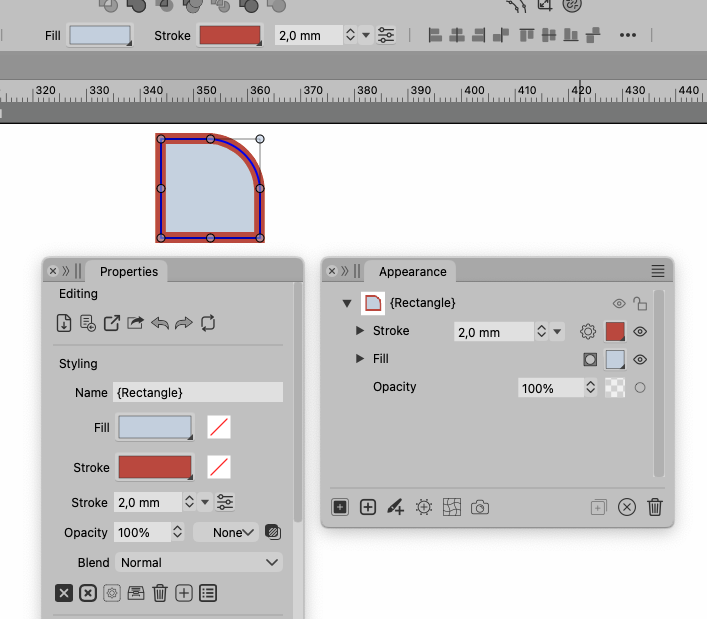
Look at this shape:
Red Stroke layered on top of blue Fill.
Appearance Panel reflects the order (of course).
Properties Panel shows Fill first
Context Menu Bar shows Fill first
Panel buttons to Add and Remove - Fill buttons come before Stroke buttons(BTW, "Add Fill" and "Remove Fill" Buttons have different icon styles, outlines and boldness...)
I "feel" Strokes should be "mentioned" before Fills..

I know that positions must be static, apart from Appearance Panel that shows the stacking order of Stroke(s) and Fill(s).
Just a thought..
BR Lars Herold
-
@larsherold This one is easy to change, added it to the backlog.
-
@larsherold I will skip this for now. I checked other apps and they also have the same ordering, both in Appearance panel and in the fixed places (context panel and properties panel).
-
@VectorStyler Fair enough..
No problem! Lots of stuff to dive into already:+1/BR Lars Herold
