VectorStyler
    • Categories
    • Unread
    • Recent
    • Tags
    • Popular
    • Register
    • Login

    Double-click Parametric Shape Tool icon to get specific panel instead of shape panel

    Scheduled Pinned Locked Moved Features and Ideas
    2 Posts 2 Posters 2.6k Views 1 Watching
    Loading More Posts
    • Oldest to Newest
    • Newest to Oldest
    • Most Votes
    Reply
    • Reply as topic
    Log in to reply
    This topic has been deleted. Only users with topic management privileges can see it.
    • BoldlineB Offline
      Boldline
      last edited by

      I think this was mentioned recently in another thread by @monsterfox but I was unable to find it quickly to add here. I was wondering if it would be better to have the double-click of the parametric Shape Tool open the specific parametric shape panel instead of general shape panel?
      When I double click on the canvas with the specific parametric shape tool activated, I think I'd rather it made a new copy of the last result - or in the case of a new document, a standard default size shape
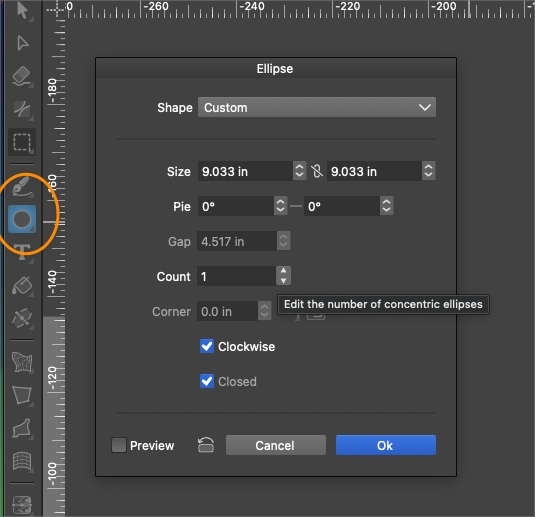
      0_1718981990279_422d3ab2-b66c-43e3-b164-149e70473beb-BLD 2024-06-21 at 10.56.45.png

      🍎 macOS Tahoe 26.2, Mac mini (M1, 2020), Chip Apple M1, Memory 16 GB
      Cintiq 27QHD Display and LG Ultra HD Display

      VectorStylerV 1 Reply Last reply Reply Quote 1
      • VectorStylerV Offline
        VectorStyler @Boldline
        last edited by

        @Boldline I think it is not that useful, as you can get the same modal view if you activate the tool and then click (not drag) on the canvas.
        Also, the shape panel can be used to adjust properties of the shape after drawing.

        1 Reply Last reply Reply Quote 1
        • First post
          Last post
