VectorStyler
    • Categories
    • Unread
    • Recent
    • Tags
    • Popular
    • Register
    • Login

    How to render the stroke of clipping group on top of its contents?

    Scheduled Pinned Locked Moved Questions and Support
    3 Posts 2 Posters 3.7k Views 2 Watching
    Loading More Posts
    • Oldest to Newest
    • Newest to Oldest
    • Most Votes
    Reply
    • Reply as topic
    Log in to reply
    This topic has been deleted. Only users with topic management privileges can see it.
    • LoginErrorL Offline
      LoginError
      last edited by

      I'm noticing that the inner half of the stroke on a clipping group is rendered behind the contents of the group. I looked around at the object options and nothing I could find seems to allow me to change this. Is there an option somewhere that allows the entire stroke on a clipping group to render over the contents of the group?

      In my desired example I achieved this by duplicating the group object and placing it on top of the group, which is less practical since it won't update when the shape of the clipping group is altered. Is there a better way to do this?
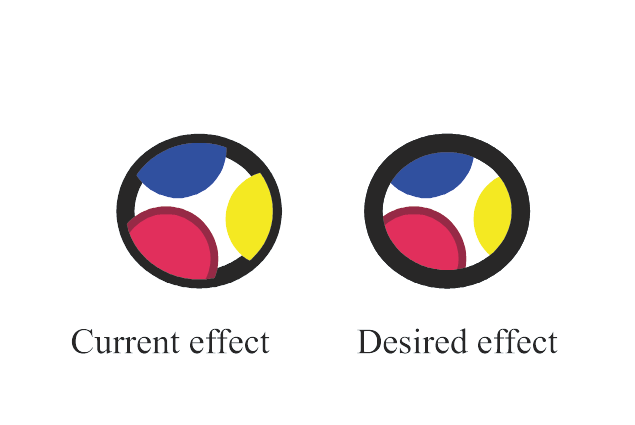
      0_1714153219865_stroke-behind-contents.png

      0_1714153239686_stroke-behind-contents.vstyler

      VectorStylerV 1 Reply Last reply Reply Quote 0
      • VectorStylerV Offline
        VectorStyler @LoginError
        last edited by

        @LoginError In the Appearance panel rearrange the Group / Stroke items using drag&drop.

        1 Reply Last reply Reply Quote 0
        • LoginErrorL Offline
          LoginError
          last edited by

          Awesome, that's exactly what I was looking for. I didn't really think that the order of things in the appearance panel would matter, but in hindsight it absolutely does, especially when dealing with things like multiple strokes and fills.

          Thanks!

          1 Reply Last reply Reply Quote 2
          • First post
            Last post
