VectorStyler
    • Categories
    • Unread
    • Recent
    • Tags
    • Popular
    • Register
    • Login

    VectorStyler Manual | PDF

    Scheduled Pinned Locked Moved Tutorials
    70 Posts 10 Posters 240.7k Views 9 Watching
    Loading More Posts
    • Oldest to Newest
    • Newest to Oldest
    • Most Votes
    Reply
    • Reply as topic
    Log in to reply
    This topic has been deleted. Only users with topic management privileges can see it.
    • F Offline
      freggern
      last edited by

      Small update ( https://k00.fr/xucgr0j9 )

      Included changes of the HTML pages (thanks @VectorStyler)

      • Text & image updates, because of changes to Pencil Tool, Shape Builder Options, Shape Paint Options.
      1 Reply Last reply Reply Quote 4
      • F Offline
        freggern
        last edited by

        Small update ( https://k00.fr/xucgr0j9 )

        • Included changes of the HTML pages (thanks @VectorStyler)
        1 Reply Last reply Reply Quote 3
        • F Offline
          freggern
          last edited by freggern

          Update:

          • PDF-manual for the 1.2.x beta version of VectorStyler available
            ~~VectorStyler 1.2.x (beta): https://k00.fr/2461e37o~~
            VectorStyler 1.1.x: https://k00.fr/xucgr0j9
          1 Reply Last reply Reply Quote 8
          • F Offline
            freggern
            last edited by

            Hello,

            new Update: https://k00.fr/xucgr0j9

            • New manual for the new VectorStyler 1.2.x release
            • Included changes to the HTML pages (thanks @VectorStyler)
            • Add the latest version of the 1.1.x release to the archive folder
            S 1 Reply Last reply Reply Quote 9
            • S Offline
              Subpath @freggern
              last edited by Subpath

              @freggern

              I don't want to miss the opportunity to thank you for your time and work.
              I really appreciate that you keeping the PDF manual updated.

              Win 11
              CPU: AMD Ryzen 5 9600X, 6-core.
              GPU: Nvidia Geforce RTX 5070.

              1 Reply Last reply Reply Quote 3
              • debraspicherD Offline
                debraspicher
                last edited by

                Thank you for this. I find this more useful than the online manual and is easier to keep up and search while discovering new features. It's already highly readable.

                Windows 11 Build 26200.7171 (25H2)
                AMD Ryzen 7 9700X with Gigabyte X870E Aorus Pro Ice
                32GB RAM @ 6000MHz
                PNY NVIDIA RTX 5070 Ti 16GB; Display 1: 4K @150%; Display 2: 4K @200%
                Wacom Intuos Pro L (2025); Wacom Intuos Pro M; Epson ET-8550; Siser Romeo

                S 1 Reply Last reply Reply Quote 3
                • S Offline
                  Subpath @debraspicher
                  last edited by Subpath

                  @debraspicher

                  ...I find this more useful ...

                  You're not the only one 🙂 and I think you can imagine how pleased
                  I was when @freggern created this PDF manual.
                  I like especially the search function in the PDF

                  Win 11
                  CPU: AMD Ryzen 5 9600X, 6-core.
                  GPU: Nvidia Geforce RTX 5070.

                  1 Reply Last reply Reply Quote 2
                  • F Offline
                    freggern
                    last edited by

                    New small update:

                    Included changes of the HTML pages (thx @VectorStyler)

                    • shortcut change, typos
                    1 Reply Last reply Reply Quote 3
                    • F Offline
                      freggern
                      last edited by

                      New update (https://k00.fr/xucgr0j9)

                      • Manuel has now reduced size from 240mb to 41mb (Generation script compresses and removes alpha channel of graphics and resizes massive ones) - When graphics look bad, inform me, please.
                      • Included changes to the HTML pages (thx @VectorStyler)
                        change: Shortcuts, Object Styling
                      Victor VectorV 1 Reply Last reply Reply Quote 10
                      • Victor VectorV Offline
                        Victor Vector @freggern
                        last edited by

                        @freggern
                        I am very grateful to you for reducing the data size of the manual by SIX TIMES! That's massive.
                        So far the graphics I have viewed looked great! 👍

                        Thank you for your solid contributions to the community!

                        1 Reply Last reply Reply Quote 8
                        • debraspicherD Offline
                          debraspicher
                          last edited by

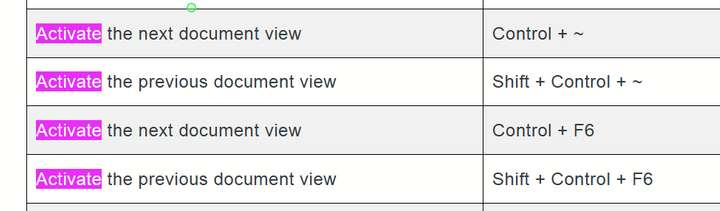
                          Tilde (~) didn't quite make the transition to PDF (Example on Pg: 176):

                          0_1717363503251_5e3ea58e-68ef-4c79-a29c-61489847fb5f-image.png

                          vs

                          Online manual (link)

                          0_1717363559537_b828013a-d454-4f0d-98ba-a4f87bb0d45b-image.png

                          Windows 11 Build 26200.7171 (25H2)
                          AMD Ryzen 7 9700X with Gigabyte X870E Aorus Pro Ice
                          32GB RAM @ 6000MHz
                          PNY NVIDIA RTX 5070 Ti 16GB; Display 1: 4K @150%; Display 2: 4K @200%
                          Wacom Intuos Pro L (2025); Wacom Intuos Pro M; Epson ET-8550; Siser Romeo

                          1 Reply Last reply Reply Quote 4
                          • F Offline
                            freggern
                            last edited by

                            @debraspicher Thank you for reporting the bug.

                            New update (https://k00.fr/xucgr0j9)

                            • Fix rendering of special char tilde
                            J debraspicherD 2 Replies Last reply Reply Quote 7
                            • J Offline
                              Jono @freggern
                              last edited by

                              @freggern

                              Thank you for the PDF manual, especially now with its smaller size.

                              Maybe something to consider for the next update:

                              Fig 2.12 (p132) 'Selecting multiple documents in the file open view', shows the old icon colours.

                              Best regards

                              Mac mini (M1, 2020) | Tahoe 26.1 | Wacom Cintiq 16 (1920 x 1080 px)

                              1 Reply Last reply Reply Quote 2
                              • debraspicherD Offline
                                debraspicher @freggern
                                last edited by

                                @freggern Thank you

                                Windows 11 Build 26200.7171 (25H2)
                                AMD Ryzen 7 9700X with Gigabyte X870E Aorus Pro Ice
                                32GB RAM @ 6000MHz
                                PNY NVIDIA RTX 5070 Ti 16GB; Display 1: 4K @150%; Display 2: 4K @200%
                                Wacom Intuos Pro L (2025); Wacom Intuos Pro M; Epson ET-8550; Siser Romeo

                                1 Reply Last reply Reply Quote 0
                                • F Offline
                                  freggern
                                  last edited by

                                  New small update (https://k00.fr/xucgr0j9)

                                  • Includes changes of the HTML pages (thx @VectorStyler)
                                  S 1 Reply Last reply Reply Quote 7
                                  • S Offline
                                    Subpath @freggern
                                    last edited by

                                    @freggern

                                    Great !

                                    Win 11
                                    CPU: AMD Ryzen 5 9600X, 6-core.
                                    GPU: Nvidia Geforce RTX 5070.

                                    1 Reply Last reply Reply Quote 1
                                    • F Offline
                                      freggern
                                      last edited by

                                      New update (https://k00.fr/xucgr0j9)

                                      • New manual for VectorStyler 1.3.x (release)
                                        • Included changes of the HTML pages (thx @VectorStyler)
                                        • Add rendering of code-HTML-tags
                                        • Update vs-logo
                                      E debraspicherD 2 Replies Last reply Reply Quote 8
                                      • E Offline
                                        EricP @freggern
                                        last edited by

                                        @freggern thank you very much for the update of the manual. This is a gold mine for understanding how some features work

                                        1 Reply Last reply Reply Quote 2
                                        • debraspicherD Offline
                                          debraspicher @freggern
                                          last edited by

                                          @freggern Thank you for this!

                                          Windows 11 Build 26200.7171 (25H2)
                                          AMD Ryzen 7 9700X with Gigabyte X870E Aorus Pro Ice
                                          32GB RAM @ 6000MHz
                                          PNY NVIDIA RTX 5070 Ti 16GB; Display 1: 4K @150%; Display 2: 4K @200%
                                          Wacom Intuos Pro L (2025); Wacom Intuos Pro M; Epson ET-8550; Siser Romeo

                                          1 Reply Last reply Reply Quote 1
                                          • First post
                                            Last post