VectorStyler
    • Categories
    • Unread
    • Recent
    • Tags
    • Popular
    • Register
    • Login

    Uniform stroke scaling
    Scheduled Pinned Locked Moved Questions and Support
    10 Posts 3 Posters 7.9k Views 3 Watching
    Loading More Posts
    • Oldest to Newest
    • Newest to Oldest
    • Most Votes
    Reply
    • Reply as topic
    Log in to reply
    This topic has been deleted. Only users with topic management privileges can see it.
    • B Offline
      B-Vs-V
      last edited by

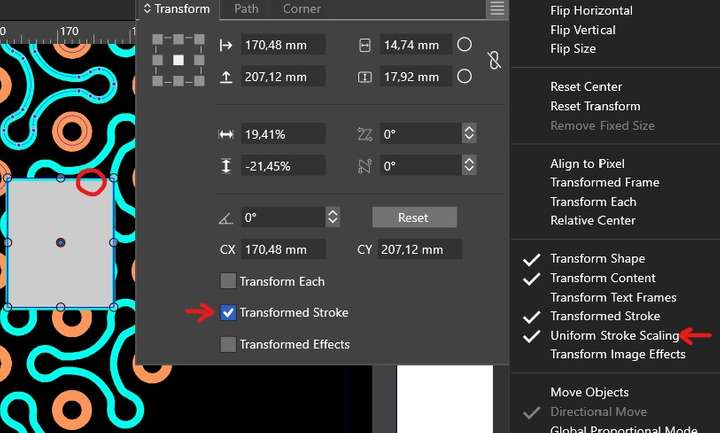
      I had the idea that it was sufficient to activate a single option to scale an object's stroke proportionally when rescaling an object. I only managed to do this by activating 'Transformed Stroke' and 'Uniform Stroke Scaling'. Is this correct or is there another option? Thanks ☺

      0_1711094930503_s1.jpg

      W11 Pro 25H2 - 12th Gen Intel(R) i7-12700K 3.61 GHz - RAM 64 Go - NVIDIA GF GTX 4070 Ti - Intuos - Dell UP3216Q / Eizo ColorEdge
      W11 Pro 25H2 - 12th Gen Intel(R) i7-12700KF 3.60 GHz -RAM 64 Go - NVIDIA GF GTX 3080 - IntuosPro- ProArt PA329C

      VectorStylerV 1 Reply Last reply Reply Quote 0
      • VectorStylerV Offline
        VectorStyler @B-Vs-V
        last edited by

        @Pat There is a also a document wide default option in Document Setup -> General tab. But remember, these work on objects that are created after changing the option.

        Also: it is possible to change for a whole layer in the Layers Option -> Geometry section.

        H B 2 Replies Last reply Reply Quote 2
        • H Offline
          Harry @VectorStyler
          last edited by

          @VectorStyler Those options are also in the Appearance panel's menu. How does they work? Does they refer to objects created via the appearance panel?

          Win 11, XP Pen Deco 01 V2 graphic tablet

          1 Reply Last reply Reply Quote 1
          • B Offline
            B-Vs-V @VectorStyler
            last edited by B-Vs-V

            @VectorStyler Thanks ☺ Is there a way to activate the proportional scaling by default ?

            W11 Pro 25H2 - 12th Gen Intel(R) i7-12700K 3.61 GHz - RAM 64 Go - NVIDIA GF GTX 4070 Ti - Intuos - Dell UP3216Q / Eizo ColorEdge
            W11 Pro 25H2 - 12th Gen Intel(R) i7-12700KF 3.60 GHz -RAM 64 Go - NVIDIA GF GTX 3080 - IntuosPro- ProArt PA329C

            VectorStylerV 1 Reply Last reply Reply Quote 1
            • VectorStylerV Offline
              VectorStyler @B-Vs-V
              last edited by

              @Pat when creating a new document 9with setup), in "More Options" (right side, scroll down) you can enable the default stroke transformation mode.

              B 1 Reply Last reply Reply Quote 1
              • B Offline
                B-Vs-V @VectorStyler
                last edited by

                @VectorStyler It's a detail in the VS development story, but as the "Uniform stroke scaling" option has no effect on its own, I was wondering if it wouldn't be easier to understand with this option positioned shifted back "transform stroke", and even if it could only be activated if "Transform stroke" is active?
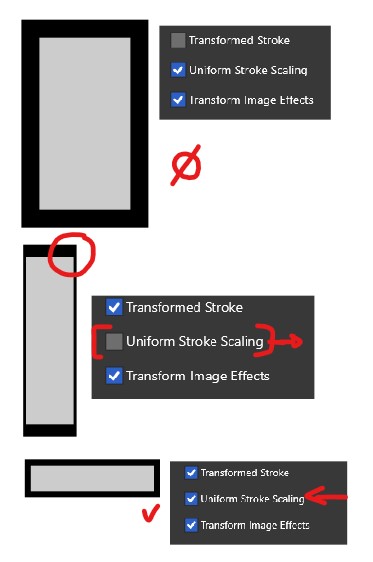
                0_1712399909785_sp.jpg

                W11 Pro 25H2 - 12th Gen Intel(R) i7-12700K 3.61 GHz - RAM 64 Go - NVIDIA GF GTX 4070 Ti - Intuos - Dell UP3216Q / Eizo ColorEdge
                W11 Pro 25H2 - 12th Gen Intel(R) i7-12700KF 3.60 GHz -RAM 64 Go - NVIDIA GF GTX 3080 - IntuosPro- ProArt PA329C

                VectorStylerV 1 Reply Last reply Reply Quote 0
                • VectorStylerV Offline
                  VectorStyler @B-Vs-V
                  last edited by

                  @Pat said in Uniform stroke scaling:

                  and even if it could only be activated if "Transform stroke" is active?

                  I will add this to the backlog.

                  B 1 Reply Last reply Reply Quote 1
                  • B Offline
                    B-Vs-V @VectorStyler
                    last edited by

                    @VectorStyler Would it be possible to add the "Uniform stroke scaling" in the Transform panel ? Thanks ☺

                    W11 Pro 25H2 - 12th Gen Intel(R) i7-12700K 3.61 GHz - RAM 64 Go - NVIDIA GF GTX 4070 Ti - Intuos - Dell UP3216Q / Eizo ColorEdge
                    W11 Pro 25H2 - 12th Gen Intel(R) i7-12700KF 3.60 GHz -RAM 64 Go - NVIDIA GF GTX 3080 - IntuosPro- ProArt PA329C

                    VectorStylerV 1 Reply Last reply Reply Quote 0
                    • VectorStylerV Offline
                      VectorStyler @B-Vs-V
                      last edited by

                      @Pat It is in the panel menu.

                      B 1 Reply Last reply Reply Quote 0
                      • B Offline
                        B-Vs-V @VectorStyler
                        last edited by

                        @VectorStyler Yes, I know & it is also fine but since it is tied to "Transform stroke", it would be logical IMHO to have it directly in the panel beside "TS" (no need then to check in the panel menu).

                        W11 Pro 25H2 - 12th Gen Intel(R) i7-12700K 3.61 GHz - RAM 64 Go - NVIDIA GF GTX 4070 Ti - Intuos - Dell UP3216Q / Eizo ColorEdge
                        W11 Pro 25H2 - 12th Gen Intel(R) i7-12700KF 3.60 GHz -RAM 64 Go - NVIDIA GF GTX 3080 - IntuosPro- ProArt PA329C

                        1 Reply Last reply Reply Quote 1
                        • First post
                          Last post