VectorStyler
    • Categories
    • Unread
    • Recent
    • Tags
    • Popular
    • Register
    • Login

    Change of color in text on path is not possible ...

    Scheduled Pinned Locked Moved Questions and Support
    6 Posts 3 Posters 5.2k Views 3 Watching
    Loading More Posts
    • Oldest to Newest
    • Newest to Oldest
    • Most Votes
    Reply
    • Reply as topic
    Log in to reply
    This topic has been deleted. Only users with topic management privileges can see it.
    • RaaskotR Offline
      Raaskot
      last edited by Raaskot

      Help needed: I cannot figure out why a simple tast as changing fill color in text on a path is a total mystery.

      Unresponsive-color-change

      When selecting letters an setting colors nothing happens. How can I succeed? (File submitted)
      0_1710256854323_cant_color_text.vstyler.zip

      Kind regards,
      Raaskot

      L VectorStylerV 2 Replies Last reply Reply Quote 0
      • L Offline
        Li Xiao @Raaskot
        last edited by

        @Raaskot The text tool selection indeed has an issue, it seems like a bug. However, the box selection works fine.

        1 Reply Last reply Reply Quote 1
        • VectorStylerV Offline
          VectorStyler @Raaskot
          last edited by

          @Raaskot All these text objects have a Group content also in the Appearance panel. As if they were clipping shapes for some groups (it is possible to use text as clipping shape)

          Remove everything that is not "Fill" in the Appearance panel and the it should be able to use local colors.

          RaaskotR 1 Reply Last reply Reply Quote 1
          • RaaskotR Offline
            Raaskot @VectorStyler
            last edited by

            Thanks, both😊

            @Li-Xiao
            Agree, box select (V) works fine following a bit clicking

            @VectorStyler
            Can't figure it out, guess I've got it wrong: Tried to reproduce your advice but "Remove everything that is not "Fill"" don't
            apply.

            GIF: Remove everything that is not "Fill"

            Kind regards, Raaskot

            VectorStylerV 1 Reply Last reply Reply Quote 0
            • VectorStylerV Offline
              VectorStyler @Raaskot
              last edited by

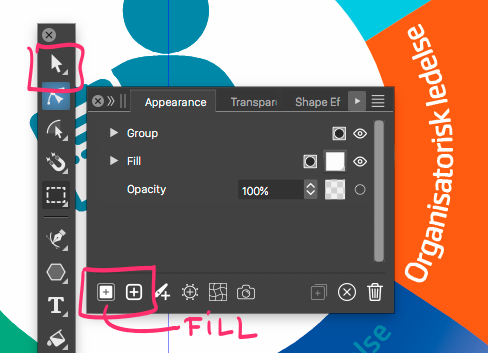
              @Raaskot The text should be selected with the pointer (transform) tool, not with the text editing tool, to remove these items in the Appearance panel.

              RaaskotR 1 Reply Last reply Reply Quote 0
              • RaaskotR Offline
                Raaskot @VectorStyler
                last edited by

                @VectorStyler

                Ah, wonderful. Now I got it☺

                .. also I must activate fill-button i "Appearances"

                0_1710332059277_678828c1-d362-4d82-9312-57ce0fb56199-billede.png

                1 Reply Last reply Reply Quote 1
                • First post
                  Last post