VectorStyler
    • Categories
    • Unread
    • Recent
    • Tags
    • Popular
    • Register
    • Login

    Node's handle will only allow movement along a predetermined angle
    Scheduled Pinned Locked Moved Questions and Support
    4 Posts 2 Posters 4.0k Views 1 Watching
    Loading More Posts
    • Oldest to Newest
    • Newest to Oldest
    • Most Votes
    Reply
    • Reply as topic
    Log in to reply
    This topic has been deleted. Only users with topic management privileges can see it.
    • BoldlineB Offline
      Boldline
      last edited by

      Occasionally I notice that a node's handle will only allow me to move along a predetermined angle.
      I can move the node itself most of the time, but editing the handle is limited. I could see this being a cool feature if implemented correctly. Perhaps it's already a feature and I'm inadvertently activating it and causing my own issues?

      The only way I've found to get out of this limitation is to make a new node nearby and delete the original one giving me trouble.
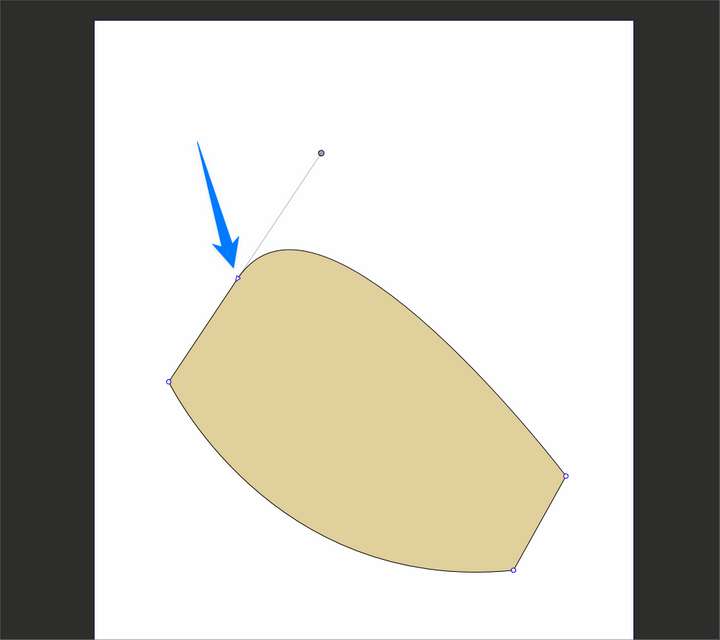
      0_1694618376015_58a88892-228b-4f69-b089-beb4986775f6-BLD 2023-09-13 at 11.19.09.png
      Here is the file below. it's the node at the very top of the shape

      0_1694618088043_constrained angle node.vstyler

      🍎 macOS Sequoia 15.3, Mac mini (M1, 2020), Chip Apple M1, Memory 16 GB
      Cintiq 27QHD Display and LG Ultra HD Display

      VectorStylerV 1 Reply Last reply Reply Quote 0
      • VectorStylerV Offline
        VectorStyler @Boldline
        last edited by

        @Boldline The node type is set to smooth (see in the context panel).

        BoldlineB 1 Reply Last reply Reply Quote 1
        • BoldlineB Offline
          Boldline @VectorStyler
          last edited by

          @VectorStyler ok thank you for showing me that. When I go and switch it from smooth to cusp and then back to smooth again, the handles are no longer locked in on one specific angle, yet the node is now set to "smooth". Is there something more to setting the locked in angle on the handle?

          🍎 macOS Sequoia 15.3, Mac mini (M1, 2020), Chip Apple M1, Memory 16 GB
          Cintiq 27QHD Display and LG Ultra HD Display

          VectorStylerV 1 Reply Last reply Reply Quote 0
          • VectorStylerV Offline
            VectorStyler @Boldline
            last edited by

            @Boldline Deleting a node between a line and a smooth node could result in this.

            1 Reply Last reply Reply Quote 0
            • First post
              Last post
