VectorStyler
    • Categories
    • Unread
    • Recent
    • Tags
    • Popular
    • Register
    • Login

    Switch Snapping Panel Options button with button that does not require a submenu

    Scheduled Pinned Locked Moved Features and Ideas
    2 Posts 2 Posters 4.4k Views 1 Watching
    Loading More Posts
    • Oldest to Newest
    • Newest to Oldest
    • Most Votes
    Reply
    • Reply as topic
    Log in to reply
    This topic has been deleted. Only users with topic management privileges can see it.
    • BoldlineB Online
      Boldline
      last edited by

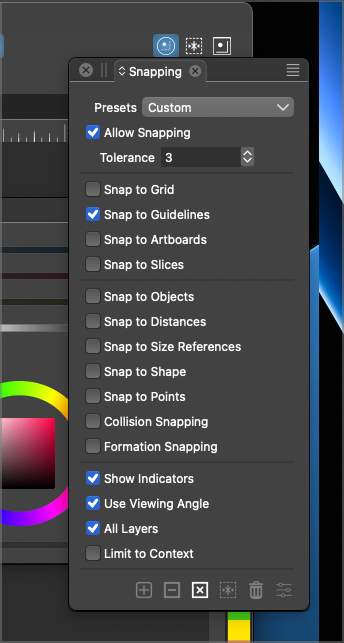
      A thread mentioning settings in the Snapping options panel reminded me of this issue from a while back where if VS is at full screen, the snapping options dropdown panel does not show (for me) because it extends beyond the screen edge. Perhaps I have this issue because I use 2 linked screens?
      I moved VS over some to get the panel to show properly and took a screenshot to show how it extends out of the main VS "box".

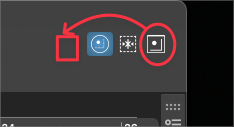
      My thought today was to consider swapping around the icons in the upper right corner, moving the snapping options dropdown to the inside and the "enable snapping" and "restrict snapping to objects" were to the right side since neither has a submenu dropdown
      0_1691588838176_e732218f-626e-441e-8de5-a93f0da429aa-BLD 2023-08-09 at 09.41.17@2x.png

      0_1691589062189_07da3d65-bd51-4913-b605-a63514822dc2-BLD 2023-08-09 at 09.50.04.png

      🍎 macOS Tahoe 26.2, Mac mini (M1, 2020), Chip Apple M1, Memory 16 GB
      Cintiq 27QHD Display and LG Ultra HD Display

      1 Reply Last reply Reply Quote 1
      • P Offline
        pentool
        last edited by

        On my 13" MacBook Pro, when I full screen the app, the icon does show. Must be a multi-monitor issue...?

        MacBook Pro 13" early 2015 8G | Intel Iris Graphics 6100 1536 MB | macOS Monterey 12.7.6

        1 Reply Last reply Reply Quote 0
        • First post
          Last post