VectorStyler
    • Categories
    • Unread
    • Recent
    • Tags
    • Popular
    • Register
    • Login

    Shape core-line setting?

    Scheduled Pinned Locked Moved Questions and Support
    12 Posts 4 Posters 9.2k Views 3 Watching
    Loading More Posts
    • Oldest to Newest
    • Newest to Oldest
    • Most Votes
    Reply
    • Reply as topic
    Log in to reply
    This topic has been deleted. Only users with topic management privileges can see it.
    • AyoA Offline
      Ayo
      last edited by

      @b77 said in Shape core-line setting?:

      But you can change it in Preferences > Editing Options 1:

      choose 'Node Editing Outline' from Interaction Indicators;
      change 'Indicator Outline' from 'Layer' to 'Color' (and adjust the color) or to 'None'

      Thank you. But that affects only the Node Editing modus. Not the Selection modus.

      b77B 1 Reply Last reply Reply Quote 1
      • AyoA Offline
        Ayo @VectorStyler
        last edited by

        @VectorStyler Pity!

        1 Reply Last reply Reply Quote 0
        • b77B Offline
          b77 @Ayo
          last edited by

          @Ayo said in Shape core-line setting?:

          But that affects only the Node Editing modus. Not the Selection modus.

          You're right. Deleted.

          MacBook Pro (Intel) running Monterey 12.6.4

          1 Reply Last reply Reply Quote 0
          • W Offline
            William Kansepa @Ayo
            last edited by William Kansepa

            @Ayo said in Shape core-line setting?:

            In VS, almost everything can be changed and adjusted in settings. That's nice but I can't find the following.

            Is there a setting that can change the black shape-core-line color and weight that pushes through everything? Seems like the preview line.
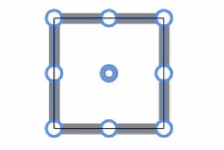
            0_1686489174924_1e17c604-e6e6-4f25-8015-3083709c2070-image.png

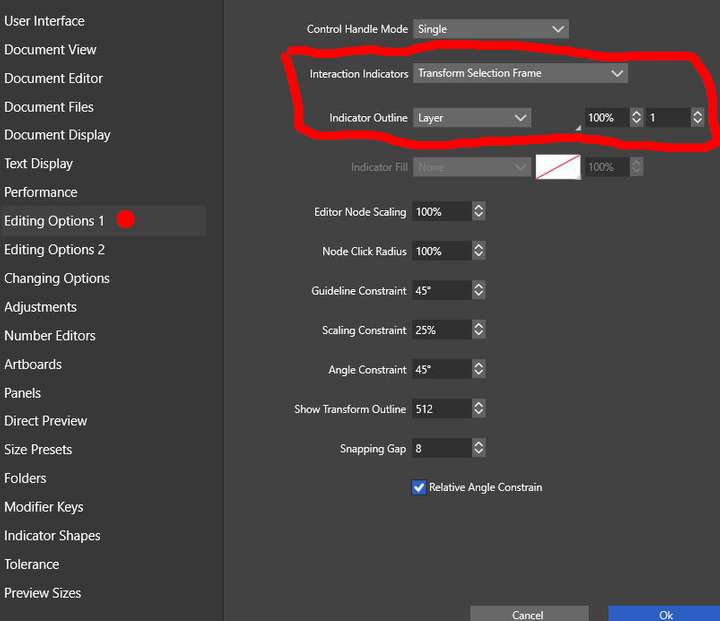
            @Ayo, Have you tried to play around with the Transform Selection Frame setting and change the value of the thickness of the outline Indicator Outline?
            Or even change it to None?
            Or simply reduce the opacity from 100% to 0%?

            Refer to attached image.

            0_1686494334488_VS Preferences _Transform Selection Frame.jpg

            HP•Windows 11 Pro•11th Gen Intel(R) Core(TM) i7-1165G7 @ 2.80GHz 2.70 GHz• RAM: 16.0 GB (DDR4)

            b77B 1 Reply Last reply Reply Quote 1
            • b77B Offline
              b77 @William Kansepa
              last edited by

              @William-Kansepa Good to know, but that one changes the color of the bounding box.
              If I understand correctly, Ayo wants to change the shape-based contour.

              MacBook Pro (Intel) running Monterey 12.6.4

              W 1 Reply Last reply Reply Quote 0
              • AyoA Offline
                Ayo
                last edited by

                @b77 said in Shape core-line setting?:

                Ayo wants to change the shape-based contour.

                Indeed. You beat me. Thanks
                Answer and options are provided by ADMIN earlier.

                1 Reply Last reply Reply Quote 0
                • W Offline
                  William Kansepa @b77
                  last edited by

                  @b77 said in Shape core-line setting?:

                  @William-Kansepa Good to know, but that one changes the color of the bounding box.
                  If I understand correctly, Ayo wants to change the shape-based contour.

                  @b77 , like you previously pointed out, the Node Editing Outline setting will change the shape-based contour. But if you look at the picture which he had attached we do see a bounding box and the line that he mentions.

                  HP•Windows 11 Pro•11th Gen Intel(R) Core(TM) i7-1165G7 @ 2.80GHz 2.70 GHz• RAM: 16.0 GB (DDR4)

                  b77B 1 Reply Last reply Reply Quote 0
                  • b77B Offline
                    b77 @William Kansepa
                    last edited by b77

                    @William-Kansepa The screenshot posted by Ayo shows the shape in
                    selection mode, not in node editing mode.
                    Ayo wants to customize the shape-based line when in selection mode.
                    That's why my first reply didn't help.

                    But what matters is that you and me dug into these settings, and we know VS better as a result. 🙂

                    @VectorStyler It looks like if I select 'None' for 'Node Editing Outline', there is
                    still a thin black line displayed over the shape.

                    MacBook Pro (Intel) running Monterey 12.6.4

                    1 Reply Last reply Reply Quote 2
                    • AyoA Offline
                      Ayo
                      last edited by

                      @b77 said in Shape core-line setting?:

                      It looks like if I select 'None' for 'Node Editing Outline', there is
                      still a thin black line displayed over the shape.

                      Exactly I'd like to know that too, but I'll post it in a new topic.

                      b77B 1 Reply Last reply Reply Quote 1
                      • b77B Offline
                        b77 @Ayo
                        last edited by b77

                        @Ayo I'm back to this discussion:

                        Are you requesting a way to change the shape's "core-line" when selected because editing the
                        color of the stroke is more difficult when this colored contour is superimposed over the shape?

                        MacBook Pro (Intel) running Monterey 12.6.4

                        1 Reply Last reply Reply Quote 0
                        • First post
                          Last post